ESP32-S3 Drives the ST7305 4.2-Inch Reflective LCD: 15 Complete Demos (4-Wire SPI + Arduino)
Use an Arduino Nano ESP32 (ESP32-S3) with 4-wire SPI to drive a 4.2-inch 300×400 ST7305 fully reflective monochrome display — wiring, flashing, 15 display demos and troubleshooting included. Perfect for Arduino makers who want to play with a backlight-free reflective screen.
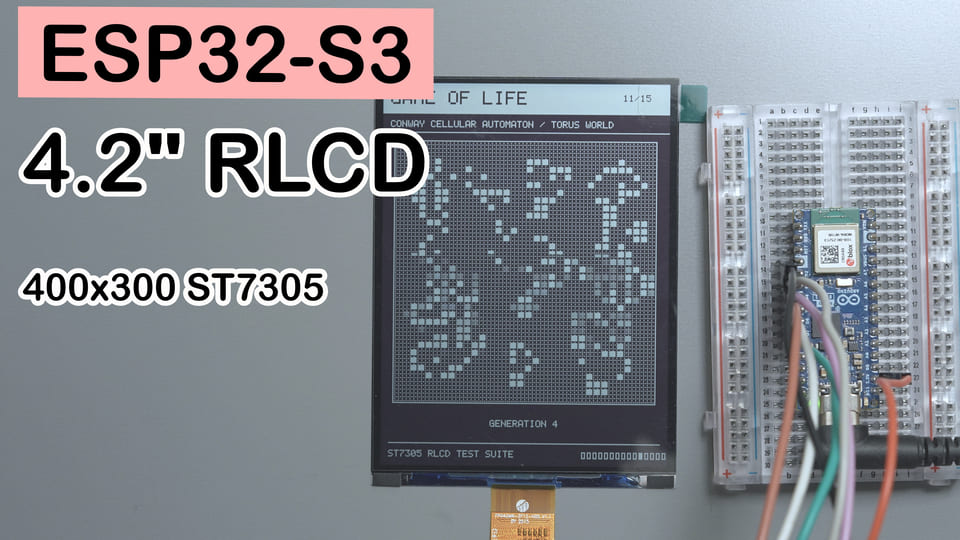
In one sentence: An Arduino Nano ESP32 (ESP32-S3) plus a 4.2-inch ST7305 fully reflective monochrome screen — a single
.inofile runs the driver and a 15-page auto-carousel demo, with no third-party display library at all.
Difficulty: ⭐⭐☆☆☆ (if you can plug dupont wires and use the Arduino IDE, you can do this)
Time needed: 30 minutes (not counting the time spent wrestling with flaky connections)
Test environment: Arduino IDE 2.3.8 + ESP32 Arduino Core 3.3.10
TL;DR (quick start):
- Wiring: SCLK → D7/GPIO10, MOSI → D5/GPIO8, CS → D6/GPIO9, DC → D4/GPIO7, RES → D3/GPIO6.
- VCI goes to 3.3V, and the screen shares ground with the board; TE and BLC stay unconnected. Heads-up: on the Nano ESP32, D5 is GPIO8 — not GPIO11.
- Install the board package
esp32 by Espressif Systems; you do NOT need U8g2, Adafruit GFX, or any other display library.- Open the bundled
ST7305_RLCD_Demo.ino, select boardArduino Nano ESP32, compile and flash.- Set the serial monitor to 115200 baud; the screen then auto-carousels through 15 demos. Animated pages use HPM; static pages are written to the screen only once.
Introduction: A Screen That’s Clearer the Less It Shines
Looking at a regular LCD at night sometimes feels like someone pointing a tiny flashlight straight into your eyes. An e-ink display is comfortable, sure, but watching it refresh an animation is like waiting for a bus — you know it’s coming, it just can’t get here any faster.
Fully reflective screens take a third path: instead of lighting up pixels with a backlight, they reflect ambient light, like a sheet of paper your program can rewrite. The more light around, the clearer the image; when it’s too dark, just switch on a lamp — don’t try to prove your willpower by squinting.
This time I used an Arduino Nano ESP32 (an ESP32-S3 at heart) to drive a 4.2-inch, 300×400, ST7305-based fully reflective Mono TFT. The goal wasn’t to stop after one Hello World, but to try text, grayscale, geometry, animation, frame rate, and four-way rotation across 15 demos.
The “easy on the eyes” claim here refers to backlight-free, ambient-light viewing — not a certified medical benefit. When your eyes need rest, no screen, however fancy, can blink for you.
The Result: 15 ST7305 Demos on Auto-Carousel
After flashing a single .ino file, the screen starts at the splash page and loops through 15 pages automatically — no buttons, serial commands, network, or external image assets needed.
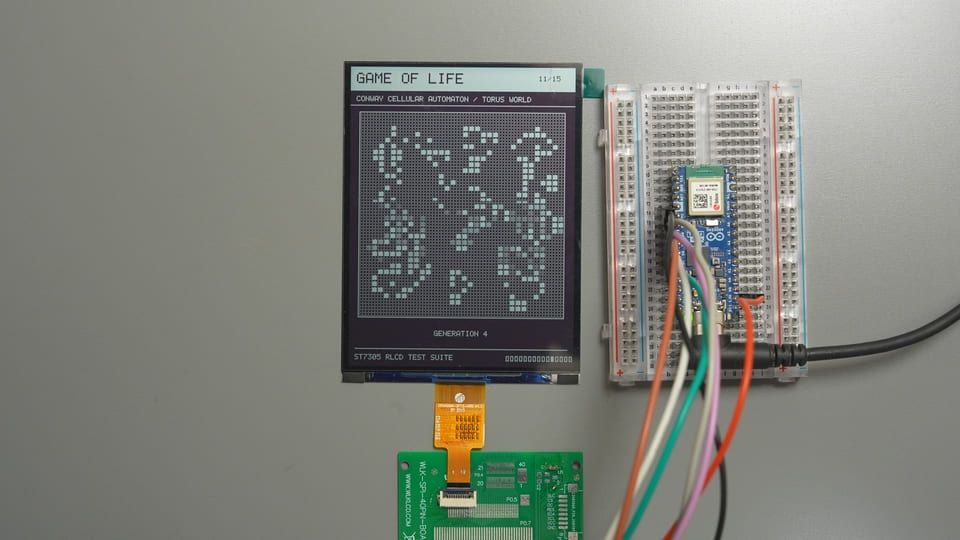
| # | Demo | What to look at | Dwell time | Target FPS |
|---|---|---|---|---|
| 1 | Hello World | Big text, borders, dithered background and a smiley | 3.5 s | static |
| 2 | Dither Gray | 17 shades of 4×4 Bayer ordered dithering, gradient, gray circles (not native grayscale; physical pixels remain 1-bit) | 6.5 s | static |
| 3 | Geometry | Lines, rectangles, circles, triangles and polygons | 5 s | static |
| 4 | Pixel Grid | Edges, aspect ratio, diagonals and geometric centering | 5 s | static |
| 5 | Text & Font | 5×7 ASCII, integer scaling and reversed text | 5.5 s | static |
| 6 | Dashboard UI | Cards, progress bars, toggles, battery and live data | 9 s | 4 FPS |
| 7 | Frame Rate | Real FPS, per-frame cost and a 54-point history graph | 8.5 s | unthrottled |
| 8 | Fine Patterns | 1/2/4-pixel checkerboards and thin-line flicker | 6 s | 2 FPS |
| 9 | Bounce | Bouncing, collisions, motion ghosting observation and hit counter | 9 s | 20 FPS |
| 10 | Starfield | Perspective flight through 56 stars | 9 s | 20 FPS |
| 11 | Game of Life | Conway’s Life on a 34×34 toroidal grid | 12 s | 3 FPS |
| 12 | Uptime Clock | An uptime clock based on esp_timer |
9 s | 4 FPS |
| 13 | Retro Desktop | A retro Macintosh-style desktop | 6.5 s | static |
| 14 | Inversion | Full-screen black/white inversion and contrast check | 6 s | 2 FPS |
| 15 | Rotation | 0°/90°/180°/270° four-way switching | 12 s | 4 FPS |
Target FPS is the pace at which the program draws and sends frames — it is not the glass panel’s optical refresh rate. Page 7 measures “drawing + one full 15000-byte SPI frame transfer”, not a vanity benchmark to slap on the screen.
YouTube demo video:
Component Overview
4.2-Inch Reflective Mono TFT: A Black-and-White Screen “Developed” by Ambient Light
The 4.2-inch fully reflective Mono TFT is a backlight-free reflective monochrome LCD. It renders black-and-white images using ambient light, and in this project it displays the 15 test patterns and animated pages.
Think of it as a sheet of paper that takes orders from a microcontroller: the better the ambient light, the easier it is to read; with no ambient light, it won’t turn itself into a flashlight either.
| Parameter | This panel |
|---|---|
| Module part no. | W420HC018MONO-12Z |
| Size | 4.2 inch |
| Resolution | 300×400 pixels, 1-bit black & white |
| Display type | Fully reflective, normally white, no backlight |
| Driver IC | Sitronix ST7305 |
| Host interface | Single 4-wire SPI, write-only |
| Panel supply | 2.8V/3.3V — 3.3V used here |
| Active area | 63.6×84.84 mm |
| Operating temp | -20℃~+70℃ |
Why this one: 300×400 is enough for a full dashboard layout, 4-wire SPI uses only a handful of pins, and with no backlight circuitry it’s great for environmental data, clocks, and low-refresh-rate gauges.
Pinout
All signals come out through a 12-pin FPC cable; with the breakout board you can hook the screen to your board with dupont wires:
| FPC pin | Name | Function | Used here as |
|---|---|---|---|
| 1, 5, 12 | GND | Power ground | To board GND |
| 2, 3 | NC | Not connected | Leave unconnected |
| 4 | VCI | Panel power | To 3.3V |
| 6 | TE | Frame sync output | Unused, left floating |
| 7 | DC | Command/data select | To GPIO7 |
| 8 | CS | SPI chip select, active low | To GPIO9 |
| 9 | SCL | SPI clock | To GPIO10 |
| 10 | SDA | SPI data input, i.e. MOSI | To GPIO8 |
| 11 | RESET | Hardware reset, active low | To GPIO6 |
Note: SDA here is SPI MOSI, not I²C. Same name, different job — don’t let it go bonding with your I²C sensors.
ST7305: The “Sorting Clerk” That Turns Bytes into Black-and-White Pixels
The ST7305 is Sitronix’s ultra-low-power monochrome TFT controller/driver IC. It takes commands from the host, manages the display RAM and drives the panel — in this project it turns the frame data sent by the ESP32-S3 into black-and-white pixels on the screen.
| Parameter | Value / configuration here |
|---|---|
| Max drive capacity | 408×408 mono pixels |
| Pixel depth | 1 bit/pixel |
| Min SPI write cycle | 30 ns — about 33 MHz max |
| SPI in this project | Mode 0, 20 MHz, MSB first |
| HPM frame rate | 16 Hz or 32 Hz; configured as 16 Hz here |
| LPM frame rate | 0.25~8 Hz; configured as 8 Hz at init here |
| Full frame data here | 15000 bytes |
The point isn’t that it has lots of registers and looks professional — it’s that the module wraps it all up nicely: the host only needs SPI, DC, CS and RESET to refresh the whole screen.
FPC Breakout Board: Translating “Delicate Ribbon Cable” into “Dupont Wires”
An FPC breakout board is a cable-interface adapter that brings the screen’s 12-pin FPC out onto experiment-friendly headers, so in this project the screen can be wired to the board with ordinary dupont wires.
| Parameter | Used here |
|---|---|
| Screen side | 12-pin FPC |
| Experiment side | GND, VCC, SCL, SDA, RES, DC, CS, BLC |
| Required signals | 5 control lines + 3.3V + GND |
| Can leave open | TE, BLC |
We use it so nobody has to hand-solder that fine ribbon cable. We’re doing a display experiment, not signing up for a combined eyesight-and-soldering exam.
BOM
| Part | Quantity | Required | Notes |
|---|---|---|---|
| Arduino Nano ESP32 board | 1 | Required | The MCU is an ESP32-S3 |
| 4.2-inch ST7305 reflective mono screen | 1 | Required | 300×400, 3.3V powered |
| Matching FPC breakout board | 1 | Recommended | Just makes wiring easier; an FPC connector works too |
| Dupont wires | 7+ | Required | Keep them short to avoid contact/signal issues |
Wiring: ESP32-S3 4-Wire SPI to the ST7305
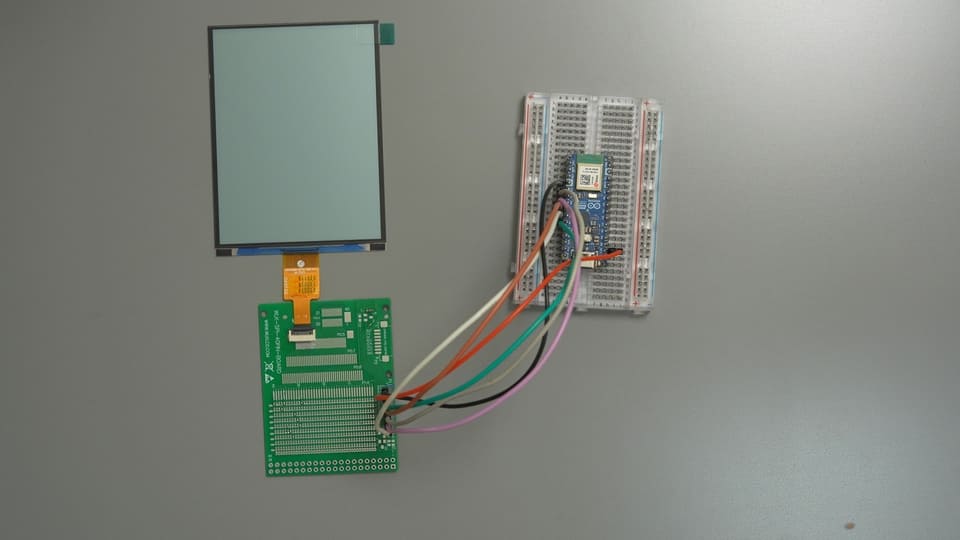
Arduino Nano ESP32                         ST7305 breakout board
┌──────────────────┐                     ┌──────────────────┐
│ D7  / GPIO10     │ ───── SCLK ───────► │ SCL              │
│ D5  / GPIO8      │ ───── MOSI ───────► │ SDA              │
│ D6  / GPIO9      │ ───── CS ─────────► │ CS               │
│ D4  / GPIO7      │ ───── DC ─────────► │ DC               │
│ D3  / GPIO6      │ ───── RESET ──────► │ RES              │
│ 3V3              │ ───── 3.3V ───────► │ VCC / VCI        │
│ GND              │ ───── GND ────────► │ GND              │
└──────────────────┘ └──────────────────┘| Breakout silkscreen | Screen FPC | Nano ESP32 silkscreen | ESP32-S3 GPIO | Purpose |
|---|---|---|---|---|
| SCL | PIN9 | D7 | GPIO10 | SPI clock |
| SDA | PIN10 | D5 | GPIO8 | SPI MOSI |
| CS | PIN8 | D6 | GPIO9 | Chip select |
| DC | PIN7 | D4 | GPIO7 | Command/data select |
| RES | PIN11 | D3 | GPIO6 | Hardware reset |
| VCC/VCI | PIN4 | 3V3 | 3.3V power | Panel supply |
| GND | PIN1/5/12 | GND | GND | Common ground |
| TE | PIN6 | not connected | — | Frame sync unused here |
| BLC | — | not connected | — | No backlight on a reflective screen |
In this project VCI goes to 3.3V — do NOT connect it to 5V, VBUS or VIN.
No Extra Driver Circuitry: The ESP32-S3 Drives the Display FPC Directly
At 3.3V supply, this panel can be driven straight from the ESP32-S3’s GPIOs: connect SCL, SDA, CS, DC and RESET on the FPC to their matching GPIOs, VCI to 3.3V, and share GND. No level-shifter chip, dedicated display driver board, or other peripheral circuitry is needed in between.
“Direct connection” here refers to the electrical connection — it doesn’t mean jamming the soft bare ribbon cable into your board’s pin headers. In practice you still need a 12-pin FPC connector, a soldered socket, or a breakout board to bring the ribbon contacts out reliably. The breakout board in this article is only a mechanical adapter for dupont wires; it is not a driver circuit the panel needs to work. If you wire directly from an FPC connector, follow the FPC PIN numbers in the table above — the signal mapping is identical.
The easiest place to mess up the wiring: the code wants the chip’s GPIO numbers, not the numbers printed in the board’s silkscreen. Here D5 = GPIO8, while GPIO11 = A4. If you wire MOSI to GPIO11 by mistake, the program still runs and the serial monitor still prints happily — while the screen stays as silent as an unpaid power bill.
After wiring, double-check in the order “power → ground → SCLK → MOSI → CS → DC → RESET” — it saves about 80% of your debugging time. For the FPC, also confirm the insertion direction, that it’s fully seated and locked; one notch off can take the whole screen down.
Libraries to Install: Only the ESP32 Board Package
This ST7305 Arduino demo does not depend on U8g2, Adafruit GFX, TFT_eSPI, or any extra font library. The driver, the 5×7 ASCII font, the graphics primitives and all 15 pages live in a single .ino file.
Step 1: Install the Arduino IDE
This article uses Arduino IDE 2.3.8, downloadable from the official Arduino website.
Step 2: Install the ESP32 Arduino Core
Open Boards Manager, search for and install:
esp32 by Espressif Systems (tested with 3.3.10 in this article)Pick the same version in Boards Manager as used here — that minimizes API and default-config differences between board packages.
Step 3: Select the Board and Port
Board: Arduino Nano ESP32
Port: choose the port that appears after connecting the board
Serial monitor: 115200
Arduino’s standard SPI, timers and esp_timer all come with the board environment — no need to wander into Library Manager and “install a few libraries with similar-sounding names on a whim”.
Bonus: What If You Want to Use an Existing Library?
This tutorial uses a single-file driver so that the init sequence, framebuffer and pixel mapping are all directly readable — it doesn’t mean the ST7305 can’t be driven by a library. If you want to build on this project, consider these options:
| Option | Best for | Things to watch when using it |
|---|---|---|
| U8g2 v2.36 or newer | Text, basic graphics and rich fonts | Provides U8G2_ST7305_300X400_1_4W_HW_SPI, supporting 4-wire hardware SPI at this resolution; check the library version when installing, and change CS, DC, RESET and SPI pins to the GPIOs used in this article |
| ST7305_MonoTFT_Arduino_Library | If you want a dedicated ST7305 Arduino driver | Offers wrappers like ST7305_4p2_BW_DisplayDriver; verify the resolution, init sequence and the pin config in DisplayConfig.h — this article has not tested it on this module |
| LVGL + ST7305 low-level driver | Complex UIs, widgets and page management | LVGL handles the UI and does not replace the ST7305 driver; you need to wire this article’s driver (or the vendor driver) into LVGL’s flush callback, and evaluate framebuffer usage and real refresh performance |
Don’t assume generic graphics libraries like Adafruit GFX, TFT_eSPI or Arduino_GFX will drive the ST7305 right after installation — first check whether the current version explicitly supports this controller, otherwise you’ll still need to adapt it yourself. Even if you switch libraries, the hardware constraints — 3.3V supply, 4-wire SPI, HPM/LPM, and the 2-row × 4-column pixel mapping — don’t go away.
Quick pick: mostly text and basic graphics → try U8g2 first; complex UI → consider LVGL; full control over init, full-frame transfer and animation pacing → this article’s single-file approach is the most direct.
Complete Code: ST7305_RLCD_Demo Single-File Arduino Sketch
Complete flashable source code:
/*
* ST7305 4.2-inch 300x400 fully reflective monochrome LCD — complete single-file Arduino demo
*
* Same features as the ESP-IDF version: driver + graphics primitives + 15-page auto-carousel demo.
* The whole program is just this one .ino file — no third-party library dependencies, easy to share.
*
* Wiring (Arduino Nano ESP32 silkscreen):
* SCLK = GPIO10 (D7) MOSI = GPIO8 (D5) CS = GPIO9 (D6)
* DC = GPIO7 (D4) RES = GPIO6 (D3) VCI = 3.3V GND = GND
*
* Arduino IDE preparation:
* 1. Install "esp32 by Espressif Systems" in Boards Manager
* 2. Select board "Arduino Nano ESP32" and its serial port
* 3. This file must live in a folder with the same name (the IDE prompts when opening the .ino — click "OK")
*/
#include <Arduino.h>
#include <SPI.h>
#include "esp_timer.h" /* esp_timer_get_time() */
#include <stdio.h>
#include <string.h>
#include <stdlib.h>
#include <stdint.h>
/* ================= User-configurable: pins and SPI clock ================= */
#define PIN_SCLK 10
#define PIN_MOSI 8
#define PIN_CS 9
#define PIN_DC 7
#define PIN_RES 6
#define SPI_CLOCK_HZ 20000000UL /* 20 MHz used in this example; drop to 8/5 MHz first if the screen garbles */
/* ================= ST7305 basic parameters ================= */
#define ST7305_LCD_WIDTH 300
#define ST7305_LCD_HEIGHT 400
#define ST7305_DATA_WIDTH 75 /* 300/4 = 75 bytes per row */
#define ST7305_BUFFER_LENGTH 15000 /* 75 * 200 */
#define ST7305_COLOR_WHITE 0x00
#define ST7305_COLOR_BLACK 0x01
#define LOGI(fmt, ...) Serial.printf("[st7305] " fmt "\r\n", ##__VA_ARGS__)
/* Driver device (single instance, 15000-byte framebuffer embedded) */
typedef struct {
int gpio_dc;
int gpio_res;
int gpio_cs;
uint32_t clock_hz;
uint8_t rotation; /* 0=0° 1=90° 2=180° 3=270° (clockwise) */
uint8_t buffer[ST7305_BUFFER_LENGTH];
} st7305_dev_t;
typedef st7305_dev_t *st7305_handle_t;
static st7305_dev_t lcd_dev; /* global single instance */
static inline void dc_cmd(st7305_handle_t dev) { digitalWrite(dev->gpio_dc, LOW); }
static inline void dc_data(st7305_handle_t dev) { digitalWrite(dev->gpio_dc, HIGH); }
static void spi_write_byte(st7305_handle_t dev, uint8_t data)
{
SPI.beginTransaction(SPISettings(dev->clock_hz, MSBFIRST, SPI_MODE0));
digitalWrite(dev->gpio_cs, LOW);
SPI.transfer(data);
digitalWrite(dev->gpio_cs, HIGH);
SPI.endTransaction();
}
/* Write register (command): DC=LOW */
static void write_register(st7305_handle_t dev, uint8_t reg)
{
dc_cmd(dev);
spi_write_byte(dev, reg);
}
/* Write parameter (data): DC=HIGH */
static void write_parameter(st7305_handle_t dev, uint8_t data)
{
dc_data(dev);
spi_write_byte(dev, data);
}
static void write_params(st7305_handle_t dev, uint8_t reg, const uint8_t *params, size_t len)
{
write_register(dev, reg);
for (size_t i = 0; i < len; i++) write_parameter(dev, params[i]);
}
/**
* ST7305 init sequence: matches the vendor HSD 4.2" 300x400 high-scan-rate init code;
* MADCTL=0x48 (MX=1, DO=1), 255ms sleep-out delay, CASET column window 0x12~0x2B.
*/
static void initial_st7305(st7305_handle_t dev)
{
/* hardware reset */
digitalWrite(dev->gpio_res, HIGH); delay(10);
digitalWrite(dev->gpio_res, LOW); delay(10);
digitalWrite(dev->gpio_res, HIGH); delay(10);
#define WR(reg, ...) do { \
const uint8_t p[] = {__VA_ARGS__}; \
write_params(dev, reg, p, sizeof(p)); \
} while (0)
WR(0xD6, 0x17, 0x02); /* NVM Load Control */
WR(0xD1, 0x01); /* Booster Enable */
WR(0xC0, 0x11, 0x04); /* Gate Voltage: VGH=16.5V, VGL=-7V */
WR(0xC1, 0x41, 0x41, 0x41, 0x41); /* VSHP 5.0V x4 */
WR(0xC2, 0x19, 0x19, 0x19, 0x19); /* VSLP 0.5V x4 */
WR(0xC4, 0x41, 0x41, 0x41, 0x41); /* VSHN -3.8V x4 */
WR(0xC5, 0x19, 0x19, 0x19, 0x19); /* VSLN 0.5V x4 */
WR(0xD8, 0xA6, 0xE9); /* OSC: HPM~51Hz / LPM~1Hz */
WR(0xB2, 0x05); /* Frame Rate: HPM=16Hz, LPM=8Hz */
WR(0xB3, 0xE5, 0xF6, 0x05, 0x46, 0x77, 0x77, 0x77, 0x77, 0x76, 0x45); /* Gate EQ HPM */
WR(0xB4, 0x05, 0x46, 0x77, 0x77, 0x77, 0x77, 0x76, 0x45); /* Gate EQ LPM */
WR(0x62, 0x32, 0x03, 0x1F); /* Gate Timing Control */
WR(0xB7, 0x13); /* Source EQ Enable */
WR(0xB0, 0x64); /* Gate Line: 400 rows (must be set before Sleep-out) */
write_register(dev, 0x11); /* Sleep out */
delay(255);
WR(0xC9, 0x00); /* Source Voltage Select: group 1 */
WR(0x36, 0x48); /* MADCTL: MX=1, DO=1 */
WR(0x3A, 0x11); /* Data Format: 3-write 24-bit */
WR(0xB9, 0x20); /* Mono mode (vendor legacy) */
WR(0xB8, 0x29); /* Panel: 1-dot drive polarity inversion + Frame scan */
write_register(dev, 0x21); /* Inverse ON */
/* WRITE RAM 300*400 address window */
WR(0x2A, 0x12, 0x2B); /* CASET */
WR(0x2B, 0x00, 0xC7); /* RASET 0~199 */
WR(0x35, 0x00); /* TE ON(V-Blank) */
WR(0xD0, 0xFF); /* Auto power down */
write_register(dev, 0x39); /* LPM */
write_register(dev, 0x29); /* DISPLAY ON */
#undef WR
}
st7305_handle_t st7305_init(int gpio_dc, int gpio_res, int gpio_cs,
int gpio_sclk, int gpio_mosi, uint32_t clock_hz)
{
st7305_handle_t dev = &lcd_dev;
dev->gpio_dc = gpio_dc;
dev->gpio_res = gpio_res;
dev->gpio_cs = gpio_cs;
dev->clock_hz = clock_hz;
dev->rotation = 0;
pinMode(gpio_dc, OUTPUT);
pinMode(gpio_res, OUTPUT);
pinMode(gpio_cs, OUTPUT);
digitalWrite(gpio_cs, HIGH);
digitalWrite(gpio_res, HIGH);
/* MOSI only, no MISO; CS is toggled manually in software */
SPI.begin(gpio_sclk, -1, gpio_mosi, -1);
initial_st7305(dev);
memset(dev->buffer, 0, ST7305_BUFFER_LENGTH);
LOGI("ST7305 init OK (%dx%d)", ST7305_LCD_WIDTH, ST7305_LCD_HEIGHT);
return dev;
}
/** Fill framebuffer (0x00 = all white / 0xFF = all black) */
void st7305_fill(st7305_handle_t dev, uint8_t data)
{
memset(dev->buffer, data, ST7305_BUFFER_LENGTH);
}
/** Clear framebuffer (all white) */
void st7305_clear(st7305_handle_t dev)
{
st7305_fill(dev, 0x00);
}
/**
* Set display orientation: 0=0°, 1=90° clockwise, 2=180°, 3=270° clockwise.
* Rotation is implemented via framebuffer coordinate mapping; at 90°/270° the logical resolution is 400x300.
* Only affects subsequent drawing; it does not clear the framebuffer or refresh the screen immediately.
*/
void st7305_set_rotation(st7305_handle_t dev, uint8_t rotation)
{
if (rotation <= 3) dev->rotation = rotation;
}
/** Get current orientation (0~3) */
uint8_t st7305_get_rotation(st7305_handle_t dev)
{
return dev->rotation;
}
/** Get logical width/height for the current orientation */
int st7305_get_width(st7305_handle_t dev)
{
return (dev->rotation & 1) ? ST7305_LCD_HEIGHT : ST7305_LCD_WIDTH;
}
int st7305_get_height(st7305_handle_t dev)
{
return (dev->rotation & 1) ? ST7305_LCD_WIDTH : ST7305_LCD_HEIGHT;
}
/**
* Logical pixels are first mapped to 300x400 physical coordinates according to orientation, then written to the framebuffer:
* One byte (8 bits) maps to 2 rows x 4 columns of pixels:
* row0: BIT7 BIT5 BIT3 BIT1 (even bits -> next row)
* row1: BIT6 BIT4 BIT2 BIT0
* 1 = black, 0 = white
*/
void st7305_write_point(st7305_handle_t dev, int x, int y, uint16_t color)
{
int logical_width = (dev->rotation & 1) ? ST7305_LCD_HEIGHT : ST7305_LCD_WIDTH;
int logical_height = (dev->rotation & 1) ? ST7305_LCD_WIDTH : ST7305_LCD_HEIGHT;
if (x < 0 || y < 0 || x >= logical_width || y >= logical_height) return;
int physical_x;
int physical_y;
switch (dev->rotation) {
case 1: /* 90° clockwise, logical 400x300 */
physical_x = ST7305_LCD_WIDTH - 1 - y;
physical_y = x;
break;
case 2: /* 180°, logical 300x400 */
physical_x = ST7305_LCD_WIDTH - 1 - x;
physical_y = ST7305_LCD_HEIGHT - 1 - y;
break;
case 3: /* 270° clockwise, logical 400x300 */
physical_x = y;
physical_y = ST7305_LCD_HEIGHT - 1 - x;
break;
default: /* 0°, logical 300x400 */
physical_x = x;
physical_y = y;
break;
}
int real_x = physical_x / 4;
int real_y = physical_y / 2;
int index = real_y * ST7305_DATA_WIDTH + real_x;
int one_two = physical_y % 2; /* 0 or 1 */
int line_bit_4 = physical_x % 4; /* 0~3 */
int bit = 7 - (line_bit_4 * 2 + one_two);
if (color) dev->buffer[index] |= (1 << bit);
else dev->buffer[index] &= ~(1 << bit);
}
/** Set address window and issue RAMWR */
static void set_address_window(st7305_handle_t dev)
{
write_params(dev, 0x2A, (uint8_t[]){0x12, 0x2A}, 2); /* CASET 0x12~0x2A */
write_params(dev, 0x2B, (uint8_t[]){0x00, 0xC7}, 2); /* RASET 0~199 */
write_register(dev, 0x2C); /* RAMWR */
}
/** Full-frame refresh: push the 15000-byte framebuffer to the screen */
void st7305_display(st7305_handle_t dev)
{
set_address_window(dev);
dc_data(dev);
SPI.beginTransaction(SPISettings(dev->clock_hz, MSBFIRST, SPI_MODE0));
digitalWrite(dev->gpio_cs, LOW);
SPI.writeBytes(dev->buffer, ST7305_BUFFER_LENGTH);
digitalWrite(dev->gpio_cs, HIGH);
SPI.endTransaction();
}
/** Enter low-power mode LPM (0x39); power saving, frame rate set by B2h */
void st7305_low_power_mode(st7305_handle_t dev)
{
write_register(dev, 0x39);
}
/** Enter high-power mode HPM (0x38); for moving content, 16/32Hz */
void st7305_high_power_mode(st7305_handle_t dev)
{
write_register(dev, 0x38);
}
/** Display on/off (0x29 / 0x28) */
void st7305_display_on(st7305_handle_t dev, bool enabled)
{
write_register(dev, enabled ? 0x29 : 0x28);
}
/** Display inversion on/off (0x21 / 0x20); a normally-white panel needs inversion on to show black */
void st7305_display_inversion(st7305_handle_t dev, bool enabled)
{
write_register(dev, enabled ? 0x21 : 0x20);
}
/** Get framebuffer pointer (advanced: manipulate bitmap data directly) */
uint8_t *st7305_get_buffer(st7305_handle_t dev)
{
return dev->buffer;
}
/* ================= Graphics primitives (ported from ST73XX_UI) ================= */
#define SWAP_INT(a, b) do { int _t = (a); (a) = (b); (b) = _t; } while (0)
void ui_draw_fast_hline(st7305_handle_t dev, int x, int y, int len, uint16_t color)
{
for (int i = 0; i < len; i++) st7305_write_point(dev, x + i, y, color);
}
void ui_draw_fast_vline(st7305_handle_t dev, int x, int y, int len, uint16_t color)
{
for (int i = 0; i < len; i++) st7305_write_point(dev, x, y + i, color);
}
void ui_draw_line(st7305_handle_t dev, int x1, int y1, int x2, int y2, uint16_t color)
{
int dx = abs(x2 - x1), sx = x1 < x2 ? 1 : -1;
int dy = -abs(y2 - y1), sy = y1 < y2 ? 1 : -1;
int err = dx + dy, e2;
while (1) {
st7305_write_point(dev, x1, y1, color);
if (x1 == x2 && y1 == y2) break;
e2 = 2 * err;
if (e2 >= dy) { err += dy; x1 += sx; }
if (e2 <= dx) { err += dx; y1 += sy; }
}
}
void ui_draw_triangle(st7305_handle_t dev, int x1, int y1, int x2, int y2,
int x3, int y3, uint16_t color)
{
ui_draw_line(dev, x1, y1, x2, y2, color);
ui_draw_line(dev, x2, y2, x3, y3, color);
ui_draw_line(dev, x3, y3, x1, y1, color);
}
void ui_draw_filled_triangle(st7305_handle_t dev, int x0, int y0, int x1, int y1,
int x2, int y2, uint16_t color)
{
if (y0 > y1) { SWAP_INT(y0, y1); SWAP_INT(x0, x1); }
if (y1 > y2) { SWAP_INT(y1, y2); SWAP_INT(x1, x2); }
if (y0 > y1) { SWAP_INT(y0, y1); SWAP_INT(x0, x1); }
if (y0 == y2) { /* flat bottom */
int xs = x0, xe = x0;
if (x1 < xs) xs = x1;
if (x1 > xe) xe = x1;
if (x2 < xs) xs = x2;
if (x2 > xe) xe = x2;
ui_draw_fast_hline(dev, xs, y0, xe - xs + 1, color);
return;
}
int total = y2 - y0;
for (int i = 0; i <= total; i++) {
int y = y0 + i;
int second_half = (i > y1 - y0) || (y1 == y0);
int seg = second_half ? (y2 - y1) : (y1 - y0);
if (seg == 0) continue;
int ax = x0 + (int)((x2 - x0) * (int64_t)i / total);
int bx = second_half ? x1 + (int)((x2 - x1) * (int64_t)(i - (y1 - y0)) / seg)
: x0 + (int)((x1 - x0) * (int64_t)i / seg);
if (ax > bx) SWAP_INT(ax, bx);
ui_draw_fast_hline(dev, ax, y, bx - ax + 1, color);
}
}
void ui_draw_rectangle(st7305_handle_t dev, int x1, int y1, int x2, int y2, uint16_t color)
{
if (x1 > x2) SWAP_INT(x1, x2);
if (y1 > y2) SWAP_INT(y1, y2);
ui_draw_fast_hline(dev, x1, y1, x2 - x1 + 1, color);
ui_draw_fast_hline(dev, x1, y2, x2 - x1 + 1, color);
ui_draw_fast_vline(dev, x1, y1, y2 - y1 + 1, color);
ui_draw_fast_vline(dev, x2, y1, y2 - y1 + 1, color);
}
void ui_draw_filled_rectangle(st7305_handle_t dev, int x1, int y1, int x2, int y2, uint16_t color)
{
if (x1 > x2) SWAP_INT(x1, x2);
if (y1 > y2) SWAP_INT(y1, y2);
for (int y = y1; y <= y2; y++) {
ui_draw_fast_hline(dev, x1, y, x2 - x1 + 1, color);
}
}
void ui_draw_circle(st7305_handle_t dev, int xc, int yc, int r, uint16_t color)
{
int x = 0, y = r, d = 3 - 2 * r;
while (x <= y) {
st7305_write_point(dev, xc + x, yc + y, color);
st7305_write_point(dev, xc - x, yc + y, color);
st7305_write_point(dev, xc + x, yc - y, color);
st7305_write_point(dev, xc - x, yc - y, color);
st7305_write_point(dev, xc + y, yc + x, color);
st7305_write_point(dev, xc - y, yc + x, color);
st7305_write_point(dev, xc + y, yc - x, color);
st7305_write_point(dev, xc - y, yc - x, color);
if (d < 0) {
d += 4 * x + 6;
} else {
d += 4 * (x - y) + 10;
y--;
}
x++;
}
}
static int int_sqrt(int x)
{
int r = 0;
while ((r + 1) * (r + 1) <= x) r++;
return r;
}
void ui_draw_filled_circle(st7305_handle_t dev, int xc, int yc, int r, uint16_t color)
{
for (int y = -r; y <= r; y++) {
int w = int_sqrt(r * r - y * y);
ui_draw_fast_hline(dev, xc - w, yc + y, 2 * w + 1, color);
}
}
void ui_draw_polygon(st7305_handle_t dev, const int *points, int n, uint16_t color)
{
if (n < 3) return;
for (int i = 0; i < n; i++) {
int x1 = points[2 * i], y1 = points[2 * i + 1];
int x2 = points[2 * ((i + 1) % n)], y2 = points[2 * ((i + 1) % n) + 1];
ui_draw_line(dev, x1, y1, x2, y2, color);
}
}
void ui_draw_filled_polygon(st7305_handle_t dev, const int *points, int n, uint16_t color)
{
if (n < 3) return;
int min_y = points[1], max_y = points[1];
for (int i = 1; i < n; i++) {
if (points[2 * i + 1] < min_y) min_y = points[2 * i + 1];
if (points[2 * i + 1] > max_y) max_y = points[2 * i + 1];
}
int *xs = (int *)malloc(n * sizeof(int));
if (!xs) return;
/* scanline fill */
for (int y = min_y; y <= max_y; y++) {
int cnt = 0;
for (int i = 0, j = n - 1; i < n; j = i++) {
int yi = points[2 * i + 1], yj = points[2 * j + 1];
int xi = points[2 * i], xj = points[2 * j];
if ((yi < y && yj >= y) || (yj < y && yi >= y)) {
xs[cnt++] = xi + (int)((int64_t)(y - yi) * (xj - xi) / (yj - yi));
}
}
/* insertion sort */
for (int i = 1; i < cnt; i++) {
int key = xs[i], k = i - 1;
while (k >= 0 && xs[k] > key) { xs[k + 1] = xs[k]; k--; }
xs[k + 1] = key;
}
for (int i = 0; i + 1 < cnt; i += 2) {
ui_draw_fast_hline(dev, xs[i], y, xs[i + 1] - xs[i] + 1, color);
}
}
free(xs);
}
/* ================= Demo: 15-page auto-carousel =================
* Text, ordered-dither grayscale, test patterns, performance benchmark, UI samples and small animations.
* No external fonts or assets. */
#define W ST7305_LCD_WIDTH
#define H ST7305_LCD_HEIGHT
#define BLACK ST7305_COLOR_BLACK
#define WHITE ST7305_COLOR_WHITE
#define ARRAY_LEN(a) ((int)(sizeof(a) / sizeof((a)[0])))
/* Classic 5x7 ASCII font, column-encoded, LSB on top. */
static const uint8_t font5x7[96][5] = {
{0x00,0x00,0x00,0x00,0x00},{0x00,0x00,0x5f,0x00,0x00},
{0x00,0x07,0x00,0x07,0x00},{0x14,0x7f,0x14,0x7f,0x14},
{0x24,0x2a,0x7f,0x2a,0x12},{0x23,0x13,0x08,0x64,0x62},
{0x36,0x49,0x55,0x22,0x50},{0x00,0x05,0x03,0x00,0x00},
{0x00,0x1c,0x22,0x41,0x00},{0x00,0x41,0x22,0x1c,0x00},
{0x14,0x08,0x3e,0x08,0x14},{0x08,0x08,0x3e,0x08,0x08},
{0x00,0x50,0x30,0x00,0x00},{0x08,0x08,0x08,0x08,0x08},
{0x00,0x60,0x60,0x00,0x00},{0x20,0x10,0x08,0x04,0x02},
{0x3e,0x51,0x49,0x45,0x3e},{0x00,0x42,0x7f,0x40,0x00},
{0x42,0x61,0x51,0x49,0x46},{0x21,0x41,0x45,0x4b,0x31},
{0x18,0x14,0x12,0x7f,0x10},{0x27,0x45,0x45,0x45,0x39},
{0x3c,0x4a,0x49,0x49,0x30},{0x01,0x71,0x09,0x05,0x03},
{0x36,0x49,0x49,0x49,0x36},{0x06,0x49,0x49,0x29,0x1e},
{0x00,0x36,0x36,0x00,0x00},{0x00,0x56,0x36,0x00,0x00},
{0x08,0x14,0x22,0x41,0x00},{0x14,0x14,0x14,0x14,0x14},
{0x00,0x41,0x22,0x14,0x08},{0x02,0x01,0x51,0x09,0x06},
{0x32,0x49,0x79,0x41,0x3e},{0x7e,0x11,0x11,0x11,0x7e},
{0x7f,0x49,0x49,0x49,0x36},{0x3e,0x41,0x41,0x41,0x22},
{0x7f,0x41,0x41,0x22,0x1c},{0x7f,0x49,0x49,0x49,0x41},
{0x7f,0x09,0x09,0x09,0x01},{0x3e,0x41,0x49,0x49,0x7a},
{0x7f,0x08,0x08,0x08,0x7f},{0x00,0x41,0x7f,0x41,0x00},
{0x20,0x40,0x41,0x3f,0x01},{0x7f,0x08,0x14,0x22,0x41},
{0x7f,0x40,0x40,0x40,0x40},{0x7f,0x02,0x0c,0x02,0x7f},
{0x7f,0x04,0x08,0x10,0x7f},{0x3e,0x41,0x41,0x41,0x3e},
{0x7f,0x09,0x09,0x09,0x06},{0x3e,0x41,0x51,0x21,0x5e},
{0x7f,0x09,0x19,0x29,0x46},{0x46,0x49,0x49,0x49,0x31},
{0x01,0x01,0x7f,0x01,0x01},{0x3f,0x40,0x40,0x40,0x3f},
{0x1f,0x20,0x40,0x20,0x1f},{0x3f,0x40,0x38,0x40,0x3f},
{0x63,0x14,0x08,0x14,0x63},{0x07,0x08,0x70,0x08,0x07},
{0x61,0x51,0x49,0x45,0x43},{0x00,0x7f,0x41,0x41,0x00},
{0x02,0x04,0x08,0x10,0x20},{0x00,0x41,0x41,0x7f,0x00},
{0x04,0x02,0x01,0x02,0x04},{0x40,0x40,0x40,0x40,0x40},
{0x00,0x01,0x02,0x04,0x00},{0x20,0x54,0x54,0x54,0x78},
{0x7f,0x48,0x44,0x44,0x38},{0x38,0x44,0x44,0x44,0x20},
{0x38,0x44,0x44,0x48,0x7f},{0x38,0x54,0x54,0x54,0x18},
{0x08,0x7e,0x09,0x01,0x02},{0x0c,0x52,0x52,0x52,0x3e},
{0x7f,0x08,0x04,0x04,0x78},{0x00,0x44,0x7d,0x40,0x00},
{0x20,0x40,0x44,0x3d,0x00},{0x7f,0x10,0x28,0x44,0x00},
{0x00,0x41,0x7f,0x40,0x00},{0x7c,0x04,0x18,0x04,0x78},
{0x7c,0x08,0x04,0x04,0x78},{0x38,0x44,0x44,0x44,0x38},
{0x7c,0x14,0x14,0x14,0x08},{0x08,0x14,0x14,0x18,0x7c},
{0x7c,0x08,0x04,0x04,0x08},{0x48,0x54,0x54,0x54,0x20},
{0x04,0x3f,0x44,0x40,0x20},{0x3c,0x40,0x40,0x20,0x7c},
{0x1c,0x20,0x40,0x20,0x1c},{0x3c,0x40,0x30,0x40,0x3c},
{0x44,0x28,0x10,0x28,0x44},{0x0c,0x50,0x50,0x50,0x3c},
{0x44,0x64,0x54,0x4c,0x44},{0x00,0x08,0x36,0x41,0x00},
{0x00,0x00,0x7f,0x00,0x00},{0x00,0x41,0x36,0x08,0x00},
{0x08,0x04,0x08,0x10,0x08},{0x00,0x00,0x00,0x00,0x00}
};
static const uint8_t bayer4[4][4] = {
{0, 8, 2, 10}, {12, 4, 14, 6}, {3, 11, 1, 9}, {15, 7, 13, 5}
};
static void text_char(st7305_handle_t d, int x, int y, char c, int scale, uint16_t color)
{
if ((unsigned char)c < 32 || (unsigned char)c > 127) c = '?';
const uint8_t *glyph = font5x7[(unsigned char)c - 32];
for (int col = 0; col < 5; col++) {
for (int row = 0; row < 7; row++) {
if (glyph[col] & (1U << row)) {
if (scale == 1) st7305_write_point(d, x + col, y + row, color);
else ui_draw_filled_rectangle(d, x + col * scale, y + row * scale,
x + (col + 1) * scale - 1, y + (row + 1) * scale - 1, color);
}
}
}
}
static void text(st7305_handle_t d, int x, int y, const char *s, int scale, uint16_t color)
{
while (*s) {
text_char(d, x, y, *s++, scale, color);
x += 6 * scale;
}
}
static int text_width(const char *s, int scale)
{
int n = (int)strlen(s);
return n ? (n * 6 - 1) * scale : 0;
}
static void text_center(st7305_handle_t d, int y, const char *s, int scale, uint16_t color)
{
text(d, (W - text_width(s, scale)) / 2, y, s, scale, color);
}
static void gray_rect(st7305_handle_t d, int x0, int y0, int x1, int y1, int level)
{
if (x0 > x1) { int t = x0; x0 = x1; x1 = t; }
if (y0 > y1) { int t = y0; y0 = y1; y1 = t; }
if (level <= 0) return;
if (level >= 16) {
ui_draw_filled_rectangle(d, x0, y0, x1, y1, BLACK);
return;
}
for (int y = y0; y <= y1; y++) {
for (int x = x0; x <= x1; x++) {
if (level > bayer4[y & 3][x & 3]) st7305_write_point(d, x, y, BLACK);
}
}
}
static void gray_circle(st7305_handle_t d, int cx, int cy, int r, int level)
{
for (int y = -r; y <= r; y++) {
for (int x = -r; x <= r; x++) {
if (x * x + y * y <= r * r && level > bayer4[(cy + y) & 3][(cx + x) & 3]) {
st7305_write_point(d, cx + x, cy + y, BLACK);
}
}
}
}
static void hline(st7305_handle_t d, int x0, int x1, int y, uint16_t color)
{
ui_draw_fast_hline(d, x0, y, x1 - x0 + 1, color);
}
static void vline(st7305_handle_t d, int x, int y0, int y1, uint16_t color)
{
ui_draw_fast_vline(d, x, y0, y1 - y0 + 1, color);
}
static void chrome(st7305_handle_t d, int page, const char *title, const char *subtitle)
{
char buf[24];
ui_draw_filled_rectangle(d, 0, 0, W - 1, 31, BLACK);
text(d, 8, 8, title, 2, WHITE);
snprintf(buf, sizeof(buf), "%02d/15", page + 1);
text(d, 251, 11, buf, 1, WHITE);
text(d, 8, 39, subtitle, 1, BLACK);
hline(d, 0, W - 1, 51, BLACK);
hline(d, 8, W - 9, 376, BLACK);
text(d, 8, 384, "ST7305 RLCD TEST SUITE", 1, BLACK);
for (int i = 0; i < 15; i++) {
int x = 210 + i * 6;
if (i == page) ui_draw_filled_rectangle(d, x, 385, x + 3, 391, BLACK);
else ui_draw_rectangle(d, x, 385, x + 3, 391, BLACK);
}
}
static uint32_t rng_state = 0x7305u;
static uint32_t demo_rand(void)
{
rng_state ^= rng_state << 13;
rng_state ^= rng_state >> 17;
rng_state ^= rng_state << 5;
return rng_state;
}
static int wave(int tick, int period)
{
int p = tick % (period * 2);
return p < period ? p : period * 2 - p;
}
static void page_hello(st7305_handle_t d, int frame, int64_t elapsed)
{
(void)frame; (void)elapsed;
gray_rect(d, 0, 0, W - 1, H - 1, 2);
ui_draw_filled_rectangle(d, 12, 12, 287, 387, WHITE);
ui_draw_rectangle(d, 12, 12, 287, 387, BLACK);
ui_draw_rectangle(d, 16, 16, 283, 383, BLACK);
text_center(d, 54, "ST7305 / RLCD", 2, BLACK);
hline(d, 42, 258, 82, BLACK);
text_center(d, 112, "HELLO", 7, BLACK);
text_center(d, 174, "WORLD!", 7, BLACK);
text_center(d, 247, "300 x 400 MONOCHROME", 2, BLACK);
text_center(d, 278, "15 PAGES / AUTO CAROUSEL", 1, BLACK);
gray_circle(d, 150, 330, 28, 5);
ui_draw_circle(d, 150, 330, 29, BLACK);
ui_draw_filled_circle(d, 140, 321, 3, BLACK);
ui_draw_filled_circle(d, 160, 321, 3, BLACK);
ui_draw_line(d, 136, 338, 142, 343, BLACK);
ui_draw_line(d, 142, 343, 158, 343, BLACK);
ui_draw_line(d, 158, 343, 164, 338, BLACK);
}
static void page_gray(st7305_handle_t d, int frame, int64_t elapsed)
{
(void)frame; (void)elapsed;
chrome(d, 1, "DITHER GRAY", "17 LEVELS / STATIC 4x4 BAYER MATRIX");
for (int i = 0; i < 17; i++) {
int x = 14 + i * 16;
gray_rect(d, x, 72, x + 14, 128, i);
ui_draw_rectangle(d, x, 72, x + 14, 128, BLACK);
}
text(d, 14, 136, "0%", 1, BLACK);
text(d, 139, 136, "50", 1, BLACK);
text(d, 259, 136, "100%", 1, BLACK);
text(d, 14, 159, "GRADIENT", 1, BLACK);
for (int y = 0; y < 36; y++) {
for (int x = 0; x < 272; x++) {
int level = x / 17;
if (level > bayer4[y & 3][x & 3]) st7305_write_point(d, 14 + x, 176 + y, BLACK);
}
}
ui_draw_rectangle(d, 13, 175, 286, 212, BLACK);
text(d, 14, 230, "DITHERED FILLS FOR UI DEPTH", 1, BLACK);
gray_circle(d, 58, 294, 39, 3);
gray_circle(d, 150, 294, 39, 7);
gray_circle(d, 242, 294, 39, 12);
ui_draw_circle(d, 58, 294, 40, BLACK);
ui_draw_circle(d, 150, 294, 40, BLACK);
ui_draw_circle(d, 242, 294, 40, BLACK);
text_center(d, 347, "NO GRAY PIXELS - JUST BLACK + WHITE", 1, BLACK);
}
static void page_geometry(st7305_handle_t d, int frame, int64_t elapsed)
{
(void)frame; (void)elapsed;
chrome(d, 2, "GEOMETRY", "LINES / CIRCLES / TRIANGLES / POLYGONS");
ui_draw_line(d, 12, 65, 285, 350, BLACK);
ui_draw_line(d, 285, 65, 12, 350, BLACK);
ui_draw_rectangle(d, 20, 75, 126, 164, BLACK);
gray_rect(d, 23, 78, 123, 161, 4);
ui_draw_filled_rectangle(d, 43, 97, 104, 139, BLACK);
ui_draw_circle(d, 213, 122, 48, BLACK);
ui_draw_circle(d, 213, 122, 38, BLACK);
gray_circle(d, 213, 122, 27, 8);
ui_draw_triangle(d, 24, 323, 87, 188, 143, 323, BLACK);
ui_draw_filled_triangle(d, 176, 310, 219, 212, 271, 310, BLACK);
const int p[] = {152,77, 168,95, 162,117, 143,117, 136,95};
ui_draw_filled_polygon(d, p, 5, BLACK);
text_center(d, 348, "BRESENHAM + SCANLINE FILL", 1, BLACK);
}
static void page_grid(st7305_handle_t d, int frame, int64_t elapsed)
{
(void)frame; (void)elapsed;
chrome(d, 3, "PIXEL GRID", "CHECK EDGES, ASPECT RATIO AND DIAGONALS");
ui_draw_rectangle(d, 0, 58, 299, 367, BLACK);
for (int x = 19; x < W; x += 20) gray_rect(d, x, 59, x, 366, 4);
for (int y = 78; y < 367; y += 20) gray_rect(d, 1, y, 298, y, 4);
ui_draw_line(d, 0, 58, 299, 367, BLACK);
ui_draw_line(d, 299, 58, 0, 367, BLACK);
ui_draw_circle(d, 150, 213, 100, BLACK);
ui_draw_rectangle(d, 50, 113, 250, 313, BLACK);
ui_draw_filled_rectangle(d, 0, 58, 5, 63, BLACK);
ui_draw_filled_rectangle(d, 294, 58, 299, 63, BLACK);
ui_draw_filled_rectangle(d, 0, 362, 5, 367, BLACK);
ui_draw_filled_rectangle(d, 294, 362, 299, 367, BLACK);
ui_draw_filled_rectangle(d, 145, 208, 155, 218, WHITE);
ui_draw_rectangle(d, 145, 208, 155, 218, BLACK);
}
static void page_text(st7305_handle_t d, int frame, int64_t elapsed)
{
(void)frame; (void)elapsed;
chrome(d, 4, "TEXT & FONT", "BUILT-IN 5x7 ASCII / INTEGER SCALING");
text_center(d, 69, "BIG TEXT 2X", 2, BLACK);
text_center(d, 96, "HUGE 4X", 4, BLACK);
hline(d, 18, 281, 135, BLACK);
text(d, 14, 148, "Regular: ABCDEFGHIJKLM", 1, BLACK);
text(d, 14, 162, " NOPQRSTUVWXYZ", 1, BLACK);
text(d, 14, 179, "Lower: abcdefghijklm", 1, BLACK);
text(d, 14, 193, " nopqrstuvwxyz", 1, BLACK);
text(d, 14, 214, "Digits: 0123456789", 2, BLACK);
text(d, 14, 241, "Symbols: !#$%&*+-/<=>?", 1, BLACK);
gray_rect(d, 14, 265, 285, 304, 12);
text_center(d, 273, "DITHERED TEXT PANEL", 2, BLACK);
ui_draw_filled_rectangle(d, 14, 318, 285, 348, BLACK);
text_center(d, 327, "REVERSED TEXT", 2, WHITE);
text_center(d, 359, "NO EXTERNAL FONT REQUIRED", 1, BLACK);
}
static void draw_toggle(st7305_handle_t d, int x, int y, bool on)
{
ui_draw_rectangle(d, x, y, x + 35, y + 16, BLACK);
if (on) {
ui_draw_filled_rectangle(d, x + 2, y + 2, x + 32, y + 14, BLACK);
ui_draw_filled_circle(d, x + 26, y + 8, 5, WHITE);
} else {
ui_draw_filled_circle(d, x + 9, y + 8, 5, BLACK);
}
}
static void page_ui(st7305_handle_t d, int frame, int64_t elapsed)
{
(void)elapsed;
chrome(d, 5, "DESKTOP UI", "DITHERED CARDS / GAUGES / LIVE WIDGETS");
gray_rect(d, 17, 67, 188, 191, 5);
ui_draw_filled_rectangle(d, 13, 63, 184, 187, WHITE);
ui_draw_rectangle(d, 13, 63, 184, 187, BLACK);
text(d, 23, 74, "ENVIRONMENT", 2, BLACK);
hline(d, 23, 174, 96, BLACK);
text(d, 23, 109, "23.6", 4, BLACK);
text(d, 107, 109, "C", 2, BLACK);
text(d, 23, 145, "HUMIDITY 48%", 1, BLACK);
text(d, 23, 161, "PRESSURE 1013", 1, BLACK);
gray_rect(d, 200, 67, 290, 191, 7);
ui_draw_filled_rectangle(d, 196, 63, 286, 187, WHITE);
ui_draw_rectangle(d, 196, 63, 286, 187, BLACK);
text(d, 207, 74, "POWER", 1, BLACK);
int battery = 20 + wave(frame, 40) * 70 / 40;
ui_draw_rectangle(d, 210, 99, 267, 121, BLACK);
ui_draw_filled_rectangle(d, 267, 104, 271, 116, BLACK);
ui_draw_filled_rectangle(d, 213, 102, 213 + battery * 50 / 100, 118, BLACK);
char buf[32];
snprintf(buf, sizeof(buf), "%d%%", battery);
text(d, 241 - text_width(buf, 2) / 2, 134, buf, 2, BLACK);
text(d, 207, 160, "SOLAR ON", 1, BLACK);
ui_draw_filled_rectangle(d, 13, 204, 286, 294, WHITE);
ui_draw_rectangle(d, 13, 204, 286, 294, BLACK);
text(d, 24, 216, "SYSTEM ACTIVITY", 1, BLACK);
for (int i = 0; i < 3; i++) {
int value = 12 + wave(frame + i * 17, 50) * 180 / 50;
text(d, 24, 240 + i * 16, i == 0 ? "CPU" : (i == 1 ? "MEM" : "SPI"), 1, BLACK);
gray_rect(d, 62, 240 + i * 16, 256, 248 + i * 16, 3);
ui_draw_filled_rectangle(d, 62, 240 + i * 16, 62 + value, 248 + i * 16, BLACK);
}
text(d, 22, 316, "WIFI", 1, BLACK);
draw_toggle(d, 63, 311, true);
text(d, 118, 316, "SYNC", 1, BLACK);
draw_toggle(d, 160, 311, (frame / 12) & 1);
text(d, 215, 316, "LIVE", 1, BLACK);
if ((frame / 4) & 1) ui_draw_filled_circle(d, 276, 319, 5, BLACK);
else ui_draw_circle(d, 276, 319, 5, BLACK);
text_center(d, 351, "A TINY REFLECTIVE DASHBOARD", 1, BLACK);
}
typedef struct {
uint32_t last_us;
uint32_t average_us;
uint16_t history[54];
int history_pos;
} perf_t;
static perf_t perf;
static void perf_record(uint32_t elapsed_us)
{
perf.last_us = elapsed_us;
perf.average_us = perf.average_us ? (perf.average_us * 7 + elapsed_us) / 8 : elapsed_us;
perf.history[perf.history_pos] = (uint16_t)(elapsed_us / 100);
perf.history_pos = (perf.history_pos + 1) % ARRAY_LEN(perf.history);
}
static void page_fps(st7305_handle_t d, int frame, int64_t elapsed)
{
chrome(d, 6, "FRAME RATE", "UNTHROTTLED FULL-FRAME DRAW + SPI BENCHMARK");
char buf[40];
uint32_t avg = perf.average_us ? perf.average_us : 1;
uint32_t fps10 = 10000000UL / avg;
snprintf(buf, sizeof(buf), "%lu.%lu FPS", (unsigned long)(fps10 / 10), (unsigned long)(fps10 % 10));
text_center(d, 66, buf, 4, BLACK);
snprintf(buf, sizeof(buf), "LAST %lu.%lu ms AVG %lu.%lu ms",
(unsigned long)(perf.last_us / 1000), (unsigned long)((perf.last_us % 1000) / 100),
(unsigned long)(avg / 1000), (unsigned long)((avg % 1000) / 100));
text_center(d, 108, buf, 1, BLACK);
text(d, 16, 132, "UPDATE TIME HISTORY", 1, BLACK);
ui_draw_rectangle(d, 15, 148, 285, 254, BLACK);
gray_rect(d, 16, 174, 284, 174, 3);
gray_rect(d, 16, 201, 284, 201, 3);
gray_rect(d, 16, 227, 284, 227, 3);
int previous_x = -1, previous_y = -1;
for (int i = 0; i < ARRAY_LEN(perf.history); i++) {
int index = (perf.history_pos + i) % ARRAY_LEN(perf.history);
int value = perf.history[index];
int y = 250 - value * 95 / 150;
if (y < 151) y = 151;
if (y > 250) y = 250;
int x = 20 + i * 5;
ui_draw_filled_circle(d, x, y, 1, BLACK);
if (previous_x >= 0) ui_draw_line(d, previous_x, previous_y, x, y, BLACK);
previous_x = x; previous_y = y;
}
snprintf(buf, sizeof(buf), "FRAME: %d", frame + 1);
text(d, 17, 271, buf, 1, BLACK);
text(d, 17, 291, "15000 BYTES PER UPDATE", 2, BLACK);
text(d, 17, 317, "SPI: 20 MHz PANEL: 16 Hz", 1, BLACK);
text(d, 17, 337, "CPU number is bus throughput,", 1, BLACK);
text(d, 17, 351, "not the optical panel limit.", 1, BLACK);
int scan = 20 + (frame * 7) % 260;
vline(d, scan, 149, 253, BLACK);
(void)elapsed;
}
static void page_patterns(st7305_handle_t d, int frame, int64_t elapsed)
{
(void)elapsed;
chrome(d, 7, "FINE PATTERNS", "1/2/4 PIXEL CHECKERS + LINE RESOLUTION");
int phase = frame & 1;
const int boxes[4][4] = {{12,66,146,184},{153,66,287,184},{12,194,146,332},{153,194,287,332}};
for (int b = 0; b < 4; b++) {
for (int y = boxes[b][1]; y <= boxes[b][3]; y++) {
for (int x = boxes[b][0]; x <= boxes[b][2]; x++) {
bool black = false;
if (b == 0) black = ((x ^ y) & 1) == phase;
if (b == 1) black = (((x / 2) ^ (y / 2)) & 1) == phase;
if (b == 2) black = (((x / 4) ^ (y / 4)) & 1) == phase;
if (b == 3) black = ((x + phase) % 4 == 0) || ((y + phase) % 4 == 0);
if (black) st7305_write_point(d, x, y, BLACK);
}
}
ui_draw_rectangle(d, boxes[b][0] - 1, boxes[b][1] - 1, boxes[b][2] + 1, boxes[b][3] + 1, BLACK);
}
text_center(d, 343, "CHECKER / 2PX / 4PX / GRID", 1, BLACK);
text_center(d, 358, phase ? "PHASE B - CHECK FOR FLICKER" : "PHASE A - CHECK FOR FLICKER", 1, BLACK);
}
static struct { int x, y, vx, vy, hits; } bounce;
static void page_bounce(st7305_handle_t d, int frame, int64_t elapsed)
{
(void)elapsed;
chrome(d, 8, "BOUNCE TEST", "MOVEMENT, COLLISIONS AND PANEL GHOSTING");
const int left = 10, right = 289, top = 65, bottom = 355;
ui_draw_rectangle(d, left, top, right, bottom, BLACK);
for (int y = top + 10; y < bottom; y += 20) gray_rect(d, left + 1, y, right - 1, y, 2);
if (frame > 0) {
bounce.x += bounce.vx;
bounce.y += bounce.vy;
if (bounce.x <= left + 2 || bounce.x + 91 >= right - 1) {
bounce.vx = -bounce.vx;
bounce.x += bounce.vx * 2;
bounce.hits++;
}
if (bounce.y <= top + 2 || bounce.y + 43 >= bottom - 1) {
bounce.vy = -bounce.vy;
bounce.y += bounce.vy * 2;
bounce.hits++;
}
}
gray_rect(d, bounce.x + 5, bounce.y + 5, bounce.x + 96, bounce.y + 48, 5);
ui_draw_filled_rectangle(d, bounce.x, bounce.y, bounce.x + 91, bounce.y + 43, WHITE);
ui_draw_rectangle(d, bounce.x, bounce.y, bounce.x + 91, bounce.y + 43, BLACK);
text(d, bounce.x + 9, bounce.y + 10, "RLCD", 3, BLACK);
char buf[24];
snprintf(buf, sizeof(buf), "WALL HITS: %d", bounce.hits);
text_center(d, 360, buf, 1, BLACK);
}
#define STAR_COUNT 56
static struct { int x, y, z; } stars[STAR_COUNT];
static void star_reset(int i, bool initial)
{
stars[i].x = (int)(demo_rand() % 401) - 200;
stars[i].y = (int)(demo_rand() % 401) - 200;
stars[i].z = initial ? 30 + (int)(demo_rand() % 220) : 250;
}
static void page_stars(st7305_handle_t d, int frame, int64_t elapsed)
{
(void)frame; (void)elapsed;
ui_draw_filled_rectangle(d, 0, 0, W - 1, H - 1, BLACK);
text(d, 10, 12, "STARFIELD", 2, WHITE);
text(d, 190, 17, "56 STARS / HPM", 1, WHITE);
hline(d, 10, 289, 38, WHITE);
for (int i = 0; i < STAR_COUNT; i++) {
int old_z = stars[i].z;
stars[i].z -= 7;
if (stars[i].z < 20) star_reset(i, false);
int z = stars[i].z;
int x = 150 + stars[i].x * 110 / z;
int y = 207 + stars[i].y * 110 / z;
int ox = 150 + stars[i].x * 110 / old_z;
int oy = 207 + stars[i].y * 110 / old_z;
if (x > 2 && x < 297 && y > 44 && y < 370) {
ui_draw_line(d, ox, oy, x, y, WHITE);
if (z < 80) ui_draw_filled_circle(d, x, y, 2, WHITE);
else st7305_write_point(d, x, y, WHITE);
}
}
hline(d, 10, 289, 377, WHITE);
text(d, 10, 385, "WARP THROUGH A MONOCHROME GALAXY", 1, WHITE);
}
#define LIFE_W 34
#define LIFE_H 34
static uint8_t life[LIFE_H][LIFE_W];
static uint8_t life_next[LIFE_H][LIFE_W];
static int generation;
static void life_seed(void)
{
memset(life, 0, sizeof(life));
rng_state = 0x42030040u;
for (int y = 2; y < LIFE_H - 2; y++) {
for (int x = 2; x < LIFE_W - 2; x++) life[y][x] = (demo_rand() % 100) < 28;
}
generation = 0;
}
static void life_step(void)
{
for (int y = 0; y < LIFE_H; y++) {
for (int x = 0; x < LIFE_W; x++) {
int neighbors = 0;
for (int dy = -1; dy <= 1; dy++) {
for (int dx = -1; dx <= 1; dx++) {
if (!dx && !dy) continue;
int yy = (y + dy + LIFE_H) % LIFE_H;
int xx = (x + dx + LIFE_W) % LIFE_W;
neighbors += life[yy][xx];
}
}
life_next[y][x] = neighbors == 3 || (neighbors == 2 && life[y][x]);
}
}
memcpy(life, life_next, sizeof(life));
generation++;
}
static void page_life(st7305_handle_t d, int frame, int64_t elapsed)
{
(void)elapsed;
chrome(d, 10, "GAME OF LIFE", "CONWAY CELLULAR AUTOMATON / TORUS WORLD");
if (frame > 0) life_step();
const int cell = 8, ox = 14, oy = 62;
gray_rect(d, ox - 3, oy - 3, ox + LIFE_W * cell + 1, oy + LIFE_H * cell + 1, 3);
ui_draw_rectangle(d, ox - 2, oy - 2, ox + LIFE_W * cell, oy + LIFE_H * cell, BLACK);
for (int y = 0; y < LIFE_H; y++) {
for (int x = 0; x < LIFE_W; x++) {
if (life[y][x]) ui_draw_filled_rectangle(d, ox + x * cell + 1, oy + y * cell + 1,
ox + x * cell + 6, oy + y * cell + 6, BLACK);
}
}
char buf[32];
snprintf(buf, sizeof(buf), "GENERATION %d", generation);
text_center(d, 352, buf, 1, BLACK);
}
static void page_clock(st7305_handle_t d, int frame, int64_t elapsed)
{
chrome(d, 11, "UPTIME CLOCK", "ESP-TIMER / NO RTC OR NETWORK REQUIRED");
int total = (int)(elapsed / 1000000);
int seconds = total % 60, minutes = (total / 60) % 60, hours = total / 3600;
int cx = 150, cy = 177, radius = 101;
ui_draw_circle(d, cx, cy, radius, BLACK);
ui_draw_circle(d, cx, cy, radius - 2, BLACK);
for (int i = 0; i < 60; i++) {
/* clockwise tick lookup table; avoids floats and libm. */
static const int8_t sx[12] = {0,50,87,100,87,50,0,-50,-87,-100,-87,-50};
static const int8_t sy[12] = {-100,-87,-50,0,50,87,100,87,50,0,-50,-87};
if (i % 5 == 0) {
int k = i / 5;
int x = cx + sx[k] * 88 / 100, y = cy + sy[k] * 88 / 100;
ui_draw_filled_circle(d, x, y, 3, BLACK);
}
}
static const int8_t sec_x[12] = {0,50,87,100,87,50,0,-50,-87,-100,-87,-50};
static const int8_t sec_y[12] = {-100,-87,-50,0,50,87,100,87,50,0,-50,-87};
int sk = (seconds / 5) % 12;
ui_draw_line(d, cx, cy, cx + sec_x[sk] * 76 / 100, cy + sec_y[sk] * 76 / 100, BLACK);
int mk = (minutes / 5) % 12;
ui_draw_line(d, cx, cy, cx + sec_x[mk] * 53 / 100, cy + sec_y[mk] * 53 / 100, BLACK);
ui_draw_filled_circle(d, cx, cy, 5, BLACK);
char buf[32];
snprintf(buf, sizeof(buf), "%02d:%02d:%02d", hours, minutes, seconds);
text_center(d, 301, buf, 4, BLACK);
snprintf(buf, sizeof(buf), "RENDER FRAME %d", frame + 1);
text_center(d, 343, buf, 1, BLACK);
text_center(d, 359, "1-BIT DOES NOT MEAN BORING", 1, BLACK);
}
static void tiny_mac(st7305_handle_t d, int x, int y)
{
ui_draw_rectangle(d, x, y, x + 37, y + 47, BLACK);
ui_draw_filled_rectangle(d, x + 4, y + 4, x + 33, y + 31, BLACK);
ui_draw_filled_rectangle(d, x + 6, y + 6, x + 31, y + 29, WHITE);
ui_draw_filled_rectangle(d, x + 11, y + 12, x + 13, y + 15, BLACK);
ui_draw_filled_rectangle(d, x + 24, y + 12, x + 26, y + 15, BLACK);
ui_draw_line(d, x + 12, y + 23, x + 16, y + 25, BLACK);
ui_draw_line(d, x + 16, y + 25, x + 22, y + 25, BLACK);
ui_draw_line(d, x + 22, y + 25, x + 26, y + 23, BLACK);
ui_draw_filled_rectangle(d, x + 7, y + 38, x + 23, y + 41, BLACK);
}
static void page_retro(st7305_handle_t d, int frame, int64_t elapsed)
{
(void)frame; (void)elapsed;
gray_rect(d, 0, 0, W - 1, H - 1, 3);
ui_draw_filled_rectangle(d, 0, 0, W - 1, 21, WHITE);
hline(d, 0, W - 1, 22, BLACK);
text(d, 9, 7, "* File Edit View Special", 1, BLACK);
text(d, 258, 7, "12:00", 1, BLACK);
text(d, 181, 34, "RLCD OS", 2, BLACK);
text(d, 184, 55, "System 1.0", 1, BLACK);
tiny_mac(d, 228, 77);
gray_rect(d, 17, 39, 212, 278, 8);
ui_draw_filled_rectangle(d, 12, 34, 207, 273, WHITE);
ui_draw_rectangle(d, 12, 34, 207, 273, BLACK);
ui_draw_filled_rectangle(d, 13, 35, 206, 51, BLACK);
text(d, 54, 39, "CONTROL PANEL", 1, WHITE);
ui_draw_rectangle(d, 16, 38, 20, 47, WHITE);
text(d, 24, 65, "Desktop Pattern", 1, BLACK);
for (int y = 0; y < 36; y++) for (int x = 0; x < 56; x++) {
if (((x / 4) ^ (y / 4)) & 1) st7305_write_point(d, 25 + x, 82 + y, BLACK);
}
gray_rect(d, 94, 82, 177, 117, 6);
ui_draw_rectangle(d, 24, 81, 81, 118, BLACK);
ui_draw_rectangle(d, 93, 81, 178, 118, BLACK);
hline(d, 22, 196, 130, BLACK);
text(d, 24, 141, "Double-Click Speed", 1, BLACK);
for (int i = 0; i < 3; i++) {
ui_draw_rectangle(d, 26 + i * 51, 163, 37 + i * 51, 174, BLACK);
if (i == 1) ui_draw_filled_rectangle(d, 28 + i * 51, 165, 35 + i * 51, 172, BLACK);
}
text(d, 24, 190, "Key Repeat Rate", 1, BLACK);
gray_rect(d, 25, 211, 187, 218, 4);
ui_draw_filled_rectangle(d, 25, 211, 110, 218, BLACK);
ui_draw_rectangle(d, 25, 210, 188, 219, BLACK);
text(d, 24, 237, "Reflective. Silent. Timeless.", 1, BLACK);
ui_draw_filled_rectangle(d, 24, 294, 195, 353, WHITE);
ui_draw_rectangle(d, 24, 294, 195, 353, BLACK);
ui_draw_filled_rectangle(d, 25, 295, 194, 310, BLACK);
text(d, 65, 299, "HELLO, WORLD!", 1, WHITE);
text(d, 36, 322, "1 bit. Infinite ideas.", 1, BLACK);
text(d, 36, 338, "OK", 1, BLACK);
ui_draw_rectangle(d, 135, 324, 180, 344, BLACK);
text(d, 236, 348, "TRASH", 1, BLACK);
ui_draw_rectangle(d, 244, 305, 265, 337, BLACK);
hline(d, 240, 269, 302, BLACK);
vline(d, 250, 309, 333, BLACK);
vline(d, 258, 309, 333, BLACK);
}
static void page_inverse(st7305_handle_t d, int frame, int64_t elapsed)
{
(void)elapsed;
chrome(d, 13, "BLACK & WHITE", "POLARITY / CONTRAST / FULL-SCREEN INVERSION");
bool invert = (frame / 2) & 1;
if (!invert) {
ui_draw_filled_rectangle(d, 12, 66, 287, 346, BLACK);
text_center(d, 92, "BLACK", 6, WHITE);
text_center(d, 155, "ON", 4, WHITE);
text_center(d, 205, "WHITE", 6, WHITE);
ui_draw_filled_rectangle(d, 42, 276, 257, 324, WHITE);
text_center(d, 289, "REVERSED", 3, BLACK);
} else {
ui_draw_rectangle(d, 12, 66, 287, 346, BLACK);
text_center(d, 92, "WHITE", 6, BLACK);
text_center(d, 155, "ON", 4, BLACK);
text_center(d, 205, "BLACK", 6, BLACK);
ui_draw_filled_rectangle(d, 42, 276, 257, 324, BLACK);
text_center(d, 289, "REVERSED", 3, WHITE);
}
text_center(d, 357, invert ? "PHASE B" : "PHASE A", 1, BLACK);
}
static void page_rotation(st7305_handle_t d, int frame, int64_t elapsed)
{
(void)frame;
static const int angles[4] = {0, 90, 180, 270};
uint8_t rotation = (uint8_t)((elapsed / 3000000) & 3);
st7305_set_rotation(d, rotation);
int width = st7305_get_width(d);
int height = st7305_get_height(d);
int cx = width / 2;
int cy = height / 2 - 5;
char buf[40];
ui_draw_rectangle(d, 0, 0, width - 1, height - 1, BLACK);
ui_draw_filled_rectangle(d, 0, 0, width - 1, 39, BLACK);
snprintf(buf, sizeof(buf), "ROTATION %d DEG", angles[rotation]);
text(d, (width - text_width(buf, 2)) / 2, 11, buf, 2, WHITE);
snprintf(buf, sizeof(buf), "LOGICAL %d x %d / FRAMEBUFFER MAPPING", width, height);
text(d, (width - text_width(buf, 1)) / 2, 50, buf, 1, BLACK);
/* asymmetric arrow + four corner marks make every orientation unambiguous. */
ui_draw_circle(d, cx, cy, 43, BLACK);
ui_draw_line(d, cx, cy + 25, cx, cy - 28, BLACK);
ui_draw_line(d, cx, cy - 28, cx - 13, cy - 14, BLACK);
ui_draw_line(d, cx, cy - 28, cx + 13, cy - 14, BLACK);
text(d, cx - text_width("UP", 2) / 2, cy - 10, "UP", 2, BLACK);
snprintf(buf, sizeof(buf), "%d", angles[rotation]);
text(d, cx - text_width(buf, 6) / 2, cy + 57, buf, 6, BLACK);
text(d, 12, 70, "A / TOP LEFT", 1, BLACK);
text(d, width - 12 - text_width("B / TOP RIGHT", 1), 70, "B / TOP RIGHT", 1, BLACK);
text(d, 12, height - 39, "C / BOTTOM LEFT", 1, BLACK);
text(d, width - 12 - text_width("D / BOTTOM RIGHT", 1), height - 39,
"D / BOTTOM RIGHT", 1, BLACK);
ui_draw_filled_rectangle(d, 3, 3, 9, 9, WHITE);
ui_draw_filled_rectangle(d, width - 10, height - 10, width - 4, height - 4, BLACK);
hline(d, 12, width - 13, height - 25, BLACK);
text(d, (width - text_width("AUTO 0 > 90 > 180 > 270 / 3 SEC EACH", 1)) / 2,
height - 15, "AUTO 0 > 90 > 180 > 270 / 3 SEC EACH", 1, BLACK);
}
typedef void (*page_draw_t)(st7305_handle_t, int, int64_t);
typedef struct {
const char *name;
page_draw_t draw;
uint32_t duration_ms;
uint16_t target_fps; /* 0 = render once only, 65535 = unthrottled */
} demo_page_t;
static const demo_page_t pages[] = {
{"Hello World", page_hello, 3500, 0},
{"Dither gray", page_gray, 6500, 0},
{"Geometry", page_geometry, 5000, 0},
{"Pixel grid", page_grid, 5000, 0},
{"Text", page_text, 5500, 0},
{"Dashboard UI", page_ui, 9000, 4},
{"Frame rate", page_fps, 8500, UINT16_MAX},
{"Fine patterns", page_patterns, 6000, 2},
{"Bounce", page_bounce, 9000, 20},
{"Starfield", page_stars, 9000, 20},
{"Game of Life", page_life, 12000, 3},
{"Uptime clock", page_clock, 9000, 4},
{"Retro desktop", page_retro, 6500, 0},
{"Inversion", page_inverse, 6000, 2},
{"Rotation 0/90/180/270", page_rotation, 12000, 4},
};
static void page_reset(int page)
{
if (page == 6) memset(&perf, 0, sizeof(perf));
if (page == 8) bounce = (typeof(bounce)){25, 85, 3, 2, 0};
if (page == 9) {
rng_state = 0x51a7f13du;
for (int i = 0; i < STAR_COUNT; i++) star_reset(i, true);
}
if (page == 10) life_seed();
}
void lcd_demo_run(st7305_handle_t lcd)
{
if (!lcd) return;
int page = 0;
while (1) {
const demo_page_t *p = &pages[page];
st7305_set_rotation(lcd, 0);
page_reset(page);
LOGI("Page %d/%d: %s", page + 1, ARRAY_LEN(pages), p->name);
int64_t started = (int64_t)esp_timer_get_time();
uint32_t wake = millis();
int frame = 0;
while (1) {
int64_t draw_started = (int64_t)esp_timer_get_time();
st7305_clear(lcd);
p->draw(lcd, frame, draw_started - started);
st7305_display(lcd);
perf_record((uint32_t)(esp_timer_get_time() - draw_started));
if (p->target_fps == 0) {
delay(p->duration_ms);
break;
}
frame++;
if (esp_timer_get_time() - started >= (int64_t)p->duration_ms * 1000) break;
if (p->target_fps != UINT16_MAX) {
uint32_t interval = 1000 / p->target_fps;
if (!interval) interval = 1;
wake += interval;
int32_t wait = (int32_t)(wake - millis());
if (wait > 0) delay(wait);
}
yield();
}
page = (page + 1) % ARRAY_LEN(pages);
}
}
/* ================= Arduino entry points ================= */
static st7305_handle_t lcd;
void setup(void)
{
Serial.begin(115200);
lcd = st7305_init(PIN_DC, PIN_RES, PIN_CS, PIN_SCLK, PIN_MOSI, SPI_CLOCK_HZ);
/* Animation needs HPM; static pages keep their image in LPM too. */
st7305_high_power_mode(lcd);
LOGI("Starting 15-page LCD demo carousel");
}
void loop(void)
{
lcd_demo_run(lcd);
}This is not pseudocode, nor a teaching excerpt that keeps only the key functions — it’s the complete single-file program including the low-level driver, graphics primitives, built-in font and the 15-page carousel. When publishing, it’s best to offer this .ino as an attachment or in a companion code repository, so readers don’t have to stitch together scattered snippets from the article body.
Put the file inside a folder with the same name:
ST7305_RLCD_Demo/
└── ST7305_RLCD_Demo.ino
Open the .ino in the Arduino IDE, select Arduino Nano ESP32 and its serial port, then compile and upload.
Minimal Startup Flow: Init First, Then the 15-Page Carousel
Here’s the entry point of the complete program. The real work is done by st7305_init() and lcd_demo_run() — the former “wakes up the screen”, the latter “gets the screen to party”.
static st7305_handle_t lcd;

void setup(void)
{
    // Step 1: open a 115200 serial port for the logs
    Serial.begin(115200);

    // Step 2: init SPI and the ST7305 with the wiring above
    lcd = st7305_init(
        PIN_DC, PIN_RES, PIN_CS,
        PIN_SCLK, PIN_MOSI,
        SPI_CLOCK_HZ
    );

    // Step 3: animated pages need refresh — switch to HPM (high-power mode)
    st7305_high_power_mode(lcd);
    LOGI("Starting 15-page LCD demo carousel");
}

void loop(void)
{
    // Step 4: this loops forever — no state machine needed
    lcd_demo_run(lcd);
}
Pins and SPI clock are grouped at the top of the file — change these first when moving to another board:
// Use GPIO numbers here — do NOT copy the D-numbers from the Nano silkscreen
#define PIN_SCLK        10          // D7
#define PIN_MOSI         8          // D5 — important: NOT GPIO11
#define PIN_CS           9          // D6
#define PIN_DC           7          // D4
#define PIN_RES          6          // D3
#define SPI_CLOCK_HZ     20000000UL // 20 MHz — get it stable first, fast later
Code Note 1: Why One Frame Is Exactly 15000 Bytes
This screen has 300×400 = 120000 pixels; each pixel is only black or white, so theoretically 1 bit:
120000 bits ÷ 8 = 15000 bytesWith the data format used in this example, one byte (8 bits) of the ST7305 maps to 2 rows × 4 columns of pixels:
Row 0: BIT7  BIT5  BIT3  BIT1
Row 1: BIT6  BIT4  BIT2  BIT0
So each row is not the usual 300÷8, but 300÷4 = 75 bytes; vertically, pixels are grouped in pairs of rows, giving 400÷2 = 200 groups:
#define ST7305_DATA_WIDTH     75      // 300 ÷ 4
#define ST7305_BUFFER_LENGTH  15000   // 75 × 200
The framebuffer is like sketching on scratch paper first and then handing it to the screen in one go. That way drawing doesn’t get tangled up with SPI timing, and the code stays easier to maintain.
The 17 shades in this example are produced by a 4×4 Bayer matrix controlling black/white dot density — no extra pixel depth is added, so the 300×400 framebuffer remains 15000 bytes. The “17 shades” is the theoretical number of dither patterns; actual discernible levels depend on viewing distance and panel rendering.
INVON/INVOFF controls display black/white inversion; Dot Inversion is an LCD drive polarity mechanism — they are not the same concept, nor is it a “timed full-screen inversion to clear ghosting”.
Code Note 2: How a Coordinate Lands on a Specific Bit in the Framebuffer
After rotation, logical coordinates are mapped back to 300×400 physical coordinates, then the byte position and bit position are computed:
// Step 1: work out which byte this pixel lands in
int real_x = physical_x / 4;
int real_y = physical_y / 2;
int index = real_y * ST7305_DATA_WIDTH + real_x;

// Step 2: work out which bit it occupies in that byte
int one_two = physical_y % 2;
int line_bit_4 = physical_x % 4;
int bit = 7 - (line_bit_4 * 2 + one_two);

// Step 3: set the bit for black, clear it for white
if (color) dev->buffer[index] |= (1 << bit);
else       dev->buffer[index] &= ~(1 << bit);
This interleaved layout is where beginners most often get the math wrong. If graphics come out slanted, shredded into barcodes, or offset every other line — check here first, don’t rush to “randomly tune” the init registers.
Code Note 3: What DC and CS Are Actually Busy With
DC is like the label on a parcel: LOW means “this is a command”, HIGH means “this is image data”. CS is like roll call — the screen only receives data while it’s pulled low.
static void write_register(st7305_handle_t dev, uint8_t reg)
{
    dc_cmd(dev);          // DC=LOW: a command follows
    spi_write_byte(dev, reg);
}

static void write_parameter(st7305_handle_t dev, uint8_t data)
{
    dc_data(dev);         // DC=HIGH: a parameter follows
    spi_write_byte(dev, data);
}
When sending a full frame, the program writes 15000 bytes in one go instead of opening a separate SPI transaction per pixel:
void st7305_display(st7305_handle_t dev)
{
    set_address_window(dev);             // Step 1: select the full-screen write window
    dc_data(dev);                        // Step 2: tell the screen that data follows
    SPI.beginTransaction(SPISettings(dev->clock_hz, MSBFIRST, SPI_MODE0));
    digitalWrite(dev->gpio_cs, LOW);
    SPI.writeBytes(dev->buffer, ST7305_BUFFER_LENGTH); // Step 3: ship the whole frame
    digitalWrite(dev->gpio_cs, HIGH);
    SPI.endTransaction();
}
At 20 MHz, the theoretical pure-SPI transfer time for 15000 bytes is about 6 ms; in practice you add commands, drawing and scheduling on top. Page 7 shows the real measured cost — no theoretical numbers passed off as measured FPS.
The datasheet’s write-cycle lower bound corresponds to about 33.3 MHz — that is the ST7305 controller’s timing spec, not a guarantee that any dupont wires, adapter boards or power environment can reliably reach that speed. This example uses 20 MHz; if you see garbled output, misalignment or unstable startup, lower the clock first to check wiring and signal integrity.
Code Note 4: HPM, LPM and Static Images Are Not the Same Thing
At the end of init the panel enters LPM; this demo switches to HPM in setup() so animated pages get suitable panel refresh conditions.
st7305_high_power_mode(lcd); // send 0x38 to enter HPMWith B2h=0x05, HPM is configured to 16 Hz and LPM to 8 Hz in this example. The target_fps in the program only controls how fast the host draws — it cannot order the liquid crystal’s physical response past the panel’s limits.
A static page with target_fps=0 means: draw once and keep the image, no repeated sending. But the whole carousel still stays in HPM — it does not automatically switch back to LPM on each static page. For a real low-power product, you should also add mode switching and partial refresh following the datasheet timing.
Code Note 5: How the 15 Demos Auto-Carousel
All pages live in the pages[] array; each entry holds a name, a draw function, a dwell time and a target FPS:
static const demo_page_t pages[] = {
    {"Hello World", page_hello, 3500, 0},
    {"Dither gray", page_gray, 6500, 0},
    // the other 12 pages follow the same pattern: function, dwell time, target FPS
    {"Rotation 0/90/180/270", page_rotation, 12000, 4},
};
Want a different order? Swap array entries. Want a few more seconds of starfield? Change duration_ms. Want your own page? Write a draw function with the same signature and register it in the array. No need to scatter carousel scheduling all over the floor.
Code Note 6: Why Four-Way Rotation Doesn’t Rely on MADCTL Guesswork
The program sets the orientation 0~3 via st7305_set_rotation(lcd, rotation) and maps coordinates when writing to the framebuffer:
rotation |
Orientation | Logical resolution |
|---|---|---|
| 0 | 0° | 300×400 |
| 1 | 90° clockwise | 400×300 |
| 2 | 180° | 300×400 |
| 3 | 270° clockwise | 400×300 |
Setting the orientation only affects subsequent drawing — it doesn’t clear the screen or refresh automatically. After switching, you should clear the framebuffer and redraw the full image; at the start of each carousel page, the program also resets the orientation to 0, so the previous page doesn’t “tilt” the next one.
Troubleshooting: ST7305 Shows Nothing, Garbled Output or Flicker
Don’t panic — 80% of “the screen won’t light up” issues come from these few spots; only the remaining 20% get to blame the init registers.
1. Serial says init succeeded, but the screen stays all white
Write-only SPI has no MISO readback — the host will say “transfer complete” even if it sent the data into thin air. First check whether D5 → GPIO8 is wired correctly, then measure whether VCI is 3.3V, grounds are shared, and the FPC is locked. Powering fully off for a few seconds and back on is more thorough than just pressing RESET.
2. The screen shows content, but randomly garbles or occasionally freezes
Temporarily lower SPI_CLOCK_HZ from 20 MHz to 5 MHz, shorten the dupont wires and re-seat the connectors. If it recovers at lower speed, fix wire length, contacts and signal integrity first — don’t start by changing Gate/Source voltages.
3. Graphics are offset, striped, or text looks shredded
Check DTFORM=0x11, the column address window and the 2-row × 4-column pixel bit mapping. Also make sure logical coordinates are in range: 0°/180° is 300×400, 90°/270° is 400×300.
4. Almost invisible in the dark
This is a fully reflective backlight-free screen — it hasn’t suddenly learned stealth. Add ambient lighting, and don’t treat BLC as a must-connect backlight line: in this example BLC can stay floating.
5. Animation ghosts or fine patterns flicker
Dense checkerboards, alternating phases and fast full-frame inversion are stress tests by design — not every UI will look like that. Lower the animated pages’ target_fps, reduce large-area high-frequency inversion, and confirm you’re in HPM; if ghosting is obvious, don’t keep pushing speed against the panel’s physics.
This driver does not need periodic full-screen black/white inversion to clear ghosting, unlike some e-paper displays. Animated pages clear and redraw the framebuffer every frame — that is just normal refresh; static pages are written once and the controller keeps scanning them. If ghosting persists, check the vendor initialization parameters, HPM/LPM settings and refresh cadence instead of adding a timed inversion flash.
6. After switching to Chinese, you only get question marks or boxes
The built-in font only has 96 5×7 ASCII characters — no Chinese. You’d need to import a trimmed Chinese font and render via st7305_write_point(); don’t just stuff in a full big font library, or the firmware will have more “weight” than the UI.
7. Want to confirm the hardware is alive without looking at complex pages first
Run an all-black / all-white alternating test first, temporarily bypassing text, coordinates and animation logic:
// Step 1: fill the frame with 1s — all-black test
st7305_fill(lcd, 0xFF);
st7305_display(lcd);
delay(2000);

// Step 2: clear the frame to 0 — all-white test
st7305_fill(lcd, 0x00);
st7305_display(lcd);
delay(2000);
If all-black and all-white work, restore the 15-page carousel. Troubleshooting is like seeing a doctor: run the simple checks first, don’t go straight for major surgery.
FAQ: ESP32-S3 and ST7305 Common Questions
Q: Can the ST7305’s SPI pins be moved to other GPIOs?
A: Yes. The ESP32-S3 can remap SPI through the GPIO Matrix — change PIN_SCLK, PIN_MOSI, PIN_CS, PIN_DC, PIN_RES and rewire accordingly. Avoid pins already used by the board, boot-strapping pins and USB-related pins; after switching boards, always check that board’s official pin map — don’t copy blindly just because “it’s all ESP32-S3”.
Q: Why must the ST7305 screen use 3.3V? Can it take 5V? A: In this example the module’s VCI uses 3.3V, and ESP32-S3 GPIOs are 3.3V logic — don’t put 5V directly on VCI or any signal pin. Power must also share ground; with only 3.3V connected and GND missed, the signals have no common reference.
Q: What’s the ST7305’s real refresh rate — does writing 20 FPS in code mean 20 Hz?
A: No. In this example the panel’s HPM is configured to 16 Hz; target_fps=20 is only the host’s target pace of generating and sending at most 20 frames per second. At 20 MHz SPI, sending 15000 bytes takes about 6 ms in theory; the real FPS is the “drawing + SPI” measurement on page 7, and the optical response is further limited by the panel mode.
Q: How much ESP32-S3 memory does the 15000-byte framebuffer take? A: The fixed framebuffer is 15000 bytes, about 14.65 KiB, plus the font table, page state and temporary drawing variables. The demo uses a static global instance, so there’s no per-frame dynamic allocation of the whole buffer.
Q: Can other ESP32-S3 boards use this ST7305 Arduino code directly? A: The driver logic is reusable, but board selection and GPIO mapping need changing. With a non-Nano-ESP32 board, select that board in the Arduino IDE and change the 5 control GPIOs to match your actual wiring; power still follows the module’s 3.3V requirement.
Q: The ST7305 screen shows nothing at all — which parameter should I change first? A: Don’t touch voltage registers first. Follow the order “3.3V power → shared ground → FPC/dupont wires → D5=GPIO8 → SPI down to 5 MHz → all-black/all-white test”. Only after the hardware chain checks out should you look at the init sequence and framebuffer.
Q: Why can this 1-bit monochrome screen show 17 gray levels? A: It has no real grayscale pixels — it uses a 4×4 Bayer ordered dither to control the density of black and white dots, so the human eye perceives 17 brightness levels (0–16) from a distance. Zoomed in, it’s still only black and white dots — “scheduling shifts” to create a sense of depth.
Q: Can the ST7305 demo show Chinese characters directly?
A: Not directly. The built-in font covers ASCII 32–126; Chinese characters get replaced with ?. You’d need to add trimmed Chinese glyphs and a draw function, or bridge the existing drawing interface to a font library.
Q: Does a fully reflective screen need to be used in a dark room? A: It needs ambient light — darker isn’t better. Normal indoor lighting or bright environments make it easier to read; in darkness you should add external lighting, because this example has no backlight and BLC is not connected.
Going Further: What Else Can You Do After Lighting Up the ST7305
- Hook up a temperature/humidity sensor and replace the demo data on page 6 with real environmental data.
- Add buttons or a rotary encoder to switch between the 15 pages manually and adjust dwell time.
- Implement partial refresh: use CASET/RASET to set a window, combined with
WRMEMC 0x3C, to reduce full-frame transfers. - Wire up the TE frame sync, write frames after V-Blank, and dig deeper into tearing control for moving content.
- Add a trimmed Chinese font to build a low-refresh weather sign, calendar or clock.
- Switch back to LPM on static pages following the datasheet timing, and actually measure total power draw — don’t just feel good about the words “low power”.
References
- ST7305 Datasheet (Sitronix): register definitions, HPM/LPM timing and the init flow follow the official datasheet
- U8g2 library: includes the
U8G2_ST7305_300X400_1_4W_HW_SPIconstructor since v2.36 - ST7305_MonoTFT_Arduino_Library: a third-party ST7305 Arduino driver wrapper
- Arduino Nano ESP32 Official Documentation: board silkscreen vs GPIO mapping
If you got yours lit too, start checking from page 4’s pixel grid and page 7’s frame-rate test, then add your own UI into pages[]. A screen with only black and white can still keep a dashboard, animations and a retro desktop pretty busy.