ESP32-S3でST7305 4.2インチ反射型モノクロLCDを駆動:15個のデモ完全攻略(4線SPI + Arduino)
Arduino Nano ESP32(ESP32-S3)と4線SPIで、ST7305搭載 4.2インチ 300×400 反射型モノクロLCDを駆動するチュートリアル。配線、書き込み、15個の表示デモ、トラブルシューティングまで網羅。バックライトなしの反射型ディスプレイを使いこなしたいArduinoユーザーにおすすめ。
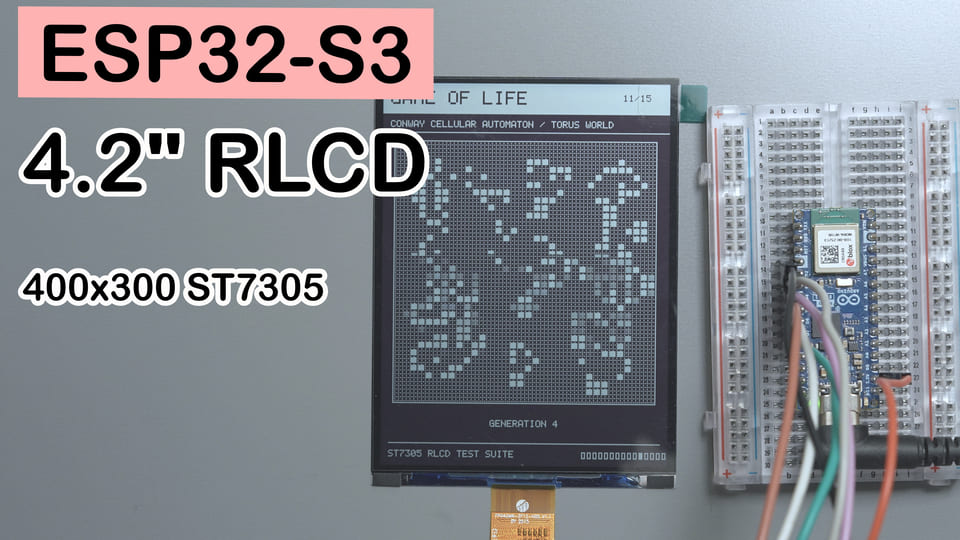
ひとこと要約:Arduino Nano ESP32(ESP32-S3)+ 4.2インチ ST7305 反射型モノクロLCD。たった 1 つの
.inoファイルでドライバ + 15ページ自動カルーセルデモが動き、サードパーティ製表示ライブラリは一切不要。
難易度:⭐⭐☆☆☆(杜邦線を挿せて Arduino IDE が使えればOK)
所要時間:30 分(接触不良との格闘時間は含まず)
テスト環境:Arduino IDE 2.3.8 + ESP32 Arduino Core 3.3.10
TL;DR(クイックスタート):
- 配線:SCLK → D7/GPIO10、MOSI → D5/GPIO8、CS → D6/GPIO9、DC → D4/GPIO7、RES → D3/GPIO6。
- VCI は 3.3V に接続し、LCD とボードの GND を共通に。TE、BLC は接続しない。注意:Nano ESP32 の D5 は GPIO8 であり、GPIO11 ではない。
- ボードパッケージ
esp32 by Espressif Systemsをインストール。U8g2、Adafruit GFX などの表示ライブラリは不要。- 付属の
ST7305_RLCD_Demo.inoを開き、ボードにArduino Nano ESP32を選択してコンパイル・書き込み。- シリアルモニターを 115200 に設定すると、LCD が 15 個のデモを自動カルーセル。アニメーションページは HPM、静的ページは 1 回だけ書き込み。
はじめに:光らないからこそ見やすい画面
夜に普通の LCD を見ると、小さな懐中電灯を目に当てられているような気分になることがある。電子ペーパーは目に優しいけれど、アニメーションの更新はバス待ちのよう——来るのは分かっているのに、なかなか来ない。
反射型LCDは第三の道を行く。バックライトでピクセルを照らすのではなく、環境光を反射する、プログラムで書き換えられる紙のような存在だ。十分な光があれば、表示はむしろくっきり。暗いときは、照明を点けよう。目を細めて根性を見せる必要はない。
今回は Arduino Nano ESP32(中身は ESP32-S3)で、4.2インチ・300×400・ST7305 搭載の反射型 Mono TFT を駆動した。目標は Hello World を 1 行出して終わりではなく、15 個のデモでテキスト、階調、幾何図形、アニメーション、フレームレート、4方向回転を全部試すこと。
ここで言う「目に優しい」は、バックライトなしで環境光反射で見るという方式の話であり、医療効能の認定ではない。目を休めるべきときに、どんな高級な画面も瞬きを代わってくれはしない。
最終效果:15 個の ST7305 デモが自動カルーセル
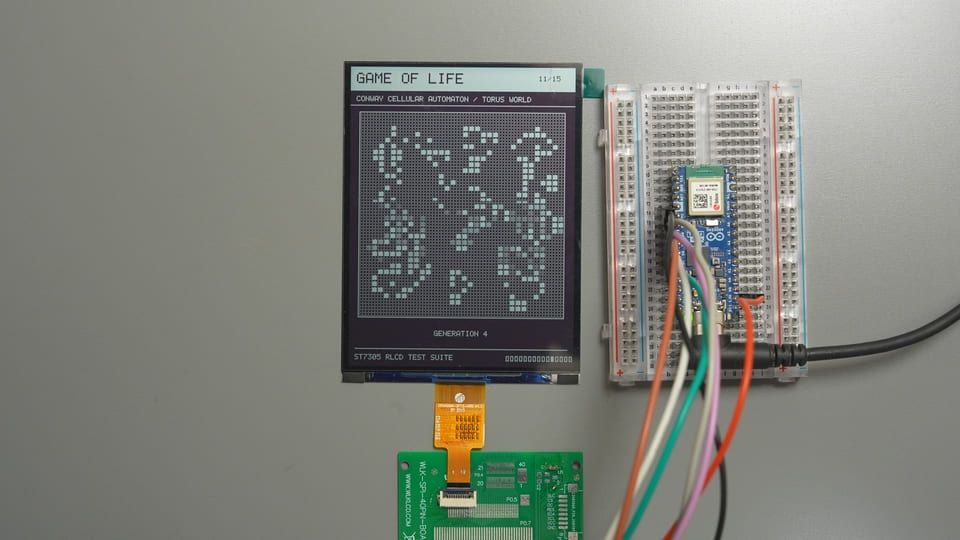
1 つの .ino を書き込むと、LCD は起動ページから 15 ページを自動ループで再生する。ボタンも、シリアルコマンドも、ネットワークも、外部画像素材も不要。
| # | デモ | 見どころ | 滞在時間 | 目標 FPS |
|---|---|---|---|---|
| 1 | Hello World | 大きな文字、枠線、ディザ背景、スマイリー | 3.5 秒 | 静的 |
| 2 | Dither Gray | 17 段階の 4×4 Bayer 秩序ディザ明暗、グラデーション、階調円(ネイティブ階調ではなく、物理ピクセルは依然 1bit) | 6.5 秒 | 静的 |
| 3 | Geometry | 直線、矩形、円、三角形、多角形 | 5 秒 | 静的 |
| 4 | Pixel Grid | エッジ、アスペクト比、対角線、幾何センタリング | 5 秒 | 静的 |
| 5 | Text & Font | 5×7 ASCII、整数倍スケーリング、反転テキスト | 5.5 秒 | 静的 |
| 6 | Dashboard UI | カード、プログレスバー、トグル、バッテリー、動的データ | 9 秒 | 4 FPS |
| 7 | Frame Rate | 実測 FPS、フレーム所要時間、54 点の履歴グラフ | 8.5 秒 | 無制限 |
| 8 | Fine Patterns | 1/2/4 ピクセル市松模様と細線のちらつき | 6 秒 | 2 FPS |
| 9 | Bounce | バウンド衝突、モーション残像観察、衝突カウンタ | 9 秒 | 20 FPS |
| 10 | Starfield | 56 個の星による透視飛行 | 9 秒 | 20 FPS |
| 11 | Game of Life | 34×34 トーラス境界の Conway ライフゲーム | 12 秒 | 3 FPS |
| 12 | Uptime Clock | esp_timer ベースの稼働時計 |
9 秒 | 4 FPS |
| 13 | Retro Desktop | レトロな Macintosh 風デスクトップ | 6.5 秒 | 静的 |
| 14 | Inversion | 全画面白黒反転とコントラストチェック | 6 秒 | 2 FPS |
| 15 | Rotation | 0°/90°/180°/270° の 4 方向切り替え | 12 秒 | 4 FPS |
目標 FPS はプログラムの描画・送信ペースであり、ガラスパネルの光学リフレッシュレートではない。7 ページ目が測定しているのは「描画 + 15000 バイトのフルフレーム SPI 転送」であり、画面に貼るための見栄えの良いベンチマークではない。
YouTube デモ動画:
部品説明
4.2インチ反射型 Mono TFT:環境光で「現像」する白黒画面
4.2インチ反射型 Mono TFT は、バックライトなしの反射型モノクロ液晶だ。環境光を利用して白黒画像を表示し、このプロジェクトでは 15 組のテストパターンと動的画面を表示する役割を担う。
「マイコンの指揮を聞く紙」と思えばいい。外光が適切なほど見やすく、環境光がなければ、自分から懐中電灯になることもない。
| パラメータ | 本プロジェクトの LCD |
|---|---|
| モジュール型番 | W420HC018MONO-12Z |
| サイズ | 4.2 インチ |
| 解像度 | 300×400 ピクセル、1 bit 白黒 |
| 表示方式 | 全反射、ノーマリーホワイト、バックライトなし |
| ドライバ IC | Sitronix ST7305 |
| ホスト側 I/F | シングル 4線 SPI、書き込み専用 |
| 画面電源 | 2.8V/3.3V、本例では 3.3V を使用 |
| 有効表示領域 | 63.6×84.84 mm |
| 動作温度 | -20℃〜+70℃ |
選んだ理由はシンプル:300×400 あればフル機能のメーター画面が描けて、4線 SPI はピンをあまり食わず、バックライト回路もいらない。環境データ、時計、低リフレッシュのダッシュボードにぴったりだ。
ピン配置
この LCD は 12Pin FPC ケーブルから全信号が出ている。変換基板を使えば杜邦線でボードに接続できる:
| FPC ピン | 名称 | 機能 | 本例での処理 |
|---|---|---|---|
| 1、5、12 | GND | 電源グラウンド | ボードの GND へ |
| 2、3 | NC | 未接続 | 接続しない |
| 4 | VCI | LCD 電源 | 3.3V へ |
| 6 | TE | フレーム同期出力 | 未使用、浮かせる |
| 7 | DC | コマンド/データ選択 | GPIO7 へ |
| 8 | CS | SPI チップセレクト、Low 有効 | GPIO9 へ |
| 9 | SCL | SPI クロック | GPIO10 へ |
| 10 | SDA | SPI データ入力、すなわち MOSI | GPIO8 へ |
| 11 | RESET | ハードウェアリセット、Low 有効 | GPIO6 へ |
ここでの SDA は SPI の MOSI であって I²C ではない。名前は同じでも仕事は別物——I²C センサーと親戚づきあいさせないように。
ST7305:バイトを白黒ピクセルに翻訳する「仕分け係」
ST7305 は Sitronix の超低消費電力モノクロ TFT コントローラ/ドライバ IC。ホストからのコマンド受信、表示メモリ管理、パネル駆動を担い、このプロジェクトでは ESP32-S3 から送られたフレームデータを画面上の白黒ピクセルに変える役割を果たす。
| パラメータ | 値 / 本プロジェクトの設定 |
|---|---|
| 最大駆動能力 | 408×408 モノクロピクセル |
| ピクセル深度 | 1 bit/ピクセル |
| SPI 書き込み周期下限 | 30 ns、約 33 MHz が上限 |
| 本プロジェクトの SPI | Mode 0、20 MHz、MSB ファースト |
| HPM フレームレート | 16 Hz または 32 Hz;本例では 16 Hz に設定 |
| LPM フレームレート | 0.25〜8 Hz;本例の初期化では 8 Hz に設定 |
| 本例の全フレーム量 | 15000 バイト |
選んだのはレジスタが多くてプロっぽいからではなく、モジュールがすでにうまくパッケージ化しているから。ホスト側は SPI、DC、CS、RESET だけで全画面更新が完結する。
FPC 変換基板:「細いフレキ線」を「杜邦線」に翻訳
FPC 変換基板はケーブルインターフェース変換基板で、LCD の 12Pin FPC を実験しやすいピンヘッダに引き出す。このプロジェクトでは、LCD を杜邦線で直接ボードに接続できるようにする役割を担う。
| パラメータ | 本プロジェクトでの使用状況 |
|---|---|
| LCD 側 | 12Pin FPC |
| 実験側 | GND、VCC、SCL、SDA、RES、DC、CS、BLC |
| 必須信号 | 制御線 5 本 + 3.3V + GND |
| 接続不要 | TE、BLC |
細いフレキ線を素手ではんだ付けしないためのもの。我々はディスプレイ実験をしているのであって、眼科とはんだ付けのダブル試験に申し込んだわけではない。
BOM
| 部品 | 数量 | 必須性 | 備考 |
|---|---|---|---|
| Arduino Nano ESP32 ボード | 1 | 必須 | MCU は ESP32-S3 |
| 4.2インチ ST7305 反射型モノクロLCD | 1 | 必須 | 300×400、3.3V 駆動 |
| 対応 FPC 変換基板 | 1 | 推奨 | 配線を楽にするだけ。FPC コネクタでも代用可 |
| 杜邦線 | 7 本以上 | 必須 | できるだけ短く。接触不良と信号問題を減らす |
配線:ESP32-S3 の 4線 SPI を ST7305 に接続
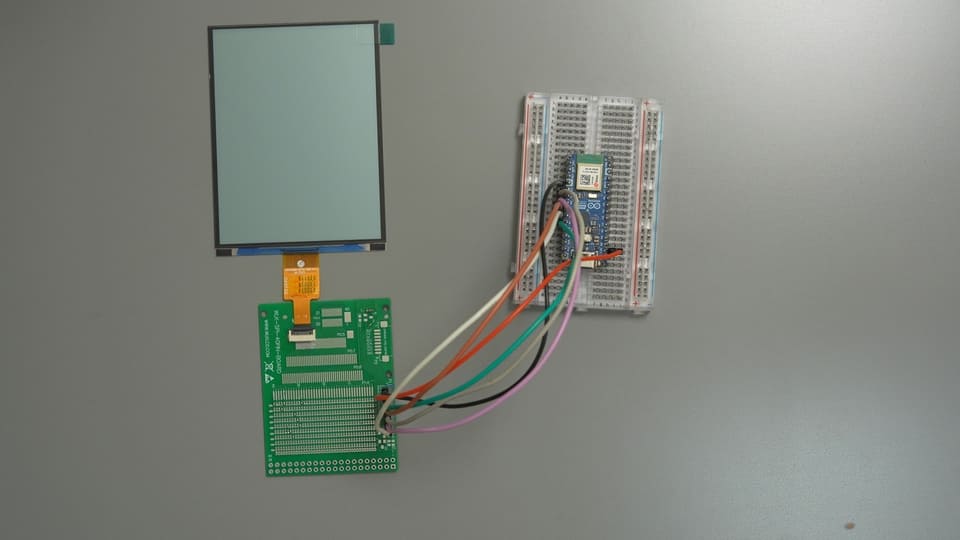
Arduino Nano ESP32                         ST7305 LCD 変換基板
┌──────────────────┐                     ┌──────────────────┐
│ D7  / GPIO10     │ ───── SCLK ───────► │ SCL              │
│ D5  / GPIO8      │ ───── MOSI ───────► │ SDA              │
│ D6  / GPIO9      │ ───── CS ─────────► │ CS               │
│ D4  / GPIO7      │ ───── DC ─────────► │ DC               │
│ D3  / GPIO6      │ ───── RESET ──────► │ RES              │
│ 3V3              │ ───── 3.3V ───────► │ VCC / VCI        │
│ GND              │ ───── 共通GND ────► │ GND              │
└──────────────────┘ └──────────────────┘| 変換基板シルク | LCD FPC | Nano ESP32 シルク | ESP32-S3 GPIO | 用途 |
|---|---|---|---|---|
| SCL | PIN9 | D7 | GPIO10 | SPI クロック |
| SDA | PIN10 | D5 | GPIO8 | SPI MOSI |
| CS | PIN8 | D6 | GPIO9 | チップセレクト |
| DC | PIN7 | D4 | GPIO7 | コマンド/データ選択 |
| RES | PIN11 | D3 | GPIO6 | ハードウェアリセット |
| VCC/VCI | PIN4 | 3V3 | 3.3V 電源 | LCD 電源 |
| GND | PIN1/5/12 | GND | GND | 共通グラウンド |
| TE | PIN6 | 接続しない | — | 本例ではフレーム同期未使用 |
| BLC | — | 接続しない | — | 反射型 LCD なのでバックライトなし |
本例の VCI は 3.3V に接続。5V、VBUS、VIN には絶対に接続しない。
追加ドライバ回路不要:ESP32-S3 は LCD の FPC に直接接続できる
この LCD は 3.3V 給電なら ESP32-S3 の GPIO で直接駆動できる。FPC の SCL、SDA、CS、DC、RESET を対応する GPIO に接続し、VCI を 3.3V、GND を共通にすればよい。間にレベルシフト IC や専用ディスプレイドライバボード、その他の周辺回路を挟む必要はない。
ここで言う「直接接続」は電気的な接続の話であって、柔らかい裸のフレキ線をそのままボードのピンヘッダに挿せという意味ではない。実際に作るときは、12Pin FPC コネクタ、はんだ付けソケット、変換基板のいずれかでフレキ線の接点を確実に引き出す必要がある。本記事で変換基板を使うのは杜邦線を挿しやすくするための機械的な変換であり、LCD の動作に必須の駆動回路ではない。FPC コネクタから直接配線する場合も、上表の FPC PIN 番号どおりに接続すれば信号関係はまったく同じだ。
配線で一番ハマりやすいのは、コードに書くのはチップの GPIO 番号であり、ボードのシルク印刷の数字ではないという点。本例では D5 = GPIO8 であり、GPIO11 = A4 だ。MOSI を間違って GPIO11 に割り当てると、プログラムは普通に動き、シリアルも普通に出力されるのに、LCD だけが電気代を滞納したかのように静まり返る。
配線後は「電源 → 共通 GND → SCLK → MOSI → CS → DC → RESET」の順に 1 本ずつ確認すると、デバッグ時間の 8 割が節約できる。FPC は挿入方向と奥まで完全に挿さっていること、ロックが掛かっていることも確認しよう。1 ピンずれているだけで画面全体がストライキを起こす。
インストールするライブラリ:ESP32 ボードパッケージだけ
この ST7305 Arduino デモは、U8g2、Adafruit GFX、TFT_eSPI、追加フォントライブラリのいずれにも依存しない。ドライバ、5×7 ASCII フォント、グラフィックプリミティブ、15 ページ分すべてが 1 つの .ino ファイルに入っている。
ステップ 1:Arduino IDE をインストール
本記事では Arduino IDE 2.3.8 を使用。Arduino 公式サイトからダウンロードしてインストールする。
ステップ 2:ESP32 Arduino Core をインストール
ボードマネージャーを開き、以下を検索してインストール:
esp32 by Espressif Systems(本記事のテストバージョン 3.3.10)ボードマネージャーで本記事と同じバージョンを選ぶと、ボードパッケージ間の API やデフォルト設定の差異を減らせる。
ステップ 3:ボードとシリアルポートを選択
ボード:Arduino Nano ESP32
ポート:ボードを接続して現れた対応ポートを選択
シリアルモニター:115200
Arduino 標準の SPI、タイマー、esp_timer はすべてボード環境が提供する。ライブラリマネージャーで「名前の似たライブラリを気まぐれにいくつかインストール」する必要はない。
補足:既製ライブラリを使いたい場合の選択肢
本チュートリアルで単一ファイルドライバを採用しているのは、初期化、フレームバッファ、ピクセルマッピングをすべて直接読めるようにするためであって、ST7305 がライブラリで使えないという意味ではない。このプロジェクトをベースに二次開発するなら、用途に応じて以下の選択肢がある:
| 選択肢 | 向いている場面 | 使うときの注意点 |
|---|---|---|
| U8g2 v2.36 以降 | テキスト、基本図形、豊富なフォント | U8G2_ST7305_300X400_1_4W_HW_SPI が用意され、本例の解像度の 4線ハードウェア SPI に対応。インストール時にライブラリのバージョンを確認し、CS、DC、RESET、SPI ピンを本記事の GPIO に変更する |
| ST7305_MonoTFT_Arduino_Library | 専用の ST7305 Arduino ドライバをそのまま使いたい | ST7305_4p2_BW_DisplayDriver などのラッパーを提供。解像度、初期化シーケンス、DisplayConfig.h のピン設定を確認すること。本記事ではこのモジュールでの実測は未実施 |
| LVGL + ST7305 低レイヤドライバ | 複雑な UI、ウィジェット、ページ管理 | LVGL は UI を担当するもので、ST7305 ドライバの代わりにはならない。本記事のドライバかメーカードライバを LVGL のフラッシュコールバックに接続する必要があり、フレームバッファ使用量と実際の更新效果も評価すること |
Adafruit GFX、TFT_eSPI、Arduino_GFX などの汎用グラフィックライブラリは、インストールすればそのまま ST7305 を駆動できると思い込まないこと。まず現行バージョンがこのコントローラを明示的にサポートしているか確認し、対応していなければ自分で適合させる必要がある。ライブラリを変えても、3.3V 給電、4線 SPI、HPM/LPM、2 行×4 列のピクセルマッピングというハードウェア制約は消えない。
**簡単な選び方:**テキストと基本図形が中心なら U8g2 をまず試す。複雑な UI なら LVGL を検討。初期化、全フレーム転送、アニメーションのペースを完全に掌握したいなら、本記事の単一ファイル方式が一番直感的だ。
完全コード:ST7305_RLCD_Demo 単一ファイル Arduino プログラム
そのまま書き込める完全なソースコード:
/*
* ST7305 4.2インチ 300x400 全反射モノクロ LCD —— Arduino 単一ファイル完全 Demo
*
* ESP-IDF 版と同等の機能:ドライバ + グラフィックプリミティブ + 15 ページ自動カルーセルデモ。
* プログラム全体がこの 1 つの .ino ファイルだけで完結し、サードパーティライブラリ不要で配布しやすい。
*
* 配線(Arduino Nano ESP32 シルク印刷):
* SCLK = GPIO10 (D7) MOSI = GPIO8 (D5) CS = GPIO9 (D6)
* DC = GPIO7 (D4) RES = GPIO6 (D3) VCI = 3.3V GND = GND
*
* Arduino IDE の準備:
* 1. ボードマネージャーで "esp32 by Espressif Systems" をインストール
* 2. ボードに "Arduino Nano ESP32" を選択し、対応するシリアルポートを選択
* 3. このファイルは同名フォルダに置く必要がある(IDE で .ino を開くと確認ダイアログが出るので「OK」をクリック)
*/
#include <Arduino.h>
#include <SPI.h>
#include "esp_timer.h" /* esp_timer_get_time() */
#include <stdio.h>
#include <string.h>
#include <stdlib.h>
#include <stdint.h>
/* ================= ユーザー変更可:ピンと SPI クロック ================= */
#define PIN_SCLK 10
#define PIN_MOSI 8
#define PIN_CS 9
#define PIN_DC 7
#define PIN_RES 6
#define SPI_CLOCK_HZ 20000000UL /* 本例では 20 MHz を使用。画面が乱れた場合はまず 8/5 MHz に下げて切り分ける */
/* ================= ST7305 基本パラメータ ================= */
#define ST7305_LCD_WIDTH 300
#define ST7305_LCD_HEIGHT 400
#define ST7305_DATA_WIDTH 75 /* 1 行あたり 300/4 = 75 バイト */
#define ST7305_BUFFER_LENGTH 15000 /* 75 * 200 */
#define ST7305_COLOR_WHITE 0x00
#define ST7305_COLOR_BLACK 0x01
#define LOGI(fmt, ...) Serial.printf("[st7305] " fmt "\r\n", ##__VA_ARGS__)
/* ドライバデバイス(シングルインスタンス、15000 バイトのフレームバッファ内蔵) */
typedef struct {
int gpio_dc;
int gpio_res;
int gpio_cs;
uint32_t clock_hz;
uint8_t rotation; /* 0=0° 1=90° 2=180° 3=270°(時計回り) */
uint8_t buffer[ST7305_BUFFER_LENGTH];
} st7305_dev_t;
typedef st7305_dev_t *st7305_handle_t;
static st7305_dev_t lcd_dev; /* グローバル唯一のインスタンス */
static inline void dc_cmd(st7305_handle_t dev) { digitalWrite(dev->gpio_dc, LOW); }
static inline void dc_data(st7305_handle_t dev) { digitalWrite(dev->gpio_dc, HIGH); }
static void spi_write_byte(st7305_handle_t dev, uint8_t data)
{
SPI.beginTransaction(SPISettings(dev->clock_hz, MSBFIRST, SPI_MODE0));
digitalWrite(dev->gpio_cs, LOW);
SPI.transfer(data);
digitalWrite(dev->gpio_cs, HIGH);
SPI.endTransaction();
}
/* レジスタ書き込み(コマンド):DC=LOW */
static void write_register(st7305_handle_t dev, uint8_t reg)
{
dc_cmd(dev);
spi_write_byte(dev, reg);
}
/* パラメータ書き込み(データ):DC=HIGH */
static void write_parameter(st7305_handle_t dev, uint8_t data)
{
dc_data(dev);
spi_write_byte(dev, data);
}
static void write_params(st7305_handle_t dev, uint8_t reg, const uint8_t *params, size_t len)
{
write_register(dev, reg);
for (size_t i = 0; i < len; i++) write_parameter(dev, params[i]);
}
/**
* ST7305 初期化シーケンス:メーカー HSD 4.2" 300x400 高スキャンレート初期化コードと一致;
* MADCTL=0x48(MX=1, DO=1)、Sleep-out 遅延 255ms、CASET 列ウィンドウ 0x12〜0x2B。
*/
static void initial_st7305(st7305_handle_t dev)
{
/* ハードウェアリセット */
digitalWrite(dev->gpio_res, HIGH); delay(10);
digitalWrite(dev->gpio_res, LOW); delay(10);
digitalWrite(dev->gpio_res, HIGH); delay(10);
#define WR(reg, ...) do { \
const uint8_t p[] = {__VA_ARGS__}; \
write_params(dev, reg, p, sizeof(p)); \
} while (0)
WR(0xD6, 0x17, 0x02); /* NVM Load Control */
WR(0xD1, 0x01); /* Booster Enable */
WR(0xC0, 0x11, 0x04); /* Gate Voltage: VGH=16.5V, VGL=-7V */
WR(0xC1, 0x41, 0x41, 0x41, 0x41); /* VSHP 5.0V x4 */
WR(0xC2, 0x19, 0x19, 0x19, 0x19); /* VSLP 0.5V x4 */
WR(0xC4, 0x41, 0x41, 0x41, 0x41); /* VSHN -3.8V x4 */
WR(0xC5, 0x19, 0x19, 0x19, 0x19); /* VSLN 0.5V x4 */
WR(0xD8, 0xA6, 0xE9); /* OSC: HPM~51Hz / LPM~1Hz */
WR(0xB2, 0x05); /* Frame Rate: HPM=16Hz, LPM=8Hz */
WR(0xB3, 0xE5, 0xF6, 0x05, 0x46, 0x77, 0x77, 0x77, 0x77, 0x76, 0x45); /* Gate EQ HPM */
WR(0xB4, 0x05, 0x46, 0x77, 0x77, 0x77, 0x77, 0x76, 0x45); /* Gate EQ LPM */
WR(0x62, 0x32, 0x03, 0x1F); /* Gate Timing Control */
WR(0xB7, 0x13); /* Source EQ Enable */
WR(0xB0, 0x64); /* Gate Line: 400 行(Sleep-out 前に設定が必要) */
write_register(dev, 0x11); /* Sleep out */
delay(255);
WR(0xC9, 0x00); /* Source Voltage Select: グループ 1 */
WR(0x36, 0x48); /* MADCTL: MX=1, DO=1 */
WR(0x3A, 0x11); /* Data Format: 3-write 24-bit */
WR(0xB9, 0x20); /* Mono モード(メーカー由来) */
WR(0xB8, 0x29); /* Panel: 1-dot 駆動極性反転 + Frame スキャン */
write_register(dev, 0x21); /* Inverse ON */
/* WRITE RAM 300*400 アドレスウィンドウ */
WR(0x2A, 0x12, 0x2B); /* CASET */
WR(0x2B, 0x00, 0xC7); /* RASET 0~199 */
WR(0x35, 0x00); /* TE ON(V-Blank) */
WR(0xD0, 0xFF); /* Auto power down */
write_register(dev, 0x39); /* LPM */
write_register(dev, 0x29); /* DISPLAY ON */
#undef WR
}
st7305_handle_t st7305_init(int gpio_dc, int gpio_res, int gpio_cs,
int gpio_sclk, int gpio_mosi, uint32_t clock_hz)
{
st7305_handle_t dev = &lcd_dev;
dev->gpio_dc = gpio_dc;
dev->gpio_res = gpio_res;
dev->gpio_cs = gpio_cs;
dev->clock_hz = clock_hz;
dev->rotation = 0;
pinMode(gpio_dc, OUTPUT);
pinMode(gpio_res, OUTPUT);
pinMode(gpio_cs, OUTPUT);
digitalWrite(gpio_cs, HIGH);
digitalWrite(gpio_res, HIGH);
/* MOSI のみで MISO なし;CS はソフトウェアで手動制御 */
SPI.begin(gpio_sclk, -1, gpio_mosi, -1);
initial_st7305(dev);
memset(dev->buffer, 0, ST7305_BUFFER_LENGTH);
LOGI("ST7305 init OK (%dx%d)", ST7305_LCD_WIDTH, ST7305_LCD_HEIGHT);
return dev;
}
/** フレームバッファ塗りつぶし(0x00 全白 / 0xFF 全黒) */
void st7305_fill(st7305_handle_t dev, uint8_t data)
{
memset(dev->buffer, data, ST7305_BUFFER_LENGTH);
}
/** フレームバッファクリア(全白) */
void st7305_clear(st7305_handle_t dev)
{
st7305_fill(dev, 0x00);
}
/**
* 表示方向の設定:0=0°、1=時計回り 90°、2=180°、3=時計回り 270°。
* 回転はフレームバッファの座標マッピングで実現;90°/270° 時の論理解像度は 400x300。
* 後続の描画にのみ影響し、フレームバッファのクリアや即時の画面更新は行わない。
*/
void st7305_set_rotation(st7305_handle_t dev, uint8_t rotation)
{
if (rotation <= 3) dev->rotation = rotation;
}
/** 現在の方向を取得(0〜3) */
uint8_t st7305_get_rotation(st7305_handle_t dev)
{
return dev->rotation;
}
/** 現在の方向の論理幅/高さを取得 */
int st7305_get_width(st7305_handle_t dev)
{
return (dev->rotation & 1) ? ST7305_LCD_HEIGHT : ST7305_LCD_WIDTH;
}
int st7305_get_height(st7305_handle_t dev)
{
return (dev->rotation & 1) ? ST7305_LCD_WIDTH : ST7305_LCD_HEIGHT;
}
/**
* 論理ピクセルはまず表示方向に従って 300x400 の物理座標にマッピングされ、フレームバッファに書き込まれる:
* 1 バイト 8 bit が 2 行×4 列のピクセルに対応:
* 行0: BIT7 BIT5 BIT3 BIT1 (偶数 bit -> 次の行)
* 行1: BIT6 BIT4 BIT2 BIT0
* 1 = 黒、0 = 白
*/
void st7305_write_point(st7305_handle_t dev, int x, int y, uint16_t color)
{
int logical_width = (dev->rotation & 1) ? ST7305_LCD_HEIGHT : ST7305_LCD_WIDTH;
int logical_height = (dev->rotation & 1) ? ST7305_LCD_WIDTH : ST7305_LCD_HEIGHT;
if (x < 0 || y < 0 || x >= logical_width || y >= logical_height) return;
int physical_x;
int physical_y;
switch (dev->rotation) {
case 1: /* 時計回り 90°、論理 400x300 */
physical_x = ST7305_LCD_WIDTH - 1 - y;
physical_y = x;
break;
case 2: /* 180°、論理 300x400 */
physical_x = ST7305_LCD_WIDTH - 1 - x;
physical_y = ST7305_LCD_HEIGHT - 1 - y;
break;
case 3: /* 時計回り 270°、論理 400x300 */
physical_x = y;
physical_y = ST7305_LCD_HEIGHT - 1 - x;
break;
default: /* 0°、論理 300x400 */
physical_x = x;
physical_y = y;
break;
}
int real_x = physical_x / 4;
int real_y = physical_y / 2;
int index = real_y * ST7305_DATA_WIDTH + real_x;
int one_two = physical_y % 2; /* 0 または 1 */
int line_bit_4 = physical_x % 4; /* 0~3 */
int bit = 7 - (line_bit_4 * 2 + one_two);
if (color) dev->buffer[index] |= (1 << bit);
else dev->buffer[index] &= ~(1 << bit);
}
/** アドレスウィンドウを設定して RAMWR を発行 */
static void set_address_window(st7305_handle_t dev)
{
write_params(dev, 0x2A, (uint8_t[]){0x12, 0x2A}, 2); /* CASET 0x12~0x2A */
write_params(dev, 0x2B, (uint8_t[]){0x00, 0xC7}, 2); /* RASET 0~199 */
write_register(dev, 0x2C); /* RAMWR */
}
/** フルフレーム更新:15000 バイトのフレームバッファを画面に転送 */
void st7305_display(st7305_handle_t dev)
{
set_address_window(dev);
dc_data(dev);
SPI.beginTransaction(SPISettings(dev->clock_hz, MSBFIRST, SPI_MODE0));
digitalWrite(dev->gpio_cs, LOW);
SPI.writeBytes(dev->buffer, ST7305_BUFFER_LENGTH);
digitalWrite(dev->gpio_cs, HIGH);
SPI.endTransaction();
}
/** 低消費電力モード LPM(0x39)に入る。省電力、フレームレートは B2h で決定 */
void st7305_low_power_mode(st7305_handle_t dev)
{
write_register(dev, 0x39);
}
/** 高消費電力モード HPM(0x38)に入る。動的画面用、16/32Hz */
void st7305_high_power_mode(st7305_handle_t dev)
{
write_register(dev, 0x38);
}
/** 表示 ON/OFF(0x29 / 0x28) */
void st7305_display_on(st7305_handle_t dev, bool enabled)
{
write_register(dev, enabled ? 0x29 : 0x28);
}
/** 反転表示 ON/OFF(0x21 / 0x20);常白パネルで黒を表示するには反転 ON が必要 */
void st7305_display_inversion(st7305_handle_t dev, bool enabled)
{
write_register(dev, enabled ? 0x21 : 0x20);
}
/** フレームバッファポインタを取得(上級者向け:ビットマップデータを直接操作可) */
uint8_t *st7305_get_buffer(st7305_handle_t dev)
{
return dev->buffer;
}
/* ================= グラフィックプリミティブ(ST73XX_UI から移植) ================= */
#define SWAP_INT(a, b) do { int _t = (a); (a) = (b); (b) = _t; } while (0)
void ui_draw_fast_hline(st7305_handle_t dev, int x, int y, int len, uint16_t color)
{
for (int i = 0; i < len; i++) st7305_write_point(dev, x + i, y, color);
}
void ui_draw_fast_vline(st7305_handle_t dev, int x, int y, int len, uint16_t color)
{
for (int i = 0; i < len; i++) st7305_write_point(dev, x, y + i, color);
}
void ui_draw_line(st7305_handle_t dev, int x1, int y1, int x2, int y2, uint16_t color)
{
int dx = abs(x2 - x1), sx = x1 < x2 ? 1 : -1;
int dy = -abs(y2 - y1), sy = y1 < y2 ? 1 : -1;
int err = dx + dy, e2;
while (1) {
st7305_write_point(dev, x1, y1, color);
if (x1 == x2 && y1 == y2) break;
e2 = 2 * err;
if (e2 >= dy) { err += dy; x1 += sx; }
if (e2 <= dx) { err += dx; y1 += sy; }
}
}
void ui_draw_triangle(st7305_handle_t dev, int x1, int y1, int x2, int y2,
int x3, int y3, uint16_t color)
{
ui_draw_line(dev, x1, y1, x2, y2, color);
ui_draw_line(dev, x2, y2, x3, y3, color);
ui_draw_line(dev, x3, y3, x1, y1, color);
}
void ui_draw_filled_triangle(st7305_handle_t dev, int x0, int y0, int x1, int y1,
int x2, int y2, uint16_t color)
{
if (y0 > y1) { SWAP_INT(y0, y1); SWAP_INT(x0, x1); }
if (y1 > y2) { SWAP_INT(y1, y2); SWAP_INT(x1, x2); }
if (y0 > y1) { SWAP_INT(y0, y1); SWAP_INT(x0, x1); }
if (y0 == y2) { /* 平底 */
int xs = x0, xe = x0;
if (x1 < xs) xs = x1;
if (x1 > xe) xe = x1;
if (x2 < xs) xs = x2;
if (x2 > xe) xe = x2;
ui_draw_fast_hline(dev, xs, y0, xe - xs + 1, color);
return;
}
int total = y2 - y0;
for (int i = 0; i <= total; i++) {
int y = y0 + i;
int second_half = (i > y1 - y0) || (y1 == y0);
int seg = second_half ? (y2 - y1) : (y1 - y0);
if (seg == 0) continue;
int ax = x0 + (int)((x2 - x0) * (int64_t)i / total);
int bx = second_half ? x1 + (int)((x2 - x1) * (int64_t)(i - (y1 - y0)) / seg)
: x0 + (int)((x1 - x0) * (int64_t)i / seg);
if (ax > bx) SWAP_INT(ax, bx);
ui_draw_fast_hline(dev, ax, y, bx - ax + 1, color);
}
}
void ui_draw_rectangle(st7305_handle_t dev, int x1, int y1, int x2, int y2, uint16_t color)
{
if (x1 > x2) SWAP_INT(x1, x2);
if (y1 > y2) SWAP_INT(y1, y2);
ui_draw_fast_hline(dev, x1, y1, x2 - x1 + 1, color);
ui_draw_fast_hline(dev, x1, y2, x2 - x1 + 1, color);
ui_draw_fast_vline(dev, x1, y1, y2 - y1 + 1, color);
ui_draw_fast_vline(dev, x2, y1, y2 - y1 + 1, color);
}
void ui_draw_filled_rectangle(st7305_handle_t dev, int x1, int y1, int x2, int y2, uint16_t color)
{
if (x1 > x2) SWAP_INT(x1, x2);
if (y1 > y2) SWAP_INT(y1, y2);
for (int y = y1; y <= y2; y++) {
ui_draw_fast_hline(dev, x1, y, x2 - x1 + 1, color);
}
}
void ui_draw_circle(st7305_handle_t dev, int xc, int yc, int r, uint16_t color)
{
int x = 0, y = r, d = 3 - 2 * r;
while (x <= y) {
st7305_write_point(dev, xc + x, yc + y, color);
st7305_write_point(dev, xc - x, yc + y, color);
st7305_write_point(dev, xc + x, yc - y, color);
st7305_write_point(dev, xc - x, yc - y, color);
st7305_write_point(dev, xc + y, yc + x, color);
st7305_write_point(dev, xc - y, yc + x, color);
st7305_write_point(dev, xc + y, yc - x, color);
st7305_write_point(dev, xc - y, yc - x, color);
if (d < 0) {
d += 4 * x + 6;
} else {
d += 4 * (x - y) + 10;
y--;
}
x++;
}
}
static int int_sqrt(int x)
{
int r = 0;
while ((r + 1) * (r + 1) <= x) r++;
return r;
}
void ui_draw_filled_circle(st7305_handle_t dev, int xc, int yc, int r, uint16_t color)
{
for (int y = -r; y <= r; y++) {
int w = int_sqrt(r * r - y * y);
ui_draw_fast_hline(dev, xc - w, yc + y, 2 * w + 1, color);
}
}
void ui_draw_polygon(st7305_handle_t dev, const int *points, int n, uint16_t color)
{
if (n < 3) return;
for (int i = 0; i < n; i++) {
int x1 = points[2 * i], y1 = points[2 * i + 1];
int x2 = points[2 * ((i + 1) % n)], y2 = points[2 * ((i + 1) % n) + 1];
ui_draw_line(dev, x1, y1, x2, y2, color);
}
}
void ui_draw_filled_polygon(st7305_handle_t dev, const int *points, int n, uint16_t color)
{
if (n < 3) return;
int min_y = points[1], max_y = points[1];
for (int i = 1; i < n; i++) {
if (points[2 * i + 1] < min_y) min_y = points[2 * i + 1];
if (points[2 * i + 1] > max_y) max_y = points[2 * i + 1];
}
int *xs = (int *)malloc(n * sizeof(int));
if (!xs) return;
/* スキャンライン填充 */
for (int y = min_y; y <= max_y; y++) {
int cnt = 0;
for (int i = 0, j = n - 1; i < n; j = i++) {
int yi = points[2 * i + 1], yj = points[2 * j + 1];
int xi = points[2 * i], xj = points[2 * j];
if ((yi < y && yj >= y) || (yj < y && yi >= y)) {
xs[cnt++] = xi + (int)((int64_t)(y - yi) * (xj - xi) / (yj - yi));
}
}
/* 挿入ソート */
for (int i = 1; i < cnt; i++) {
int key = xs[i], k = i - 1;
while (k >= 0 && xs[k] > key) { xs[k + 1] = xs[k]; k--; }
xs[k + 1] = key;
}
for (int i = 0; i + 1 < cnt; i += 2) {
ui_draw_fast_hline(dev, xs[i], y, xs[i + 1] - xs[i] + 1, color);
}
}
free(xs);
}
/* ================= Demo:15 ページ自動カルーセル =================
* テキスト、秩序ディザリング階調、テストパターン、性能ベンチマーク、UI サンプル、小アニメーション。
* 外部フォント・素材なし。 */
#define W ST7305_LCD_WIDTH
#define H ST7305_LCD_HEIGHT
#define BLACK ST7305_COLOR_BLACK
#define WHITE ST7305_COLOR_WHITE
#define ARRAY_LEN(a) ((int)(sizeof(a) / sizeof((a)[0])))
/* 定番の 5x7 ASCII フォント、列エンコード、最下位ビットが上。 */
static const uint8_t font5x7[96][5] = {
{0x00,0x00,0x00,0x00,0x00},{0x00,0x00,0x5f,0x00,0x00},
{0x00,0x07,0x00,0x07,0x00},{0x14,0x7f,0x14,0x7f,0x14},
{0x24,0x2a,0x7f,0x2a,0x12},{0x23,0x13,0x08,0x64,0x62},
{0x36,0x49,0x55,0x22,0x50},{0x00,0x05,0x03,0x00,0x00},
{0x00,0x1c,0x22,0x41,0x00},{0x00,0x41,0x22,0x1c,0x00},
{0x14,0x08,0x3e,0x08,0x14},{0x08,0x08,0x3e,0x08,0x08},
{0x00,0x50,0x30,0x00,0x00},{0x08,0x08,0x08,0x08,0x08},
{0x00,0x60,0x60,0x00,0x00},{0x20,0x10,0x08,0x04,0x02},
{0x3e,0x51,0x49,0x45,0x3e},{0x00,0x42,0x7f,0x40,0x00},
{0x42,0x61,0x51,0x49,0x46},{0x21,0x41,0x45,0x4b,0x31},
{0x18,0x14,0x12,0x7f,0x10},{0x27,0x45,0x45,0x45,0x39},
{0x3c,0x4a,0x49,0x49,0x30},{0x01,0x71,0x09,0x05,0x03},
{0x36,0x49,0x49,0x49,0x36},{0x06,0x49,0x49,0x29,0x1e},
{0x00,0x36,0x36,0x00,0x00},{0x00,0x56,0x36,0x00,0x00},
{0x08,0x14,0x22,0x41,0x00},{0x14,0x14,0x14,0x14,0x14},
{0x00,0x41,0x22,0x14,0x08},{0x02,0x01,0x51,0x09,0x06},
{0x32,0x49,0x79,0x41,0x3e},{0x7e,0x11,0x11,0x11,0x7e},
{0x7f,0x49,0x49,0x49,0x36},{0x3e,0x41,0x41,0x41,0x22},
{0x7f,0x41,0x41,0x22,0x1c},{0x7f,0x49,0x49,0x49,0x41},
{0x7f,0x09,0x09,0x09,0x01},{0x3e,0x41,0x49,0x49,0x7a},
{0x7f,0x08,0x08,0x08,0x7f},{0x00,0x41,0x7f,0x41,0x00},
{0x20,0x40,0x41,0x3f,0x01},{0x7f,0x08,0x14,0x22,0x41},
{0x7f,0x40,0x40,0x40,0x40},{0x7f,0x02,0x0c,0x02,0x7f},
{0x7f,0x04,0x08,0x10,0x7f},{0x3e,0x41,0x41,0x41,0x3e},
{0x7f,0x09,0x09,0x09,0x06},{0x3e,0x41,0x51,0x21,0x5e},
{0x7f,0x09,0x19,0x29,0x46},{0x46,0x49,0x49,0x49,0x31},
{0x01,0x01,0x7f,0x01,0x01},{0x3f,0x40,0x40,0x40,0x3f},
{0x1f,0x20,0x40,0x20,0x1f},{0x3f,0x40,0x38,0x40,0x3f},
{0x63,0x14,0x08,0x14,0x63},{0x07,0x08,0x70,0x08,0x07},
{0x61,0x51,0x49,0x45,0x43},{0x00,0x7f,0x41,0x41,0x00},
{0x02,0x04,0x08,0x10,0x20},{0x00,0x41,0x41,0x7f,0x00},
{0x04,0x02,0x01,0x02,0x04},{0x40,0x40,0x40,0x40,0x40},
{0x00,0x01,0x02,0x04,0x00},{0x20,0x54,0x54,0x54,0x78},
{0x7f,0x48,0x44,0x44,0x38},{0x38,0x44,0x44,0x44,0x20},
{0x38,0x44,0x44,0x48,0x7f},{0x38,0x54,0x54,0x54,0x18},
{0x08,0x7e,0x09,0x01,0x02},{0x0c,0x52,0x52,0x52,0x3e},
{0x7f,0x08,0x04,0x04,0x78},{0x00,0x44,0x7d,0x40,0x00},
{0x20,0x40,0x44,0x3d,0x00},{0x7f,0x10,0x28,0x44,0x00},
{0x00,0x41,0x7f,0x40,0x00},{0x7c,0x04,0x18,0x04,0x78},
{0x7c,0x08,0x04,0x04,0x78},{0x38,0x44,0x44,0x44,0x38},
{0x7c,0x14,0x14,0x14,0x08},{0x08,0x14,0x14,0x18,0x7c},
{0x7c,0x08,0x04,0x04,0x08},{0x48,0x54,0x54,0x54,0x20},
{0x04,0x3f,0x44,0x40,0x20},{0x3c,0x40,0x40,0x20,0x7c},
{0x1c,0x20,0x40,0x20,0x1c},{0x3c,0x40,0x30,0x40,0x3c},
{0x44,0x28,0x10,0x28,0x44},{0x0c,0x50,0x50,0x50,0x3c},
{0x44,0x64,0x54,0x4c,0x44},{0x00,0x08,0x36,0x41,0x00},
{0x00,0x00,0x7f,0x00,0x00},{0x00,0x41,0x36,0x08,0x00},
{0x08,0x04,0x08,0x10,0x08},{0x00,0x00,0x00,0x00,0x00}
};
static const uint8_t bayer4[4][4] = {
{0, 8, 2, 10}, {12, 4, 14, 6}, {3, 11, 1, 9}, {15, 7, 13, 5}
};
static void text_char(st7305_handle_t d, int x, int y, char c, int scale, uint16_t color)
{
if ((unsigned char)c < 32 || (unsigned char)c > 127) c = '?';
const uint8_t *glyph = font5x7[(unsigned char)c - 32];
for (int col = 0; col < 5; col++) {
for (int row = 0; row < 7; row++) {
if (glyph[col] & (1U << row)) {
if (scale == 1) st7305_write_point(d, x + col, y + row, color);
else ui_draw_filled_rectangle(d, x + col * scale, y + row * scale,
x + (col + 1) * scale - 1, y + (row + 1) * scale - 1, color);
}
}
}
}
static void text(st7305_handle_t d, int x, int y, const char *s, int scale, uint16_t color)
{
while (*s) {
text_char(d, x, y, *s++, scale, color);
x += 6 * scale;
}
}
static int text_width(const char *s, int scale)
{
int n = (int)strlen(s);
return n ? (n * 6 - 1) * scale : 0;
}
static void text_center(st7305_handle_t d, int y, const char *s, int scale, uint16_t color)
{
text(d, (W - text_width(s, scale)) / 2, y, s, scale, color);
}
static void gray_rect(st7305_handle_t d, int x0, int y0, int x1, int y1, int level)
{
if (x0 > x1) { int t = x0; x0 = x1; x1 = t; }
if (y0 > y1) { int t = y0; y0 = y1; y1 = t; }
if (level <= 0) return;
if (level >= 16) {
ui_draw_filled_rectangle(d, x0, y0, x1, y1, BLACK);
return;
}
for (int y = y0; y <= y1; y++) {
for (int x = x0; x <= x1; x++) {
if (level > bayer4[y & 3][x & 3]) st7305_write_point(d, x, y, BLACK);
}
}
}
static void gray_circle(st7305_handle_t d, int cx, int cy, int r, int level)
{
for (int y = -r; y <= r; y++) {
for (int x = -r; x <= r; x++) {
if (x * x + y * y <= r * r && level > bayer4[(cy + y) & 3][(cx + x) & 3]) {
st7305_write_point(d, cx + x, cy + y, BLACK);
}
}
}
}
static void hline(st7305_handle_t d, int x0, int x1, int y, uint16_t color)
{
ui_draw_fast_hline(d, x0, y, x1 - x0 + 1, color);
}
static void vline(st7305_handle_t d, int x, int y0, int y1, uint16_t color)
{
ui_draw_fast_vline(d, x, y0, y1 - y0 + 1, color);
}
static void chrome(st7305_handle_t d, int page, const char *title, const char *subtitle)
{
char buf[24];
ui_draw_filled_rectangle(d, 0, 0, W - 1, 31, BLACK);
text(d, 8, 8, title, 2, WHITE);
snprintf(buf, sizeof(buf), "%02d/15", page + 1);
text(d, 251, 11, buf, 1, WHITE);
text(d, 8, 39, subtitle, 1, BLACK);
hline(d, 0, W - 1, 51, BLACK);
hline(d, 8, W - 9, 376, BLACK);
text(d, 8, 384, "ST7305 RLCD TEST SUITE", 1, BLACK);
for (int i = 0; i < 15; i++) {
int x = 210 + i * 6;
if (i == page) ui_draw_filled_rectangle(d, x, 385, x + 3, 391, BLACK);
else ui_draw_rectangle(d, x, 385, x + 3, 391, BLACK);
}
}
static uint32_t rng_state = 0x7305u;
static uint32_t demo_rand(void)
{
rng_state ^= rng_state << 13;
rng_state ^= rng_state >> 17;
rng_state ^= rng_state << 5;
return rng_state;
}
static int wave(int tick, int period)
{
int p = tick % (period * 2);
return p < period ? p : period * 2 - p;
}
static void page_hello(st7305_handle_t d, int frame, int64_t elapsed)
{
(void)frame; (void)elapsed;
gray_rect(d, 0, 0, W - 1, H - 1, 2);
ui_draw_filled_rectangle(d, 12, 12, 287, 387, WHITE);
ui_draw_rectangle(d, 12, 12, 287, 387, BLACK);
ui_draw_rectangle(d, 16, 16, 283, 383, BLACK);
text_center(d, 54, "ST7305 / RLCD", 2, BLACK);
hline(d, 42, 258, 82, BLACK);
text_center(d, 112, "HELLO", 7, BLACK);
text_center(d, 174, "WORLD!", 7, BLACK);
text_center(d, 247, "300 x 400 MONOCHROME", 2, BLACK);
text_center(d, 278, "15 PAGES / AUTO CAROUSEL", 1, BLACK);
gray_circle(d, 150, 330, 28, 5);
ui_draw_circle(d, 150, 330, 29, BLACK);
ui_draw_filled_circle(d, 140, 321, 3, BLACK);
ui_draw_filled_circle(d, 160, 321, 3, BLACK);
ui_draw_line(d, 136, 338, 142, 343, BLACK);
ui_draw_line(d, 142, 343, 158, 343, BLACK);
ui_draw_line(d, 158, 343, 164, 338, BLACK);
}
static void page_gray(st7305_handle_t d, int frame, int64_t elapsed)
{
(void)frame; (void)elapsed;
chrome(d, 1, "DITHER GRAY", "17 LEVELS / STATIC 4x4 BAYER MATRIX");
for (int i = 0; i < 17; i++) {
int x = 14 + i * 16;
gray_rect(d, x, 72, x + 14, 128, i);
ui_draw_rectangle(d, x, 72, x + 14, 128, BLACK);
}
text(d, 14, 136, "0%", 1, BLACK);
text(d, 139, 136, "50", 1, BLACK);
text(d, 259, 136, "100%", 1, BLACK);
text(d, 14, 159, "GRADIENT", 1, BLACK);
for (int y = 0; y < 36; y++) {
for (int x = 0; x < 272; x++) {
int level = x / 17;
if (level > bayer4[y & 3][x & 3]) st7305_write_point(d, 14 + x, 176 + y, BLACK);
}
}
ui_draw_rectangle(d, 13, 175, 286, 212, BLACK);
text(d, 14, 230, "DITHERED FILLS FOR UI DEPTH", 1, BLACK);
gray_circle(d, 58, 294, 39, 3);
gray_circle(d, 150, 294, 39, 7);
gray_circle(d, 242, 294, 39, 12);
ui_draw_circle(d, 58, 294, 40, BLACK);
ui_draw_circle(d, 150, 294, 40, BLACK);
ui_draw_circle(d, 242, 294, 40, BLACK);
text_center(d, 347, "NO GRAY PIXELS - JUST BLACK + WHITE", 1, BLACK);
}
static void page_geometry(st7305_handle_t d, int frame, int64_t elapsed)
{
(void)frame; (void)elapsed;
chrome(d, 2, "GEOMETRY", "LINES / CIRCLES / TRIANGLES / POLYGONS");
ui_draw_line(d, 12, 65, 285, 350, BLACK);
ui_draw_line(d, 285, 65, 12, 350, BLACK);
ui_draw_rectangle(d, 20, 75, 126, 164, BLACK);
gray_rect(d, 23, 78, 123, 161, 4);
ui_draw_filled_rectangle(d, 43, 97, 104, 139, BLACK);
ui_draw_circle(d, 213, 122, 48, BLACK);
ui_draw_circle(d, 213, 122, 38, BLACK);
gray_circle(d, 213, 122, 27, 8);
ui_draw_triangle(d, 24, 323, 87, 188, 143, 323, BLACK);
ui_draw_filled_triangle(d, 176, 310, 219, 212, 271, 310, BLACK);
const int p[] = {152,77, 168,95, 162,117, 143,117, 136,95};
ui_draw_filled_polygon(d, p, 5, BLACK);
text_center(d, 348, "BRESENHAM + SCANLINE FILL", 1, BLACK);
}
static void page_grid(st7305_handle_t d, int frame, int64_t elapsed)
{
(void)frame; (void)elapsed;
chrome(d, 3, "PIXEL GRID", "CHECK EDGES, ASPECT RATIO AND DIAGONALS");
ui_draw_rectangle(d, 0, 58, 299, 367, BLACK);
for (int x = 19; x < W; x += 20) gray_rect(d, x, 59, x, 366, 4);
for (int y = 78; y < 367; y += 20) gray_rect(d, 1, y, 298, y, 4);
ui_draw_line(d, 0, 58, 299, 367, BLACK);
ui_draw_line(d, 299, 58, 0, 367, BLACK);
ui_draw_circle(d, 150, 213, 100, BLACK);
ui_draw_rectangle(d, 50, 113, 250, 313, BLACK);
ui_draw_filled_rectangle(d, 0, 58, 5, 63, BLACK);
ui_draw_filled_rectangle(d, 294, 58, 299, 63, BLACK);
ui_draw_filled_rectangle(d, 0, 362, 5, 367, BLACK);
ui_draw_filled_rectangle(d, 294, 362, 299, 367, BLACK);
ui_draw_filled_rectangle(d, 145, 208, 155, 218, WHITE);
ui_draw_rectangle(d, 145, 208, 155, 218, BLACK);
}
static void page_text(st7305_handle_t d, int frame, int64_t elapsed)
{
(void)frame; (void)elapsed;
chrome(d, 4, "TEXT & FONT", "BUILT-IN 5x7 ASCII / INTEGER SCALING");
text_center(d, 69, "BIG TEXT 2X", 2, BLACK);
text_center(d, 96, "HUGE 4X", 4, BLACK);
hline(d, 18, 281, 135, BLACK);
text(d, 14, 148, "Regular: ABCDEFGHIJKLM", 1, BLACK);
text(d, 14, 162, " NOPQRSTUVWXYZ", 1, BLACK);
text(d, 14, 179, "Lower: abcdefghijklm", 1, BLACK);
text(d, 14, 193, " nopqrstuvwxyz", 1, BLACK);
text(d, 14, 214, "Digits: 0123456789", 2, BLACK);
text(d, 14, 241, "Symbols: !#$%&*+-/<=>?", 1, BLACK);
gray_rect(d, 14, 265, 285, 304, 12);
text_center(d, 273, "DITHERED TEXT PANEL", 2, BLACK);
ui_draw_filled_rectangle(d, 14, 318, 285, 348, BLACK);
text_center(d, 327, "REVERSED TEXT", 2, WHITE);
text_center(d, 359, "NO EXTERNAL FONT REQUIRED", 1, BLACK);
}
static void draw_toggle(st7305_handle_t d, int x, int y, bool on)
{
ui_draw_rectangle(d, x, y, x + 35, y + 16, BLACK);
if (on) {
ui_draw_filled_rectangle(d, x + 2, y + 2, x + 32, y + 14, BLACK);
ui_draw_filled_circle(d, x + 26, y + 8, 5, WHITE);
} else {
ui_draw_filled_circle(d, x + 9, y + 8, 5, BLACK);
}
}
static void page_ui(st7305_handle_t d, int frame, int64_t elapsed)
{
(void)elapsed;
chrome(d, 5, "DESKTOP UI", "DITHERED CARDS / GAUGES / LIVE WIDGETS");
gray_rect(d, 17, 67, 188, 191, 5);
ui_draw_filled_rectangle(d, 13, 63, 184, 187, WHITE);
ui_draw_rectangle(d, 13, 63, 184, 187, BLACK);
text(d, 23, 74, "ENVIRONMENT", 2, BLACK);
hline(d, 23, 174, 96, BLACK);
text(d, 23, 109, "23.6", 4, BLACK);
text(d, 107, 109, "C", 2, BLACK);
text(d, 23, 145, "HUMIDITY 48%", 1, BLACK);
text(d, 23, 161, "PRESSURE 1013", 1, BLACK);
gray_rect(d, 200, 67, 290, 191, 7);
ui_draw_filled_rectangle(d, 196, 63, 286, 187, WHITE);
ui_draw_rectangle(d, 196, 63, 286, 187, BLACK);
text(d, 207, 74, "POWER", 1, BLACK);
int battery = 20 + wave(frame, 40) * 70 / 40;
ui_draw_rectangle(d, 210, 99, 267, 121, BLACK);
ui_draw_filled_rectangle(d, 267, 104, 271, 116, BLACK);
ui_draw_filled_rectangle(d, 213, 102, 213 + battery * 50 / 100, 118, BLACK);
char buf[32];
snprintf(buf, sizeof(buf), "%d%%", battery);
text(d, 241 - text_width(buf, 2) / 2, 134, buf, 2, BLACK);
text(d, 207, 160, "SOLAR ON", 1, BLACK);
ui_draw_filled_rectangle(d, 13, 204, 286, 294, WHITE);
ui_draw_rectangle(d, 13, 204, 286, 294, BLACK);
text(d, 24, 216, "SYSTEM ACTIVITY", 1, BLACK);
for (int i = 0; i < 3; i++) {
int value = 12 + wave(frame + i * 17, 50) * 180 / 50;
text(d, 24, 240 + i * 16, i == 0 ? "CPU" : (i == 1 ? "MEM" : "SPI"), 1, BLACK);
gray_rect(d, 62, 240 + i * 16, 256, 248 + i * 16, 3);
ui_draw_filled_rectangle(d, 62, 240 + i * 16, 62 + value, 248 + i * 16, BLACK);
}
text(d, 22, 316, "WIFI", 1, BLACK);
draw_toggle(d, 63, 311, true);
text(d, 118, 316, "SYNC", 1, BLACK);
draw_toggle(d, 160, 311, (frame / 12) & 1);
text(d, 215, 316, "LIVE", 1, BLACK);
if ((frame / 4) & 1) ui_draw_filled_circle(d, 276, 319, 5, BLACK);
else ui_draw_circle(d, 276, 319, 5, BLACK);
text_center(d, 351, "A TINY REFLECTIVE DASHBOARD", 1, BLACK);
}
typedef struct {
uint32_t last_us;
uint32_t average_us;
uint16_t history[54];
int history_pos;
} perf_t;
static perf_t perf;
static void perf_record(uint32_t elapsed_us)
{
perf.last_us = elapsed_us;
perf.average_us = perf.average_us ? (perf.average_us * 7 + elapsed_us) / 8 : elapsed_us;
perf.history[perf.history_pos] = (uint16_t)(elapsed_us / 100);
perf.history_pos = (perf.history_pos + 1) % ARRAY_LEN(perf.history);
}
static void page_fps(st7305_handle_t d, int frame, int64_t elapsed)
{
chrome(d, 6, "FRAME RATE", "UNTHROTTLED FULL-FRAME DRAW + SPI BENCHMARK");
char buf[40];
uint32_t avg = perf.average_us ? perf.average_us : 1;
uint32_t fps10 = 10000000UL / avg;
snprintf(buf, sizeof(buf), "%lu.%lu FPS", (unsigned long)(fps10 / 10), (unsigned long)(fps10 % 10));
text_center(d, 66, buf, 4, BLACK);
snprintf(buf, sizeof(buf), "LAST %lu.%lu ms AVG %lu.%lu ms",
(unsigned long)(perf.last_us / 1000), (unsigned long)((perf.last_us % 1000) / 100),
(unsigned long)(avg / 1000), (unsigned long)((avg % 1000) / 100));
text_center(d, 108, buf, 1, BLACK);
text(d, 16, 132, "UPDATE TIME HISTORY", 1, BLACK);
ui_draw_rectangle(d, 15, 148, 285, 254, BLACK);
gray_rect(d, 16, 174, 284, 174, 3);
gray_rect(d, 16, 201, 284, 201, 3);
gray_rect(d, 16, 227, 284, 227, 3);
int previous_x = -1, previous_y = -1;
for (int i = 0; i < ARRAY_LEN(perf.history); i++) {
int index = (perf.history_pos + i) % ARRAY_LEN(perf.history);
int value = perf.history[index];
int y = 250 - value * 95 / 150;
if (y < 151) y = 151;
if (y > 250) y = 250;
int x = 20 + i * 5;
ui_draw_filled_circle(d, x, y, 1, BLACK);
if (previous_x >= 0) ui_draw_line(d, previous_x, previous_y, x, y, BLACK);
previous_x = x; previous_y = y;
}
snprintf(buf, sizeof(buf), "FRAME: %d", frame + 1);
text(d, 17, 271, buf, 1, BLACK);
text(d, 17, 291, "15000 BYTES PER UPDATE", 2, BLACK);
text(d, 17, 317, "SPI: 20 MHz PANEL: 16 Hz", 1, BLACK);
text(d, 17, 337, "CPU number is bus throughput,", 1, BLACK);
text(d, 17, 351, "not the optical panel limit.", 1, BLACK);
int scan = 20 + (frame * 7) % 260;
vline(d, scan, 149, 253, BLACK);
(void)elapsed;
}
static void page_patterns(st7305_handle_t d, int frame, int64_t elapsed)
{
(void)elapsed;
chrome(d, 7, "FINE PATTERNS", "1/2/4 PIXEL CHECKERS + LINE RESOLUTION");
int phase = frame & 1;
const int boxes[4][4] = {{12,66,146,184},{153,66,287,184},{12,194,146,332},{153,194,287,332}};
for (int b = 0; b < 4; b++) {
for (int y = boxes[b][1]; y <= boxes[b][3]; y++) {
for (int x = boxes[b][0]; x <= boxes[b][2]; x++) {
bool black = false;
if (b == 0) black = ((x ^ y) & 1) == phase;
if (b == 1) black = (((x / 2) ^ (y / 2)) & 1) == phase;
if (b == 2) black = (((x / 4) ^ (y / 4)) & 1) == phase;
if (b == 3) black = ((x + phase) % 4 == 0) || ((y + phase) % 4 == 0);
if (black) st7305_write_point(d, x, y, BLACK);
}
}
ui_draw_rectangle(d, boxes[b][0] - 1, boxes[b][1] - 1, boxes[b][2] + 1, boxes[b][3] + 1, BLACK);
}
text_center(d, 343, "CHECKER / 2PX / 4PX / GRID", 1, BLACK);
text_center(d, 358, phase ? "PHASE B - CHECK FOR FLICKER" : "PHASE A - CHECK FOR FLICKER", 1, BLACK);
}
static struct { int x, y, vx, vy, hits; } bounce;
static void page_bounce(st7305_handle_t d, int frame, int64_t elapsed)
{
(void)elapsed;
chrome(d, 8, "BOUNCE TEST", "MOVEMENT, COLLISIONS AND PANEL GHOSTING");
const int left = 10, right = 289, top = 65, bottom = 355;
ui_draw_rectangle(d, left, top, right, bottom, BLACK);
for (int y = top + 10; y < bottom; y += 20) gray_rect(d, left + 1, y, right - 1, y, 2);
if (frame > 0) {
bounce.x += bounce.vx;
bounce.y += bounce.vy;
if (bounce.x <= left + 2 || bounce.x + 91 >= right - 1) {
bounce.vx = -bounce.vx;
bounce.x += bounce.vx * 2;
bounce.hits++;
}
if (bounce.y <= top + 2 || bounce.y + 43 >= bottom - 1) {
bounce.vy = -bounce.vy;
bounce.y += bounce.vy * 2;
bounce.hits++;
}
}
gray_rect(d, bounce.x + 5, bounce.y + 5, bounce.x + 96, bounce.y + 48, 5);
ui_draw_filled_rectangle(d, bounce.x, bounce.y, bounce.x + 91, bounce.y + 43, WHITE);
ui_draw_rectangle(d, bounce.x, bounce.y, bounce.x + 91, bounce.y + 43, BLACK);
text(d, bounce.x + 9, bounce.y + 10, "RLCD", 3, BLACK);
char buf[24];
snprintf(buf, sizeof(buf), "WALL HITS: %d", bounce.hits);
text_center(d, 360, buf, 1, BLACK);
}
#define STAR_COUNT 56
static struct { int x, y, z; } stars[STAR_COUNT];
static void star_reset(int i, bool initial)
{
stars[i].x = (int)(demo_rand() % 401) - 200;
stars[i].y = (int)(demo_rand() % 401) - 200;
stars[i].z = initial ? 30 + (int)(demo_rand() % 220) : 250;
}
static void page_stars(st7305_handle_t d, int frame, int64_t elapsed)
{
(void)frame; (void)elapsed;
ui_draw_filled_rectangle(d, 0, 0, W - 1, H - 1, BLACK);
text(d, 10, 12, "STARFIELD", 2, WHITE);
text(d, 190, 17, "56 STARS / HPM", 1, WHITE);
hline(d, 10, 289, 38, WHITE);
for (int i = 0; i < STAR_COUNT; i++) {
int old_z = stars[i].z;
stars[i].z -= 7;
if (stars[i].z < 20) star_reset(i, false);
int z = stars[i].z;
int x = 150 + stars[i].x * 110 / z;
int y = 207 + stars[i].y * 110 / z;
int ox = 150 + stars[i].x * 110 / old_z;
int oy = 207 + stars[i].y * 110 / old_z;
if (x > 2 && x < 297 && y > 44 && y < 370) {
ui_draw_line(d, ox, oy, x, y, WHITE);
if (z < 80) ui_draw_filled_circle(d, x, y, 2, WHITE);
else st7305_write_point(d, x, y, WHITE);
}
}
hline(d, 10, 289, 377, WHITE);
text(d, 10, 385, "WARP THROUGH A MONOCHROME GALAXY", 1, WHITE);
}
#define LIFE_W 34
#define LIFE_H 34
static uint8_t life[LIFE_H][LIFE_W];
static uint8_t life_next[LIFE_H][LIFE_W];
static int generation;
static void life_seed(void)
{
memset(life, 0, sizeof(life));
rng_state = 0x42030040u;
for (int y = 2; y < LIFE_H - 2; y++) {
for (int x = 2; x < LIFE_W - 2; x++) life[y][x] = (demo_rand() % 100) < 28;
}
generation = 0;
}
static void life_step(void)
{
for (int y = 0; y < LIFE_H; y++) {
for (int x = 0; x < LIFE_W; x++) {
int neighbors = 0;
for (int dy = -1; dy <= 1; dy++) {
for (int dx = -1; dx <= 1; dx++) {
if (!dx && !dy) continue;
int yy = (y + dy + LIFE_H) % LIFE_H;
int xx = (x + dx + LIFE_W) % LIFE_W;
neighbors += life[yy][xx];
}
}
life_next[y][x] = neighbors == 3 || (neighbors == 2 && life[y][x]);
}
}
memcpy(life, life_next, sizeof(life));
generation++;
}
static void page_life(st7305_handle_t d, int frame, int64_t elapsed)
{
(void)elapsed;
chrome(d, 10, "GAME OF LIFE", "CONWAY CELLULAR AUTOMATON / TORUS WORLD");
if (frame > 0) life_step();
const int cell = 8, ox = 14, oy = 62;
gray_rect(d, ox - 3, oy - 3, ox + LIFE_W * cell + 1, oy + LIFE_H * cell + 1, 3);
ui_draw_rectangle(d, ox - 2, oy - 2, ox + LIFE_W * cell, oy + LIFE_H * cell, BLACK);
for (int y = 0; y < LIFE_H; y++) {
for (int x = 0; x < LIFE_W; x++) {
if (life[y][x]) ui_draw_filled_rectangle(d, ox + x * cell + 1, oy + y * cell + 1,
ox + x * cell + 6, oy + y * cell + 6, BLACK);
}
}
char buf[32];
snprintf(buf, sizeof(buf), "GENERATION %d", generation);
text_center(d, 352, buf, 1, BLACK);
}
static void page_clock(st7305_handle_t d, int frame, int64_t elapsed)
{
chrome(d, 11, "UPTIME CLOCK", "ESP-TIMER / NO RTC OR NETWORK REQUIRED");
int total = (int)(elapsed / 1000000);
int seconds = total % 60, minutes = (total / 60) % 60, hours = total / 3600;
int cx = 150, cy = 177, radius = 101;
ui_draw_circle(d, cx, cy, radius, BLACK);
ui_draw_circle(d, cx, cy, radius - 2, BLACK);
for (int i = 0; i < 60; i++) {
/* 時計回りの目盛りをルックアップテーブル化し、浮動小数点と libm を回避。 */
static const int8_t sx[12] = {0,50,87,100,87,50,0,-50,-87,-100,-87,-50};
static const int8_t sy[12] = {-100,-87,-50,0,50,87,100,87,50,0,-50,-87};
if (i % 5 == 0) {
int k = i / 5;
int x = cx + sx[k] * 88 / 100, y = cy + sy[k] * 88 / 100;
ui_draw_filled_circle(d, x, y, 3, BLACK);
}
}
static const int8_t sec_x[12] = {0,50,87,100,87,50,0,-50,-87,-100,-87,-50};
static const int8_t sec_y[12] = {-100,-87,-50,0,50,87,100,87,50,0,-50,-87};
int sk = (seconds / 5) % 12;
ui_draw_line(d, cx, cy, cx + sec_x[sk] * 76 / 100, cy + sec_y[sk] * 76 / 100, BLACK);
int mk = (minutes / 5) % 12;
ui_draw_line(d, cx, cy, cx + sec_x[mk] * 53 / 100, cy + sec_y[mk] * 53 / 100, BLACK);
ui_draw_filled_circle(d, cx, cy, 5, BLACK);
char buf[32];
snprintf(buf, sizeof(buf), "%02d:%02d:%02d", hours, minutes, seconds);
text_center(d, 301, buf, 4, BLACK);
snprintf(buf, sizeof(buf), "RENDER FRAME %d", frame + 1);
text_center(d, 343, buf, 1, BLACK);
text_center(d, 359, "1-BIT DOES NOT MEAN BORING", 1, BLACK);
}
static void tiny_mac(st7305_handle_t d, int x, int y)
{
ui_draw_rectangle(d, x, y, x + 37, y + 47, BLACK);
ui_draw_filled_rectangle(d, x + 4, y + 4, x + 33, y + 31, BLACK);
ui_draw_filled_rectangle(d, x + 6, y + 6, x + 31, y + 29, WHITE);
ui_draw_filled_rectangle(d, x + 11, y + 12, x + 13, y + 15, BLACK);
ui_draw_filled_rectangle(d, x + 24, y + 12, x + 26, y + 15, BLACK);
ui_draw_line(d, x + 12, y + 23, x + 16, y + 25, BLACK);
ui_draw_line(d, x + 16, y + 25, x + 22, y + 25, BLACK);
ui_draw_line(d, x + 22, y + 25, x + 26, y + 23, BLACK);
ui_draw_filled_rectangle(d, x + 7, y + 38, x + 23, y + 41, BLACK);
}
static void page_retro(st7305_handle_t d, int frame, int64_t elapsed)
{
(void)frame; (void)elapsed;
gray_rect(d, 0, 0, W - 1, H - 1, 3);
ui_draw_filled_rectangle(d, 0, 0, W - 1, 21, WHITE);
hline(d, 0, W - 1, 22, BLACK);
text(d, 9, 7, "* File Edit View Special", 1, BLACK);
text(d, 258, 7, "12:00", 1, BLACK);
text(d, 181, 34, "RLCD OS", 2, BLACK);
text(d, 184, 55, "System 1.0", 1, BLACK);
tiny_mac(d, 228, 77);
gray_rect(d, 17, 39, 212, 278, 8);
ui_draw_filled_rectangle(d, 12, 34, 207, 273, WHITE);
ui_draw_rectangle(d, 12, 34, 207, 273, BLACK);
ui_draw_filled_rectangle(d, 13, 35, 206, 51, BLACK);
text(d, 54, 39, "CONTROL PANEL", 1, WHITE);
ui_draw_rectangle(d, 16, 38, 20, 47, WHITE);
text(d, 24, 65, "Desktop Pattern", 1, BLACK);
for (int y = 0; y < 36; y++) for (int x = 0; x < 56; x++) {
if (((x / 4) ^ (y / 4)) & 1) st7305_write_point(d, 25 + x, 82 + y, BLACK);
}
gray_rect(d, 94, 82, 177, 117, 6);
ui_draw_rectangle(d, 24, 81, 81, 118, BLACK);
ui_draw_rectangle(d, 93, 81, 178, 118, BLACK);
hline(d, 22, 196, 130, BLACK);
text(d, 24, 141, "Double-Click Speed", 1, BLACK);
for (int i = 0; i < 3; i++) {
ui_draw_rectangle(d, 26 + i * 51, 163, 37 + i * 51, 174, BLACK);
if (i == 1) ui_draw_filled_rectangle(d, 28 + i * 51, 165, 35 + i * 51, 172, BLACK);
}
text(d, 24, 190, "Key Repeat Rate", 1, BLACK);
gray_rect(d, 25, 211, 187, 218, 4);
ui_draw_filled_rectangle(d, 25, 211, 110, 218, BLACK);
ui_draw_rectangle(d, 25, 210, 188, 219, BLACK);
text(d, 24, 237, "Reflective. Silent. Timeless.", 1, BLACK);
ui_draw_filled_rectangle(d, 24, 294, 195, 353, WHITE);
ui_draw_rectangle(d, 24, 294, 195, 353, BLACK);
ui_draw_filled_rectangle(d, 25, 295, 194, 310, BLACK);
text(d, 65, 299, "HELLO, WORLD!", 1, WHITE);
text(d, 36, 322, "1 bit. Infinite ideas.", 1, BLACK);
text(d, 36, 338, "OK", 1, BLACK);
ui_draw_rectangle(d, 135, 324, 180, 344, BLACK);
text(d, 236, 348, "TRASH", 1, BLACK);
ui_draw_rectangle(d, 244, 305, 265, 337, BLACK);
hline(d, 240, 269, 302, BLACK);
vline(d, 250, 309, 333, BLACK);
vline(d, 258, 309, 333, BLACK);
}
static void page_inverse(st7305_handle_t d, int frame, int64_t elapsed)
{
(void)elapsed;
chrome(d, 13, "BLACK & WHITE", "POLARITY / CONTRAST / FULL-SCREEN INVERSION");
bool invert = (frame / 2) & 1;
if (!invert) {
ui_draw_filled_rectangle(d, 12, 66, 287, 346, BLACK);
text_center(d, 92, "BLACK", 6, WHITE);
text_center(d, 155, "ON", 4, WHITE);
text_center(d, 205, "WHITE", 6, WHITE);
ui_draw_filled_rectangle(d, 42, 276, 257, 324, WHITE);
text_center(d, 289, "REVERSED", 3, BLACK);
} else {
ui_draw_rectangle(d, 12, 66, 287, 346, BLACK);
text_center(d, 92, "WHITE", 6, BLACK);
text_center(d, 155, "ON", 4, BLACK);
text_center(d, 205, "BLACK", 6, BLACK);
ui_draw_filled_rectangle(d, 42, 276, 257, 324, BLACK);
text_center(d, 289, "REVERSED", 3, WHITE);
}
text_center(d, 357, invert ? "PHASE B" : "PHASE A", 1, BLACK);
}
static void page_rotation(st7305_handle_t d, int frame, int64_t elapsed)
{
(void)frame;
static const int angles[4] = {0, 90, 180, 270};
uint8_t rotation = (uint8_t)((elapsed / 3000000) & 3);
st7305_set_rotation(d, rotation);
int width = st7305_get_width(d);
int height = st7305_get_height(d);
int cx = width / 2;
int cy = height / 2 - 5;
char buf[40];
ui_draw_rectangle(d, 0, 0, width - 1, height - 1, BLACK);
ui_draw_filled_rectangle(d, 0, 0, width - 1, 39, BLACK);
snprintf(buf, sizeof(buf), "ROTATION %d DEG", angles[rotation]);
text(d, (width - text_width(buf, 2)) / 2, 11, buf, 2, WHITE);
snprintf(buf, sizeof(buf), "LOGICAL %d x %d / FRAMEBUFFER MAPPING", width, height);
text(d, (width - text_width(buf, 1)) / 2, 50, buf, 1, BLACK);
/* 非対称矢印 + 四隅マーカーで、どの方向も曖昧さなく判別できる。 */
ui_draw_circle(d, cx, cy, 43, BLACK);
ui_draw_line(d, cx, cy + 25, cx, cy - 28, BLACK);
ui_draw_line(d, cx, cy - 28, cx - 13, cy - 14, BLACK);
ui_draw_line(d, cx, cy - 28, cx + 13, cy - 14, BLACK);
text(d, cx - text_width("UP", 2) / 2, cy - 10, "UP", 2, BLACK);
snprintf(buf, sizeof(buf), "%d", angles[rotation]);
text(d, cx - text_width(buf, 6) / 2, cy + 57, buf, 6, BLACK);
text(d, 12, 70, "A / TOP LEFT", 1, BLACK);
text(d, width - 12 - text_width("B / TOP RIGHT", 1), 70, "B / TOP RIGHT", 1, BLACK);
text(d, 12, height - 39, "C / BOTTOM LEFT", 1, BLACK);
text(d, width - 12 - text_width("D / BOTTOM RIGHT", 1), height - 39,
"D / BOTTOM RIGHT", 1, BLACK);
ui_draw_filled_rectangle(d, 3, 3, 9, 9, WHITE);
ui_draw_filled_rectangle(d, width - 10, height - 10, width - 4, height - 4, BLACK);
hline(d, 12, width - 13, height - 25, BLACK);
text(d, (width - text_width("AUTO 0 > 90 > 180 > 270 / 3 SEC EACH", 1)) / 2,
height - 15, "AUTO 0 > 90 > 180 > 270 / 3 SEC EACH", 1, BLACK);
}
typedef void (*page_draw_t)(st7305_handle_t, int, int64_t);
typedef struct {
const char *name;
page_draw_t draw;
uint32_t duration_ms;
uint16_t target_fps; /* 0 = 1 回だけ描画, 65535 = 無制限 */
} demo_page_t;
static const demo_page_t pages[] = {
{"Hello World", page_hello, 3500, 0},
{"Dither gray", page_gray, 6500, 0},
{"Geometry", page_geometry, 5000, 0},
{"Pixel grid", page_grid, 5000, 0},
{"Text", page_text, 5500, 0},
{"Dashboard UI", page_ui, 9000, 4},
{"Frame rate", page_fps, 8500, UINT16_MAX},
{"Fine patterns", page_patterns, 6000, 2},
{"Bounce", page_bounce, 9000, 20},
{"Starfield", page_stars, 9000, 20},
{"Game of Life", page_life, 12000, 3},
{"Uptime clock", page_clock, 9000, 4},
{"Retro desktop", page_retro, 6500, 0},
{"Inversion", page_inverse, 6000, 2},
{"Rotation 0/90/180/270", page_rotation, 12000, 4},
};
static void page_reset(int page)
{
if (page == 6) memset(&perf, 0, sizeof(perf));
if (page == 8) bounce = (typeof(bounce)){25, 85, 3, 2, 0};
if (page == 9) {
rng_state = 0x51a7f13du;
for (int i = 0; i < STAR_COUNT; i++) star_reset(i, true);
}
if (page == 10) life_seed();
}
void lcd_demo_run(st7305_handle_t lcd)
{
if (!lcd) return;
int page = 0;
while (1) {
const demo_page_t *p = &pages[page];
st7305_set_rotation(lcd, 0);
page_reset(page);
LOGI("Page %d/%d: %s", page + 1, ARRAY_LEN(pages), p->name);
int64_t started = (int64_t)esp_timer_get_time();
uint32_t wake = millis();
int frame = 0;
while (1) {
int64_t draw_started = (int64_t)esp_timer_get_time();
st7305_clear(lcd);
p->draw(lcd, frame, draw_started - started);
st7305_display(lcd);
perf_record((uint32_t)(esp_timer_get_time() - draw_started));
if (p->target_fps == 0) {
delay(p->duration_ms);
break;
}
frame++;
if (esp_timer_get_time() - started >= (int64_t)p->duration_ms * 1000) break;
if (p->target_fps != UINT16_MAX) {
uint32_t interval = 1000 / p->target_fps;
if (!interval) interval = 1;
wake += interval;
int32_t wait = (int32_t)(wake - millis());
if (wait > 0) delay(wait);
}
yield();
}
page = (page + 1) % ARRAY_LEN(pages);
}
}
/* ================= Arduino エントリ ================= */
static st7305_handle_t lcd;
void setup(void)
{
Serial.begin(115200);
lcd = st7305_init(PIN_DC, PIN_RES, PIN_CS, PIN_SCLK, PIN_MOSI, SPI_CLOCK_HZ);
/* アニメーションには HPM が必要;静的ページは LPM でも画面を保持できる。 */
st7305_high_power_mode(lcd);
LOGI("Starting 15-page LCD demo carousel");
}
void loop(void)
{
lcd_demo_run(lcd);
}これは疑似コードでも、主要関数だけを抜き出した教材用ダイジェストでもない。低レイヤドライバ、グラフィックプリミティブ、内蔵フォント、15 ページのカルーセルを含む完全な単一ファイルプログラムだ。記事を公開する際は、この .ino を添付ファイルか付属コードリポジトリに入れるのがおすすめ——読者に本文の断片コードを継ぎ接ぎさせないためだ。
ファイルは同名フォルダに置く:
ST7305_RLCD_Demo/
└── ST7305_RLCD_Demo.ino
Arduino IDE で .ino を開き、Arduino Nano ESP32 と対応するシリアルポートを選択して、コンパイル・アップロードすればよい。
最小起動フロー:初期化してから 15 ページカルーセルへ
以下は完全版プログラムのエントリ部分。実際に仕事をしているのは st7305_init() と lcd_demo_run() で、前者が「画面を起こす」、後者が「画面に芸をさせる」役割だ。
static st7305_handle_t lcd;

void setup(void)
{
    // ステップ 1:115200 のシリアルポートを開いてログを見られるように
    Serial.begin(115200);

    // ステップ 2:さっきの配線で SPI と ST7305 を初期化
    lcd = st7305_init(
        PIN_DC, PIN_RES, PIN_CS,
        PIN_SCLK, PIN_MOSI,
        SPI_CLOCK_HZ
    );

    // ステップ 3:動的ページは更新が必要なので HPM(高リフレッシュモード)に切り替え
    st7305_high_power_mode(lcd);
    LOGI("Starting 15-page LCD demo carousel");
}

void loop(void)
{
    // ステップ 4:ここで永遠にカルーセル。状態機械を書く必要はない
    lcd_demo_run(lcd);
}
ピンと SPI クロックはファイル先頭にまとまっている。ボードを変えるときはまずここを直そう:
// ここに書くのは GPIO 番号。Nano のシルク印刷の D 番号をそのまま写さないこと
#define PIN_SCLK        10          // D7
#define PIN_MOSI         8          // D5、重要:GPIO11 ではない
#define PIN_CS           9          // D6
#define PIN_DC           7          // D4
#define PIN_RES          6          // D3
#define SPI_CLOCK_HZ     20000000UL // 20 MHz。まず安定、それから高速化
コード解説 1:なぜ 1 フレームがちょうど 15000 バイトなのか
この LCD のピクセル数は 300×400 = 120000。各ピクセルは白か黒だけなので、理論上は 1 bit:
120000 bit ÷ 8 = 15000 バイト本例のデータフォーマットでは、ST7305 の 1 バイト(8 bit)が 2 行×4 列のピクセルに対応する:
0 行目:BIT7  BIT5  BIT3  BIT1
1 行目:BIT6  BIT4  BIT2  BIT0
つまりプログラム上の 1 行は、よくある 300÷8 ではなく 300÷4 = 75 バイト。縦方向は 2 行 1 組で、400÷2 = 200 組になる:
#define ST7305_DATA_WIDTH     75      // 300 ÷ 4
#define ST7305_BUFFER_LENGTH  15000   // 75 × 200
フレームバッファは、下書き用紙に描いてから画面に一括で渡すようなもの。描画と SPI タイミングが混線せず、コードの保守も楽になる。
本例の 17 段階の明暗は、4×4 Bayer マトリックスで白黒ドット密度を制御することで実現しており、ピクセル深度は増えない。したがって 300×400 のフレームバッファは依然 15000 バイトである。ここでいう「17 段階」は理論上のディザパターン数であり、実際に識別できる程度は視聴距離やパネルの表示効果にも影響される。
INVON/INVOFF が制御するのは画面の白黒表示反転であり、Dot Inversion は液晶駆動極性のメカニズムである。両者は同じ概念ではなく、「残像消去のための定期反転」でもない。
コード解説 2:座標がフレームバッファのどのビットに落ちるか
回転後の論理座標は、まず 300×400 の物理座標にマッピングされ、それからバイト位置とビット位置が計算される:
// ステップ 1:このピクセルがどのバイトに入るかを計算
int real_x = physical_x / 4;
int real_y = physical_y / 2;
int index = real_y * ST7305_DATA_WIDTH + real_x;

// ステップ 2:そのバイトのどのビットを占めるかを計算
int one_two = physical_y % 2;
int line_bit_4 = physical_x % 4;
int bit = 7 - (line_bit_4 * 2 + one_two);

// ステップ 3:黒ならビットを立て、白ならクリア
if (color) dev->buffer[index] |= (1 << bit);
else       dev->buffer[index] &= ~(1 << bit);
このインターリーブ配置こそ、初心者が一番計算を間違いやすい場所。図形が斜めになったり、バーコード状に割れたり、1 行おきにずれたりしたら、まずここをチェック。初期化レジスタを「闇雲にいじる」のは後回しにしよう。
コード解説 3:DC と CS は何をしているのか
DC は宅配便の荷札のようなもの。LOW は「これはコマンド」、HIGH は「これは画像データ」を意味する。CS は点呼のようなもので、LOW に下げられた間だけ、この LCD がデータを受け取る番になる。
static void write_register(st7305_handle_t dev, uint8_t reg)
{
    dc_cmd(dev);          // DC=LOW:次はコマンド
    spi_write_byte(dev, reg);
}

static void write_parameter(st7305_handle_t dev, uint8_t data)
{
    dc_data(dev);         // DC=HIGH:次はパラメータ
    spi_write_byte(dev, data);
}
フルフレーム送信時、プログラムは 15000 バイトを連続書き込みする。ピクセルごとに SPI トランザクションを開くわけではない:
void st7305_display(st7305_handle_t dev)
{
    set_address_window(dev);             // ステップ 1:全画面の書き込みウィンドウを囲む
    dc_data(dev);                        // ステップ 2:この後はデータだと画面に伝える
    SPI.beginTransaction(SPISettings(dev->clock_hz, MSBFIRST, SPI_MODE0));
    digitalWrite(dev->gpio_cs, LOW);
    SPI.writeBytes(dev->buffer, ST7305_BUFFER_LENGTH); // ステップ 3:フレームを一気に送る
    digitalWrite(dev->gpio_cs, HIGH);
    SPI.endTransaction();
}
20 MHz なら、15000 バイトの純粋な SPI 理論転送時間は約 6 ms。実際にはコマンド、描画、プログラムのスケジューリングが上乗せされる。7 ページ目には実測の所要時間が表示される。理論値を実測 FPS と偽ることはしない。
データシートの書き込みサイクル下限は約 33.3 MHz に相当するが、これは ST7305 コントローラのタイミング仕様であり、任意の杜邦線・変換基板・電源環境で安定に達成できる速度ではない。本例では 20 MHz を採用している。画面乱れ・ずれ・起動不安定が出た場合は、まずクロックを下げて配線と信号品質を確認すること。
コード解説 4:HPM、LPM、静止画は別物
初期化が終わると LPM に入る。本デモでは setup() で HPM に切り替え、アニメーションページにより適したパネル更新条件にしている。
st7305_high_power_mode(lcd); // 0x38 を送って HPM に入る本例では B2h=0x05 で HPM を 16 Hz、LPM を 8 Hz に設定している。プログラムの target_fps はホストがどれくらいの速さで描くかを制御するだけで、液晶の物理応答にパネルの限界を超えろと命令することはできない。
静的ページの target_fps=0 は、1 回描いたら画面を保持し、再送信しないという意味。ただしカルーセル全体は HPM のままで、静的ページごとに自動で LPM に戻るわけではない。本物の低消費電力製品にするなら、データシートのタイミングに従ってモード切り替えと部分更新も実装しよう。
コード解説 5:15 個のデモがどう自動カルーセルするか
全ページは pages[] 配列にまとまっており、各要素は名前、描画関数、滞在時間、目標 FPS を持つ:
static const demo_page_t pages[] = {
    {"Hello World", page_hello, 3500, 0},
    {"Dither gray", page_gray, 6500, 0},
    // 中間の 12 ページも同じ形:関数、滞在時間、目標 FPS
    {"Rotation 0/90/180/270", page_rotation, 12000, 4},
};
再生順を変えたければ配列要素を入れ替える。星空をもう少し眺めたければ duration_ms を変える。自分のページを追加したければ、同じシグネチャの描画関数を書いて配列に登録する。カルーセルのスケジューリングをバラバラに散らかす必要はない。
コード解説 6:4 方向回転が MADCTL の当てずっぽうに頼らない理由
プログラムは st7305_set_rotation(lcd, rotation) で 0〜3 の 4 方向を設定し、フレームバッファへの書き込み時に座標をマッピングする:
rotation |
表示方向 | 論理解像度 |
|---|---|---|
| 0 | 0° | 300×400 |
| 1 | 時計回り 90° | 400×300 |
| 2 | 180° | 300×400 |
| 3 | 時計回り 270° | 400×300 |
方向の設定は後続の描画にのみ影響し、自動で画面をクリアしたり更新したりはしない。切り替え後はフレームバッファをクリアして完全に再描画すべき。各カルーセルページの開始時に、プログラムはまず方向を 0 にリセットする。前のページが次のページを「傾けない」ようにするためだ。
トラブルシューティング:ST7305 が映らない、化ける、ちらつくとき
慌てないで。「画面が点かない」問題の 8 割は、これから挙げる場所が原因。残りの 2 割だけが初期化レジスタのせいになる。
1. シリアルには初期化成功と出るのに、画面が真っ白
書き込み専用 SPI には MISO の読み戻しがない。ホストがデータを空気に送りつけても「転送完了」と言う。まず D5 → GPIO8 が正しく配線されているか確認し、次に VCI が 3.3V か、GND が共通か、FPC がロックされているかを測る。数秒完全に電源を落としてから再投入するほうが、RESET を押すだけより徹底的だ。
2. 画面に内容は出るが、ランダムに化けたり、たまに固まったりする
SPI_CLOCK_HZ を 20 MHz から一時的に 5 MHz に下げ、杜邦線を短くし、コネクタを挿し直す。低速で回復したら、まず線の長さ・接触・信号品質を直すこと。Gate/Source 電圧からいじり始めないこと。
3. 図形がずれる、縞が出る、文字が刻まれたように見える
DTFORM=0x11、列アドレスウィンドウ、2 行×4 列のピクセルビットマッピングを確認。論理座標が範囲外になっていないかも確認:0°/180° は 300×400、90°/270° は 400×300。
4. 暗いところでほとんど見えない
これはバックライトなしの全反射 LCD。画面が急に透明人間になったわけではない。環境照明を足そう。BLC を必須のバックライト線だと思わないこと。本例では BLC は浮かせたままでよい。
5. アニメーションに残像がある、細かいパターンがちらつく
細かい市松模様、位相反転、高速な全画面反転は、もともとストレステストだ。すべての UI がこうなるわけではない。動的ページの target_fps を下げ、大面積の高頻度反転を減らし、HPM になっているか確認する。残像が目立つときは、パネルの物理特性に無理やり逆らって加速し続けないこと。
本ドライバは、一部の電子ペーパーのように残像消去のために定期的な全画面白黒反転を行う必要はない。動的ページは毎フレームバッファをクリアして再描画するだけの通常の画面更新であり、静的ページは一度書き込んだ後コントローラが継続的に走査表示する。残像が持続的に目立つ場合は、メーカー初期化パラメータ・HPM/LPM・リフレッシュリズムを確認すべきであり、定期反転フラッシュを追加するのではない。
6. 中国語に変えたら「?」や四角しか出ない
内蔵フォントは 96 個の 5×7 ASCII 文字だけで、中国語は含まれない。別途、切り出した中国語フォントを導入し、st7305_write_point() で描画する必要がある。完全な大型フォントをそのまま突っ込まないこと——ファームウェアのサイズが UI より「重く」なってしまう。
7. 複雑なページを見る前に、ハードウェアが生きているか確認したい
まず全黒・全白の交互テストで、テキスト、座標、アニメーションロジックをいったん迂回する:
// ステップ 1:フレーム全体を 1 に——全黒テスト
st7305_fill(lcd, 0xFF);
st7305_display(lcd);
delay(2000);

// ステップ 2:フレーム全体を 0 に——全白テスト
st7305_fill(lcd, 0x00);
st7305_display(lcd);
delay(2000);
全黒・全白が正常なら、15 ページカルーセルに戻る。トラブルシューティングは医者と同じで、まず簡単な検査から。いきなり大手術はしない。
FAQ:ESP32-S3 と ST7305 のよくある質問
Q:ST7305 の SPI ピンは他の GPIO に変えられる?
A:変えられる。ESP32-S3 は GPIO Matrix で SPI を再マッピングできる。PIN_SCLK、PIN_MOSI、PIN_CS、PIN_DC、PIN_RES を変更して配線も合わせて変えればよい。ボードが使用中のピン、起動設定、USB 関連ピンは避けること。ボードを変えたら必ずそのボードの公式ピン表を確認すること。「同じ ESP32-S3 だから」という理由だけでそのまま使い回さない。
Q:ST7305 はなぜ 3.3V 必須なの?5V に接続できる? A:本例のモジュールは VCI が 3.3V で、ESP32-S3 の GPIO も 3.3V ロジック。VCI や信号ピンに直接 5V を加えてはいけない。給電時は GND も共通にすること。3.3V だけ接続して GND を忘れると、信号に共通の基準点がなくなる。
Q:ST7305 の実際のリフレッシュレートは?コードに 20 FPS と書けば 20 Hz になる?
A:ならない。本例のパネル HPM は 16 Hz に設定されており、target_fps=20 はホストが 1 秒間に最大 20 フレームを生成・送信する目標ペースにすぎない。20 MHz の SPI で 15000 バイトを送る理論時間は約 6 ms。実際の FPS は 7 ページ目の「描画 + SPI」測定値が基準で、光学応答はさらにパネルモードの制約を受ける。
Q:15000 バイトのフレームバッファは ESP32-S3 のメモリをどれくらい食う? A:固定のフレームバッファは 15000 バイト、約 14.65 KiB。これにフォントテーブル、ページ状態、描画の一時変数が加わる。デモは静的グローバルインスタンスを使っているので、フレームごとにバッファ全体を動的確保する必要はない。
Q:他の ESP32-S3 ボードでもこの ST7305 Arduino コードはそのまま使える? A:ドライバのロジックは再利用できるが、ボード選択と GPIO マッピングは変更要。Nano ESP32 以外のボードを使うなら、Arduino IDE でそのボードを選択し、5 つの制御 GPIO を実際の配線に合わせて変更する。給電はモジュールの要求どおり 3.3V のまま。
Q:ST7305 がまったく表示しない場合、最初にいじるパラメータは? A:まず電圧レジスタはいじらない。「3.3V 給電 → 共通 GND → FPC/杜邦線 → D5=GPIO8 → SPI を 5 MHz に下げる → 全黒全白テスト」の順に切り分ける。ハードウェアの導線が確認できてから、初期化シーケンスとフレームバッファを調べる。
Q:この 1 bit モノクロ LCD がなぜ 17 段階の階調を表示できるの? A:本物の階調ピクセルは存在しない。4×4 Bayer 秩序ディザリングで白黒ドットの密度を制御し、人間の目に一定距離から 0〜16 の 17 段階の明るさを感じさせている。拡大しても黒点と白点しかない——「シフトを組んで立体感を出す」方式だ。
Q:ST7305 のデモは中国語を直接表示できる?
A:直接はできない。現在の内蔵フォントは ASCII 32〜126 をカバーし、中国語は ? に置き換わる。切り出した中国語字形を追加して描画関数を書くか、既存の描画インターフェースをフォントライブラリにブリッジする必要がある。
Q:反射型 LCD は暗い部屋で使うもの? A:環境光が必要で、暗いほど良いわけではない。普通の室内照明や明るい環境のほうが見やすい。本例にはバックライトがなく BLC も接続していないので、暗所では外部照明を足すべきだ。
応用編:ST7305 を点灯させた後にできること
- 温湿度センサーを接続し、6 ページ目のデモデータを実際の環境データに置き換える。
- ボタンやロータリーエンコーダを追加して、15 ページを手動で切り替え、滞在時間を調整できるようにする。
- 部分更新を実装する:CASET/RASET でウィンドウを設定し、
WRMEMC 0x3Cと組み合わせてフルフレーム転送を減らす。 - TE フレーム同期を接続し、V-Blank 後にフレームを書き込んで、動的画面のティアリング制御をさらに研究する。
- 切り出し中国語フォントを追加して、低リフレッシュの天気予報ボード、カレンダー、時計を作る。
- データシートのタイミングに従って静的ページで LPM に戻り、実際に消費電力を測定する。「低消費電力」という文字だけで満足しない。
参考資料
- ST7305 データシート(Sitronix):レジスタ定義、HPM/LPM タイミング、初期化フローは公式データシートを基準に
- U8g2 ライブラリ:v2.36 から
U8G2_ST7305_300X400_1_4W_HW_SPIコンストラクタを内蔵 - ST7305_MonoTFT_Arduino_Library:サードパーティ製 ST7305 Arduino ドライバラッパー
- Arduino Nano ESP32 公式ドキュメント:ボードのシルク印刷と GPIO マッピングの対応関係
あなたも点灯できたなら、まず 4 ページ目のピクセルグリッドと 7 ページ目のフレームレートテストから確認し、それから自分の UI を pages[] に追加しよう。白黒 2 色だけの画面でも、メーター、アニメーション、レトロデスクトップを存分に遊べる。