ESP32-S3 驅動 ST7305 4.2 吋全反射螢幕:15 個示例完整教學(四線 SPI + Arduino)
用 Arduino Nano ESP32(ESP32-S3)和四線 SPI 驅動 ST7305 4.2 吋 300×400 全反射單色螢幕,完成接線、燒錄、15 個顯示示例與故障排查,適合想玩轉無背光反射螢幕的 Arduino 玩家。
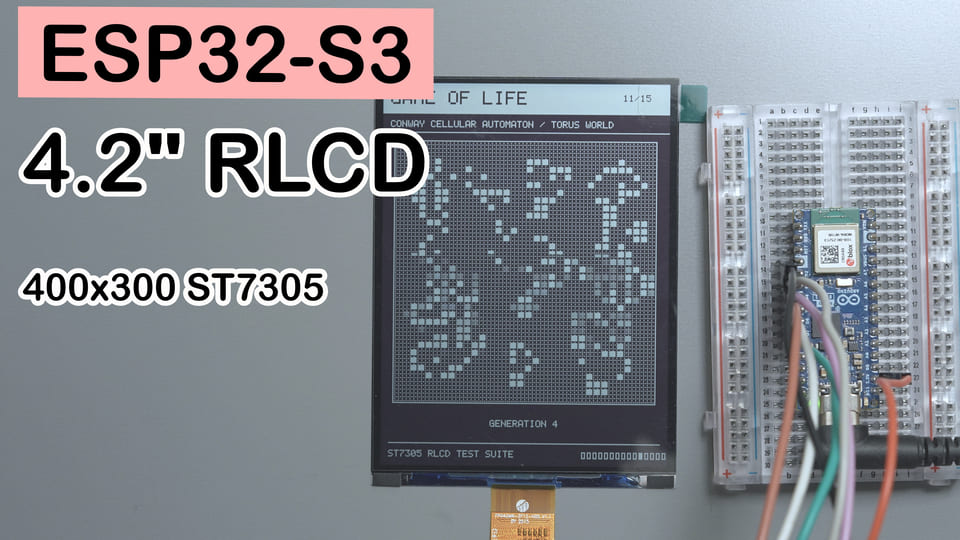
一句話摘要:Arduino Nano ESP32(ESP32-S3)+ 4.2 吋 ST7305 全反射單色螢幕,一個
.ino檔案跑通驅動 + 15 頁自動輪播演示,不用任何第三方顯示函式庫。
難度:⭐⭐☆☆☆(會接杜邦線、會用 Arduino IDE 就能上手)
預計時間:30 分鐘(不含和接觸不良鬥智鬥勇的時間)
測試環境:Arduino IDE 2.3.8 + ESP32 Arduino Core 3.3.10
TL;DR(快速上手):
- 接線:SCLK → D7/GPIO10,MOSI → D5/GPIO8,CS → D6/GPIO9,DC → D4/GPIO7,RES → D3/GPIO6。
- VCI 接 3.3V,螢幕與開發板共地;TE、BLC 不接。注意:Nano ESP32 的 D5 是 GPIO8,不是 GPIO11。
- 安裝開發板支援包
esp32 by Espressif Systems,不用安裝 U8g2、Adafruit GFX 或其他顯示函式庫。- 打開配套
ST7305_RLCD_Demo.ino,開發板選擇Arduino Nano ESP32,編譯燒錄。- 序列埠鮑率設為 115200,螢幕會自動輪播 15 個示例;動畫頁使用 HPM,靜態頁只寫屏一次。
前言:一塊不發光,反而更清楚的螢幕
晚上看普通 LCD,有時像有人拿著小手電照你的眼睛;電子墨水屏舒服歸舒服,刷新動畫又像在等公車——你知道它會來,但就是快不起來。
全反射屏走的是另一條路:它不靠背光照亮像素,而是反射環境光,像一張能被程式改寫的紙。光線充足時,顯示反而更清楚;環境太暗時,請開一盞環境燈,別靠瞇眼展示意志力。
這次我用 Arduino Nano ESP32(主控是 ESP32-S3),驅動一塊 4.2 吋、300×400、ST7305 控制器的全反射 Mono TFT。目標不是只顯示一句 Hello World 就收工,而是用 15 個示例把文字、灰階、幾何圖形、動畫、幀率和四方向旋轉都試一遍。
這裡說的「護眼」是無背光、依靠環境光反射的觀看方式,不是醫療功效認證。該休息眼睛時,再高級的屏也不能替你眨眼。
最終效果:15 個 ST7305 示例自動輪播
燒錄一個 .ino 檔案後,螢幕會從啟動頁開始,自動循環 15 個頁面,不需要按鍵、序列埠命令、網路或外部圖片素材。
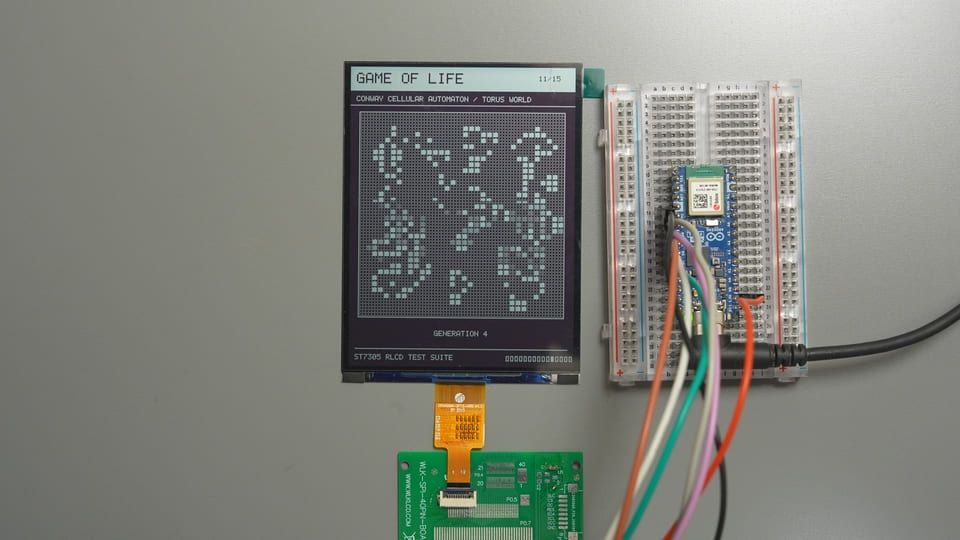
| # | 示例 | 主要看什麼 | 停留時間 | 目標幀率 |
|---|---|---|---|---|
| 1 | Hello World | 大字、邊框、抖動背景和笑臉 | 3.5 秒 | 靜態 |
| 2 | Dither Gray | 17 檔 4×4 Bayer 有序抖動明暗、漸變和灰度圓(非原生灰階,物理像素仍為 1bit) | 6.5 秒 | 靜態 |
| 3 | Geometry | 直線、矩形、圓、三角形和多邊形 | 5 秒 | 靜態 |
| 4 | Pixel Grid | 邊緣、比例、對角線和幾何居中 | 5 秒 | 靜態 |
| 5 | Text & Font | 5×7 ASCII、整數倍放大和反白文字 | 5.5 秒 | 靜態 |
| 6 | Dashboard UI | 卡片、進度條、開關、電池和動態資料 | 9 秒 | 4 FPS |
| 7 | Frame Rate | 實際 FPS、幀耗時和 54 點歷史曲線 | 8.5 秒 | 不限速 |
| 8 | Fine Patterns | 1/2/4 像素棋盤格與細線閃爍 | 6 秒 | 2 FPS |
| 9 | Bounce | 彈跳碰撞、運動殘影觀察和碰撞計數 | 9 秒 | 20 FPS |
| 10 | Starfield | 56 個星點的透視飛行 | 9 秒 | 20 FPS |
| 11 | Game of Life | 34×34 環形邊界的 Conway 生命遊戲 | 12 秒 | 3 FPS |
| 12 | Uptime Clock | 基於 esp_timer 的運行時鐘 |
9 秒 | 4 FPS |
| 13 | Retro Desktop | 復古 Macintosh 風格桌面 | 6.5 秒 | 靜態 |
| 14 | Inversion | 全屏黑白反色與對比度檢查 | 6 秒 | 2 FPS |
| 15 | Rotation | 0°/90°/180°/270° 四方向切換 | 12 秒 | 4 FPS |
目標幀率是程式繪製與發送的節奏,不等於玻璃面板的光學刷新率。第 7 頁統計的是「繪圖 + 15000 位元組整幀 SPI 發送」,不是給螢幕貼一張虛高的跑分獎狀。
Youtube 演示影片:
元件說明
4.2 吋全反射 Mono TFT:靠環境光「顯影」的黑白屏
4.2 吋全反射 Mono TFT 是一種無背光的反射式單色液晶屏,負責利用環境光呈現黑白畫面,用在本專案裡的作用是顯示 15 組測試圖案和動態介面。
可以把它理解成一張「會聽單片機指揮的紙」:外界光線越合適,看起來越省力;沒有環境光時,它也不會自己變成手電筒。
| 參數 | 本專案螢幕 |
|---|---|
| 模組圖號 | W420HC018MONO-12Z |
| 尺寸 | 4.2 英寸 |
| 解析度 | 300×400 像素,1 bit 黑白 |
| 顯示方式 | 全反射、常白、無背光 |
| 驅動 IC | Sitronix ST7305 |
| 主控介面 | 單路四線 SPI,只寫不讀 |
| 螢幕供電 | 2.8V/3.3V,本例使用 3.3V |
| 有效顯示區 | 63.6×84.84 mm |
| 工作溫度 | -20℃~+70℃ |
選它的原因很簡單:300×400 足夠畫完整儀表介面,四線 SPI 不佔太多腳位,而且不用背光電路,適合環境資料、時鐘和低刷新率儀表盤。
腳位說明
這塊屏透過 12Pin FPC 排線引出全部訊號,配合轉接板即可用杜邦線連接開發板:
| FPC 腳位 | 名稱 | 功能 | 本例處理 |
|---|---|---|---|
| 1、5、12 | GND | 電源地 | 接開發板 GND |
| 2、3 | NC | 空腳 | 不接 |
| 4 | VCI | 螢幕電源 | 接 3.3V |
| 6 | TE | 幀同步輸出 | 本例未用,懸空 |
| 7 | DC | 命令/資料選擇 | 接 GPIO7 |
| 8 | CS | SPI 片選,低有效 | 接 GPIO9 |
| 9 | SCL | SPI 時脈 | 接 GPIO10 |
| 10 | SDA | SPI 資料輸入,即 MOSI | 接 GPIO8 |
| 11 | RESET | 硬體復位,低有效 | 接 GPIO6 |
這裡的 SDA 是 SPI MOSI,不是 I²C。名字一樣,幹的活不一樣,別讓它去和 I²C 感測器認親。
ST7305:把位元組翻譯成黑白像素的「分揀員」
ST7305 是 Sitronix 的超低功耗單色 TFT 控制器/驅動 IC,負責接收主控命令、管理顯示記憶體並驅動面板,用在本專案裡的作用是把 ESP32-S3 發來的幀資料變成螢幕上的黑白像素。
| 參數 | 數值或本專案配置 |
|---|---|
| 最大驅動能力 | 408×408 單色像素 |
| 像素深度 | 1 bit/像素 |
| SPI 寫週期下限 | 30 ns,對應約 33 MHz 上限 |
| 本專案 SPI | Mode 0、20 MHz、MSB 先傳 |
| HPM 幀率 | 16 Hz 或 32 Hz;本例配置為 16 Hz |
| LPM 幀率 | 0.25~8 Hz;本例初始化配置為 8 Hz |
| 本專案整幀資料 | 15000 位元組 |
選它不是因為暫存器多顯得專業,而是模組已經把它封裝好了:主控只需要 SPI、DC、CS 和 RESET,就能完成整屏刷新。
FPC 轉接板:把「細排線」翻譯成「杜邦線」
FPC 轉接板是一種排線介面轉換板,負責把螢幕的 12Pin FPC 引到便於實驗的排針,用在本專案裡的作用是讓螢幕能直接透過杜邦線連接開發板。
| 參數 | 本專案使用情況 |
|---|---|
| 螢幕端 | 12Pin FPC |
| 實驗端 | GND、VCC、SCL、SDA、RES、DC、CS、BLC |
| 必需訊號 | 5 根控制線 + 3.3V + GND |
| 可不接 | TE、BLC |
選它是為了不徒手焊接細排線。畢竟我們做顯示實驗,不是報名參加眼科和焊接雙重考試。
BOM 清單
| 元件 | 數量 | 必需性 | 備註 |
|---|---|---|---|
| Arduino Nano ESP32 開發板 | 1 | 必需 | 主控為 ESP32-S3 |
| 4.2 吋 ST7305 全反射單色屏 | 1 | 必需 | 300×400,3.3V 供電 |
| 配套 FPC 轉接板 | 1 | 建議 | 僅方便接線,可用 FPC 連接器代替 |
| 杜邦線 | 7 根以上 | 必需 | 盡量短,減少接觸和訊號問題 |
接線方式:ESP32-S3 四線 SPI 連接 ST7305
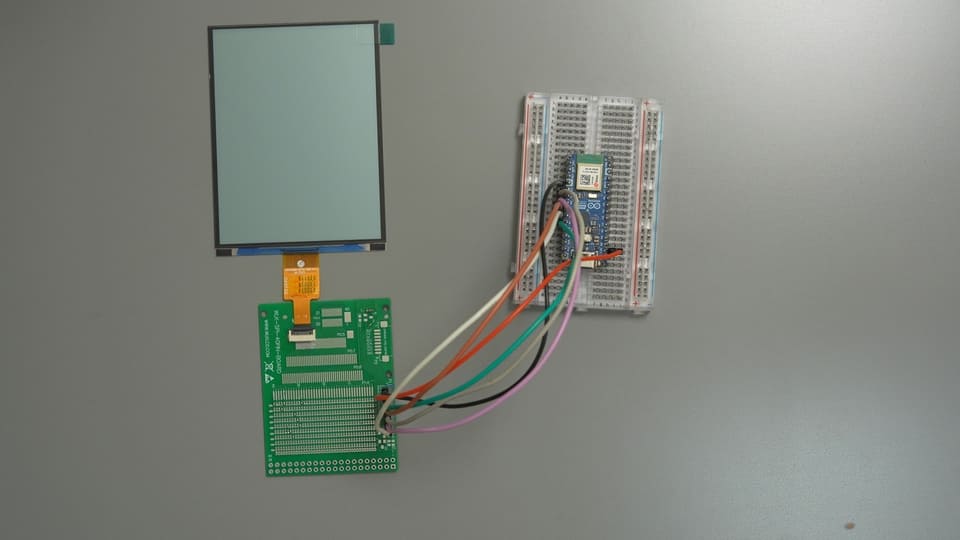
Arduino Nano ESP32                         ST7305 螢幕轉接板
┌──────────────────┐                     ┌──────────────────┐
│ D7  / GPIO10     │ ───── SCLK ───────► │ SCL              │
│ D5  / GPIO8      │ ───── MOSI ───────► │ SDA              │
│ D6  / GPIO9      │ ───── CS ─────────► │ CS               │
│ D4  / GPIO7      │ ───── DC ─────────► │ DC               │
│ D3  / GPIO6      │ ───── RESET ──────► │ RES              │
│ 3V3              │ ───── 3.3V ───────► │ VCC / VCI        │
│ GND              │ ───── 共地 ───────► │ GND              │
└──────────────────┘ └──────────────────┘| 轉接板絲印 | 螢幕 FPC | Nano ESP32 絲印 | ESP32-S3 GPIO | 用途 |
|---|---|---|---|---|
| SCL | PIN9 | D7 | GPIO10 | SPI 時脈 |
| SDA | PIN10 | D5 | GPIO8 | SPI MOSI |
| CS | PIN8 | D6 | GPIO9 | 片選 |
| DC | PIN7 | D4 | GPIO7 | 命令/資料選擇 |
| RES | PIN11 | D3 | GPIO6 | 硬體復位 |
| VCC/VCI | PIN4 | 3V3 | 3.3V 電源 | 螢幕供電 |
| GND | PIN1/5/12 | GND | GND | 共地 |
| TE | PIN6 | 不接 | — | 本例未使用幀同步 |
| BLC | — | 不接 | — | 全反射屏無背光 |
本例 VCI 接 3.3V,不要接 5V、VBUS 或 VIN。
不用額外驅動電路,ESP32-S3 可以直接連接螢幕 FPC
這塊屏在 3.3V 供電下,可以由 ESP32-S3 的 GPIO 直接驅動:FPC 上的 SCL、SDA、CS、DC、RESET 分別連接對應 GPIO,VCI 接 3.3V,GND 共地即可。中間不需要增加電平轉換晶片、專用顯示驅動板或其他周邊功能電路。
這裡的「直接連接」說的是電氣連接,不是把柔軟的裸排線直接插進開發板排針。實際製作時,仍需使用 12Pin FPC 連接器、焊接座或轉接板,把排線觸點可靠地引出來。本文使用轉接板只是為了方便接杜邦線,它承擔機械轉接作用,並不是螢幕工作所必需的驅動電路。如果直接從 FPC 連接器引線,按照上表中的 FPC PIN 編號連接即可,訊號關係完全相同。
接線最容易翻車的一點是:程式碼裡填的是晶片 GPIO 編號,不是開發板絲印中的數字。本例 D5 = GPIO8,而 GPIO11 = A4。如果把 MOSI 錯配到 GPIO11,程式照樣運行、序列埠照樣列印,螢幕卻會安靜得像沒交電費。
建議接完後按「電源 → 共地 → SCLK → MOSI → CS → DC → RESET」的順序逐一核對,能省 80% 排錯時間。FPC 還要確認插入方向、完全到底並鎖緊,鬆一格都可能讓整屏罷工。
需要安裝的函式庫:只裝 ESP32 開發板支援包
這份 ST7305 Arduino 示例不依賴 U8g2、Adafruit GFX、TFT_eSPI 或額外字體函式庫。驅動、5×7 ASCII 字庫、圖形基元和 15 個頁面都在一個 .ino 檔案裡。
第一步:安裝 Arduino IDE
本文使用 Arduino IDE 2.3.8,可從 Arduino 官方網站下載安裝。
第二步:安裝 ESP32 Arduino Core
打開開發板管理員,搜尋並安裝:
esp32 by Espressif Systems(本文測試版本 3.3.10)在開發板管理員中選擇與本文一致的版本,可以減少不同開發板支援包之間的 API 和預設配置差異。
第三步:選擇開發板與序列埠
開發板:Arduino Nano ESP32
埠口:選擇連接開發板後出現的對應埠口
序列埠監控視窗:115200
Arduino 標準 SPI、計時器和 esp_timer 都由開發板環境提供,不需要再去函式庫管理員裡「隨緣安裝幾個名字像的函式庫」。
補充:如果想使用現成函式庫,有哪些選擇?
本教學採用單檔驅動,是為了讓初始化、幀緩存和像素映射都能直接查看;並不是說 ST7305 不能使用函式庫。若要在本專案基礎上二次開發,可以按需求考慮以下方案:
| 方案 | 適合場景 | 使用時的注意事項 |
|---|---|---|
| U8g2 v2.36 及以上 | 文字、基礎圖形和豐富字體 | 已提供 U8G2_ST7305_300X400_1_4W_HW_SPI,支援本例解析度的四線硬體 SPI;安裝時確認函式庫版本,並把 CS、DC、RESET 及 SPI 腳位改為本文使用的 GPIO |
| ST7305_MonoTFT_Arduino_Library | 想直接使用專門的 ST7305 Arduino 驅動 | 提供 ST7305_4p2_BW_DisplayDriver 等封裝;需核對解析度、初始化序列及 DisplayConfig.h 腳位配置,本文尚未在該模組上實測 |
| LVGL + ST7305 底層驅動 | 複雜介面、控制項和頁面管理 | LVGL 負責 UI,並不替代 ST7305 驅動;需要把本文驅動或廠商驅動接入顯示刷新回呼,同時評估幀緩存佔用和實際刷新效果 |
不要預設 Adafruit GFX、TFT_eSPI、Arduino_GFX 等通用圖形函式庫安裝後就能直接驅動 ST7305;應先確認目前版本是否明確支援這個控制器,否則仍需自行適配。即使換函式庫,3.3V 供電、四線 SPI、HPM/LPM 和 2 行×4 列像素映射等硬體約束也不會消失。
**簡單選型建議:**主要顯示文字和基礎圖形,可優先嘗試 U8g2;想做複雜 UI,再考慮 LVGL;若希望完整掌控初始化、整幀發送和動畫節奏,本文的單檔方案更直觀。
完整程式碼:ST7305_RLCD_Demo 單檔 Arduino 程式
完整可燒錄原始碼:
/*
* ST7305 4.2 吋 300x400 全反射單色 LCD —— Arduino 單檔完整 Demo
*
* 與 ESP-IDF 版本功能一致:驅動 + 圖形基元 + 15 頁自動輪播演示。
* 整個程式只有這一個 .ino 檔案,不依賴任何第三方函式庫,方便直接傳播。
*
* 接線(Arduino Nano ESP32 絲印):
* SCLK = GPIO10 (D7) MOSI = GPIO8 (D5) CS = GPIO9 (D6)
* DC = GPIO7 (D4) RES = GPIO6 (D3) VCI = 3.3V GND = GND
*
* Arduino IDE 準備:
* 1. 開發板管理員安裝 "esp32 by Espressif Systems"
* 2. 開發板選擇 "Arduino Nano ESP32",選擇對應序列埠
* 3. 本檔案需放在同名資料夾中(IDE 打開 .ino 時會提示,點「確定」即可)
*/
#include <Arduino.h>
#include <SPI.h>
#include "esp_timer.h" /* esp_timer_get_time() */
#include <stdio.h>
#include <string.h>
#include <stdlib.h>
#include <stdint.h>
/* ================= 使用者可改:腳位與 SPI 時脈 ================= */
#define PIN_SCLK 10
#define PIN_MOSI 8
#define PIN_CS 9
#define PIN_DC 7
#define PIN_RES 6
#define SPI_CLOCK_HZ 20000000UL /* 本例使用 20 MHz;花屏時先降至 8/5 MHz 排查 */
/* ================= ST7305 基本參數 ================= */
#define ST7305_LCD_WIDTH 300
#define ST7305_LCD_HEIGHT 400
#define ST7305_DATA_WIDTH 75 /* 每行 300/4 = 75 位元組 */
#define ST7305_BUFFER_LENGTH 15000 /* 75 * 200 */
#define ST7305_COLOR_WHITE 0x00
#define ST7305_COLOR_BLACK 0x01
#define LOGI(fmt, ...) Serial.printf("[st7305] " fmt "\r\n", ##__VA_ARGS__)
/* 驅動裝置(單實例,幀緩存 15000 位元組內嵌) */
typedef struct {
int gpio_dc;
int gpio_res;
int gpio_cs;
uint32_t clock_hz;
uint8_t rotation; /* 0=0° 1=90° 2=180° 3=270°(順時針) */
uint8_t buffer[ST7305_BUFFER_LENGTH];
} st7305_dev_t;
typedef st7305_dev_t *st7305_handle_t;
static st7305_dev_t lcd_dev; /* 全域唯一實例 */
static inline void dc_cmd(st7305_handle_t dev) { digitalWrite(dev->gpio_dc, LOW); }
static inline void dc_data(st7305_handle_t dev) { digitalWrite(dev->gpio_dc, HIGH); }
static void spi_write_byte(st7305_handle_t dev, uint8_t data)
{
SPI.beginTransaction(SPISettings(dev->clock_hz, MSBFIRST, SPI_MODE0));
digitalWrite(dev->gpio_cs, LOW);
SPI.transfer(data);
digitalWrite(dev->gpio_cs, HIGH);
SPI.endTransaction();
}
/* 寫暫存器(命令):DC=低 */
static void write_register(st7305_handle_t dev, uint8_t reg)
{
dc_cmd(dev);
spi_write_byte(dev, reg);
}
/* 寫參數(資料):DC=高 */
static void write_parameter(st7305_handle_t dev, uint8_t data)
{
dc_data(dev);
spi_write_byte(dev, data);
}
static void write_params(st7305_handle_t dev, uint8_t reg, const uint8_t *params, size_t len)
{
write_register(dev, reg);
for (size_t i = 0; i < len; i++) write_parameter(dev, params[i]);
}
/**
* ST7305 初始化序列:與廠商 HSD 4.2" 300x400 高掃描率初始化程式碼一致;
* MADCTL=0x48(MX=1, DO=1)、Sleep-out 延時 255ms、CASET 列窗口 0x12~0x2B。
*/
static void initial_st7305(st7305_handle_t dev)
{
/* 硬體復位 */
digitalWrite(dev->gpio_res, HIGH); delay(10);
digitalWrite(dev->gpio_res, LOW); delay(10);
digitalWrite(dev->gpio_res, HIGH); delay(10);
#define WR(reg, ...) do { \
const uint8_t p[] = {__VA_ARGS__}; \
write_params(dev, reg, p, sizeof(p)); \
} while (0)
WR(0xD6, 0x17, 0x02); /* NVM Load Control */
WR(0xD1, 0x01); /* Booster Enable */
WR(0xC0, 0x11, 0x04); /* Gate Voltage: VGH=16.5V, VGL=-7V */
WR(0xC1, 0x41, 0x41, 0x41, 0x41); /* VSHP 5.0V x4 */
WR(0xC2, 0x19, 0x19, 0x19, 0x19); /* VSLP 0.5V x4 */
WR(0xC4, 0x41, 0x41, 0x41, 0x41); /* VSHN -3.8V x4 */
WR(0xC5, 0x19, 0x19, 0x19, 0x19); /* VSLN 0.5V x4 */
WR(0xD8, 0xA6, 0xE9); /* OSC: HPM~51Hz / LPM~1Hz */
WR(0xB2, 0x05); /* Frame Rate: HPM=16Hz, LPM=8Hz */
WR(0xB3, 0xE5, 0xF6, 0x05, 0x46, 0x77, 0x77, 0x77, 0x77, 0x76, 0x45); /* Gate EQ HPM */
WR(0xB4, 0x05, 0x46, 0x77, 0x77, 0x77, 0x77, 0x76, 0x45); /* Gate EQ LPM */
WR(0x62, 0x32, 0x03, 0x1F); /* Gate Timing Control */
WR(0xB7, 0x13); /* Source EQ Enable */
WR(0xB0, 0x64); /* Gate Line: 400 行(需 Sleep-out 前設定) */
write_register(dev, 0x11); /* Sleep out */
delay(255);
WR(0xC9, 0x00); /* Source Voltage Select: 第 1 組 */
WR(0x36, 0x48); /* MADCTL: MX=1, DO=1 */
WR(0x3A, 0x11); /* Data Format: 3-write 24-bit */
WR(0xB9, 0x20); /* Mono 模式(廠商遺留) */
WR(0xB8, 0x29); /* Panel: 1-dot 驅動極性反轉 + Frame 掃描 */
write_register(dev, 0x21); /* Inverse ON */
/* WRITE RAM 300*400 位址窗口 */
WR(0x2A, 0x12, 0x2B); /* CASET */
WR(0x2B, 0x00, 0xC7); /* RASET 0~199 */
WR(0x35, 0x00); /* TE ON(V-Blank) */
WR(0xD0, 0xFF); /* Auto power down */
write_register(dev, 0x39); /* LPM */
write_register(dev, 0x29); /* DISPLAY ON */
#undef WR
}
st7305_handle_t st7305_init(int gpio_dc, int gpio_res, int gpio_cs,
int gpio_sclk, int gpio_mosi, uint32_t clock_hz)
{
st7305_handle_t dev = &lcd_dev;
dev->gpio_dc = gpio_dc;
dev->gpio_res = gpio_res;
dev->gpio_cs = gpio_cs;
dev->clock_hz = clock_hz;
dev->rotation = 0;
pinMode(gpio_dc, OUTPUT);
pinMode(gpio_res, OUTPUT);
pinMode(gpio_cs, OUTPUT);
digitalWrite(gpio_cs, HIGH);
digitalWrite(gpio_res, HIGH);
/* 只有 MOSI,無 MISO;CS 由軟體手動控制 */
SPI.begin(gpio_sclk, -1, gpio_mosi, -1);
initial_st7305(dev);
memset(dev->buffer, 0, ST7305_BUFFER_LENGTH);
LOGI("ST7305 init OK (%dx%d)", ST7305_LCD_WIDTH, ST7305_LCD_HEIGHT);
return dev;
}
/** 幀緩存填充(0x00 全白 / 0xFF 全黑) */
void st7305_fill(st7305_handle_t dev, uint8_t data)
{
memset(dev->buffer, data, ST7305_BUFFER_LENGTH);
}
/** 清空幀緩存(全白) */
void st7305_clear(st7305_handle_t dev)
{
st7305_fill(dev, 0x00);
}
/**
* 設定顯示方向:0=0°,1=順時針 90°,2=180°,3=順時針 270°。
* 旋轉由幀緩存座標映射實現;90°/270° 時邏輯解析度為 400x300。
* 只影響後續繪製,不會清空幀緩存或立即刷新螢幕。
*/
void st7305_set_rotation(st7305_handle_t dev, uint8_t rotation)
{
if (rotation <= 3) dev->rotation = rotation;
}
/** 取得目前方向(0~3) */
uint8_t st7305_get_rotation(st7305_handle_t dev)
{
return dev->rotation;
}
/** 取得目前方向的邏輯寬度/高度 */
int st7305_get_width(st7305_handle_t dev)
{
return (dev->rotation & 1) ? ST7305_LCD_HEIGHT : ST7305_LCD_WIDTH;
}
int st7305_get_height(st7305_handle_t dev)
{
return (dev->rotation & 1) ? ST7305_LCD_WIDTH : ST7305_LCD_HEIGHT;
}
/**
* 邏輯像素先按顯示方向映射到 300x400 實體座標,再寫入幀緩存:
* 一個位元組 8 bit 對應 2 行 x 4 列像素:
* 行0: BIT7 BIT5 BIT3 BIT1 (偶 bit -> 下一行)
* 行1: BIT6 BIT4 BIT2 BIT0
* 1 = 黑,0 = 白
*/
void st7305_write_point(st7305_handle_t dev, int x, int y, uint16_t color)
{
int logical_width = (dev->rotation & 1) ? ST7305_LCD_HEIGHT : ST7305_LCD_WIDTH;
int logical_height = (dev->rotation & 1) ? ST7305_LCD_WIDTH : ST7305_LCD_HEIGHT;
if (x < 0 || y < 0 || x >= logical_width || y >= logical_height) return;
int physical_x;
int physical_y;
switch (dev->rotation) {
case 1: /* 順時針 90°,邏輯 400x300 */
physical_x = ST7305_LCD_WIDTH - 1 - y;
physical_y = x;
break;
case 2: /* 180°,邏輯 300x400 */
physical_x = ST7305_LCD_WIDTH - 1 - x;
physical_y = ST7305_LCD_HEIGHT - 1 - y;
break;
case 3: /* 順時針 270°,邏輯 400x300 */
physical_x = y;
physical_y = ST7305_LCD_HEIGHT - 1 - x;
break;
default: /* 0°,邏輯 300x400 */
physical_x = x;
physical_y = y;
break;
}
int real_x = physical_x / 4;
int real_y = physical_y / 2;
int index = real_y * ST7305_DATA_WIDTH + real_x;
int one_two = physical_y % 2; /* 0 或 1 */
int line_bit_4 = physical_x % 4; /* 0~3 */
int bit = 7 - (line_bit_4 * 2 + one_two);
if (color) dev->buffer[index] |= (1 << bit);
else dev->buffer[index] &= ~(1 << bit);
}
/** 設定位址窗口並發起 RAMWR */
static void set_address_window(st7305_handle_t dev)
{
write_params(dev, 0x2A, (uint8_t[]){0x12, 0x2A}, 2); /* CASET 0x12~0x2A */
write_params(dev, 0x2B, (uint8_t[]){0x00, 0xC7}, 2); /* RASET 0~199 */
write_register(dev, 0x2C); /* RAMWR */
}
/** 整幀刷新:把 15000 位元組幀緩存推送到螢幕 */
void st7305_display(st7305_handle_t dev)
{
set_address_window(dev);
dc_data(dev);
SPI.beginTransaction(SPISettings(dev->clock_hz, MSBFIRST, SPI_MODE0));
digitalWrite(dev->gpio_cs, LOW);
SPI.writeBytes(dev->buffer, ST7305_BUFFER_LENGTH);
digitalWrite(dev->gpio_cs, HIGH);
SPI.endTransaction();
}
/** 進入低功耗模式 LPM(0x39),省電,幀率由 B2h 決定 */
void st7305_low_power_mode(st7305_handle_t dev)
{
write_register(dev, 0x39);
}
/** 進入高功耗模式 HPM(0x38),動態畫面用,16/32Hz */
void st7305_high_power_mode(st7305_handle_t dev)
{
write_register(dev, 0x38);
}
/** 顯示開/關(0x29 / 0x28) */
void st7305_display_on(st7305_handle_t dev, bool enabled)
{
write_register(dev, enabled ? 0x29 : 0x28);
}
/** 反顯開/關(0x21 / 0x20);常白屏顯示黑色需要反顯開 */
void st7305_display_inversion(st7305_handle_t dev, bool enabled)
{
write_register(dev, enabled ? 0x21 : 0x20);
}
/** 取得幀緩存指標(進階用法,可直接操作點陣圖資料) */
uint8_t *st7305_get_buffer(st7305_handle_t dev)
{
return dev->buffer;
}
/* ================= 圖形基元(移植自 ST73XX_UI) ================= */
#define SWAP_INT(a, b) do { int _t = (a); (a) = (b); (b) = _t; } while (0)
void ui_draw_fast_hline(st7305_handle_t dev, int x, int y, int len, uint16_t color)
{
for (int i = 0; i < len; i++) st7305_write_point(dev, x + i, y, color);
}
void ui_draw_fast_vline(st7305_handle_t dev, int x, int y, int len, uint16_t color)
{
for (int i = 0; i < len; i++) st7305_write_point(dev, x, y + i, color);
}
void ui_draw_line(st7305_handle_t dev, int x1, int y1, int x2, int y2, uint16_t color)
{
int dx = abs(x2 - x1), sx = x1 < x2 ? 1 : -1;
int dy = -abs(y2 - y1), sy = y1 < y2 ? 1 : -1;
int err = dx + dy, e2;
while (1) {
st7305_write_point(dev, x1, y1, color);
if (x1 == x2 && y1 == y2) break;
e2 = 2 * err;
if (e2 >= dy) { err += dy; x1 += sx; }
if (e2 <= dx) { err += dx; y1 += sy; }
}
}
void ui_draw_triangle(st7305_handle_t dev, int x1, int y1, int x2, int y2,
int x3, int y3, uint16_t color)
{
ui_draw_line(dev, x1, y1, x2, y2, color);
ui_draw_line(dev, x2, y2, x3, y3, color);
ui_draw_line(dev, x3, y3, x1, y1, color);
}
void ui_draw_filled_triangle(st7305_handle_t dev, int x0, int y0, int x1, int y1,
int x2, int y2, uint16_t color)
{
if (y0 > y1) { SWAP_INT(y0, y1); SWAP_INT(x0, x1); }
if (y1 > y2) { SWAP_INT(y1, y2); SWAP_INT(x1, x2); }
if (y0 > y1) { SWAP_INT(y0, y1); SWAP_INT(x0, x1); }
if (y0 == y2) { /* 平底 */
int xs = x0, xe = x0;
if (x1 < xs) xs = x1;
if (x1 > xe) xe = x1;
if (x2 < xs) xs = x2;
if (x2 > xe) xe = x2;
ui_draw_fast_hline(dev, xs, y0, xe - xs + 1, color);
return;
}
int total = y2 - y0;
for (int i = 0; i <= total; i++) {
int y = y0 + i;
int second_half = (i > y1 - y0) || (y1 == y0);
int seg = second_half ? (y2 - y1) : (y1 - y0);
if (seg == 0) continue;
int ax = x0 + (int)((x2 - x0) * (int64_t)i / total);
int bx = second_half ? x1 + (int)((x2 - x1) * (int64_t)(i - (y1 - y0)) / seg)
: x0 + (int)((x1 - x0) * (int64_t)i / seg);
if (ax > bx) SWAP_INT(ax, bx);
ui_draw_fast_hline(dev, ax, y, bx - ax + 1, color);
}
}
void ui_draw_rectangle(st7305_handle_t dev, int x1, int y1, int x2, int y2, uint16_t color)
{
if (x1 > x2) SWAP_INT(x1, x2);
if (y1 > y2) SWAP_INT(y1, y2);
ui_draw_fast_hline(dev, x1, y1, x2 - x1 + 1, color);
ui_draw_fast_hline(dev, x1, y2, x2 - x1 + 1, color);
ui_draw_fast_vline(dev, x1, y1, y2 - y1 + 1, color);
ui_draw_fast_vline(dev, x2, y1, y2 - y1 + 1, color);
}
void ui_draw_filled_rectangle(st7305_handle_t dev, int x1, int y1, int x2, int y2, uint16_t color)
{
if (x1 > x2) SWAP_INT(x1, x2);
if (y1 > y2) SWAP_INT(y1, y2);
for (int y = y1; y <= y2; y++) {
ui_draw_fast_hline(dev, x1, y, x2 - x1 + 1, color);
}
}
void ui_draw_circle(st7305_handle_t dev, int xc, int yc, int r, uint16_t color)
{
int x = 0, y = r, d = 3 - 2 * r;
while (x <= y) {
st7305_write_point(dev, xc + x, yc + y, color);
st7305_write_point(dev, xc - x, yc + y, color);
st7305_write_point(dev, xc + x, yc - y, color);
st7305_write_point(dev, xc - x, yc - y, color);
st7305_write_point(dev, xc + y, yc + x, color);
st7305_write_point(dev, xc - y, yc + x, color);
st7305_write_point(dev, xc + y, yc - x, color);
st7305_write_point(dev, xc - y, yc - x, color);
if (d < 0) {
d += 4 * x + 6;
} else {
d += 4 * (x - y) + 10;
y--;
}
x++;
}
}
static int int_sqrt(int x)
{
int r = 0;
while ((r + 1) * (r + 1) <= x) r++;
return r;
}
void ui_draw_filled_circle(st7305_handle_t dev, int xc, int yc, int r, uint16_t color)
{
for (int y = -r; y <= r; y++) {
int w = int_sqrt(r * r - y * y);
ui_draw_fast_hline(dev, xc - w, yc + y, 2 * w + 1, color);
}
}
void ui_draw_polygon(st7305_handle_t dev, const int *points, int n, uint16_t color)
{
if (n < 3) return;
for (int i = 0; i < n; i++) {
int x1 = points[2 * i], y1 = points[2 * i + 1];
int x2 = points[2 * ((i + 1) % n)], y2 = points[2 * ((i + 1) % n) + 1];
ui_draw_line(dev, x1, y1, x2, y2, color);
}
}
void ui_draw_filled_polygon(st7305_handle_t dev, const int *points, int n, uint16_t color)
{
if (n < 3) return;
int min_y = points[1], max_y = points[1];
for (int i = 1; i < n; i++) {
if (points[2 * i + 1] < min_y) min_y = points[2 * i + 1];
if (points[2 * i + 1] > max_y) max_y = points[2 * i + 1];
}
int *xs = (int *)malloc(n * sizeof(int));
if (!xs) return;
/* 掃描線填充 */
for (int y = min_y; y <= max_y; y++) {
int cnt = 0;
for (int i = 0, j = n - 1; i < n; j = i++) {
int yi = points[2 * i + 1], yj = points[2 * j + 1];
int xi = points[2 * i], xj = points[2 * j];
if ((yi < y && yj >= y) || (yj < y && yi >= y)) {
xs[cnt++] = xi + (int)((int64_t)(y - yi) * (xj - xi) / (yj - yi));
}
}
/* 插入排序 */
for (int i = 1; i < cnt; i++) {
int key = xs[i], k = i - 1;
while (k >= 0 && xs[k] > key) { xs[k + 1] = xs[k]; k--; }
xs[k + 1] = key;
}
for (int i = 0; i + 1 < cnt; i += 2) {
ui_draw_fast_hline(dev, xs[i], y, xs[i + 1] - xs[i] + 1, color);
}
}
free(xs);
}
/* ================= Demo:15 頁自動輪播 =================
* 文字、有序抖動灰階、測試圖案、效能基準、UI 樣張和小動畫。
* 無外部字體與素材。 */
#define W ST7305_LCD_WIDTH
#define H ST7305_LCD_HEIGHT
#define BLACK ST7305_COLOR_BLACK
#define WHITE ST7305_COLOR_WHITE
#define ARRAY_LEN(a) ((int)(sizeof(a) / sizeof((a)[0])))
/* 經典 5x7 ASCII 字體,列編碼,最低位在上。 */
static const uint8_t font5x7[96][5] = {
{0x00,0x00,0x00,0x00,0x00},{0x00,0x00,0x5f,0x00,0x00},
{0x00,0x07,0x00,0x07,0x00},{0x14,0x7f,0x14,0x7f,0x14},
{0x24,0x2a,0x7f,0x2a,0x12},{0x23,0x13,0x08,0x64,0x62},
{0x36,0x49,0x55,0x22,0x50},{0x00,0x05,0x03,0x00,0x00},
{0x00,0x1c,0x22,0x41,0x00},{0x00,0x41,0x22,0x1c,0x00},
{0x14,0x08,0x3e,0x08,0x14},{0x08,0x08,0x3e,0x08,0x08},
{0x00,0x50,0x30,0x00,0x00},{0x08,0x08,0x08,0x08,0x08},
{0x00,0x60,0x60,0x00,0x00},{0x20,0x10,0x08,0x04,0x02},
{0x3e,0x51,0x49,0x45,0x3e},{0x00,0x42,0x7f,0x40,0x00},
{0x42,0x61,0x51,0x49,0x46},{0x21,0x41,0x45,0x4b,0x31},
{0x18,0x14,0x12,0x7f,0x10},{0x27,0x45,0x45,0x45,0x39},
{0x3c,0x4a,0x49,0x49,0x30},{0x01,0x71,0x09,0x05,0x03},
{0x36,0x49,0x49,0x49,0x36},{0x06,0x49,0x49,0x29,0x1e},
{0x00,0x36,0x36,0x00,0x00},{0x00,0x56,0x36,0x00,0x00},
{0x08,0x14,0x22,0x41,0x00},{0x14,0x14,0x14,0x14,0x14},
{0x00,0x41,0x22,0x14,0x08},{0x02,0x01,0x51,0x09,0x06},
{0x32,0x49,0x79,0x41,0x3e},{0x7e,0x11,0x11,0x11,0x7e},
{0x7f,0x49,0x49,0x49,0x36},{0x3e,0x41,0x41,0x41,0x22},
{0x7f,0x41,0x41,0x22,0x1c},{0x7f,0x49,0x49,0x49,0x41},
{0x7f,0x09,0x09,0x09,0x01},{0x3e,0x41,0x49,0x49,0x7a},
{0x7f,0x08,0x08,0x08,0x7f},{0x00,0x41,0x7f,0x41,0x00},
{0x20,0x40,0x41,0x3f,0x01},{0x7f,0x08,0x14,0x22,0x41},
{0x7f,0x40,0x40,0x40,0x40},{0x7f,0x02,0x0c,0x02,0x7f},
{0x7f,0x04,0x08,0x10,0x7f},{0x3e,0x41,0x41,0x41,0x3e},
{0x7f,0x09,0x09,0x09,0x06},{0x3e,0x41,0x51,0x21,0x5e},
{0x7f,0x09,0x19,0x29,0x46},{0x46,0x49,0x49,0x49,0x31},
{0x01,0x01,0x7f,0x01,0x01},{0x3f,0x40,0x40,0x40,0x3f},
{0x1f,0x20,0x40,0x20,0x1f},{0x3f,0x40,0x38,0x40,0x3f},
{0x63,0x14,0x08,0x14,0x63},{0x07,0x08,0x70,0x08,0x07},
{0x61,0x51,0x49,0x45,0x43},{0x00,0x7f,0x41,0x41,0x00},
{0x02,0x04,0x08,0x10,0x20},{0x00,0x41,0x41,0x7f,0x00},
{0x04,0x02,0x01,0x02,0x04},{0x40,0x40,0x40,0x40,0x40},
{0x00,0x01,0x02,0x04,0x00},{0x20,0x54,0x54,0x54,0x78},
{0x7f,0x48,0x44,0x44,0x38},{0x38,0x44,0x44,0x44,0x20},
{0x38,0x44,0x44,0x48,0x7f},{0x38,0x54,0x54,0x54,0x18},
{0x08,0x7e,0x09,0x01,0x02},{0x0c,0x52,0x52,0x52,0x3e},
{0x7f,0x08,0x04,0x04,0x78},{0x00,0x44,0x7d,0x40,0x00},
{0x20,0x40,0x44,0x3d,0x00},{0x7f,0x10,0x28,0x44,0x00},
{0x00,0x41,0x7f,0x40,0x00},{0x7c,0x04,0x18,0x04,0x78},
{0x7c,0x08,0x04,0x04,0x78},{0x38,0x44,0x44,0x44,0x38},
{0x7c,0x14,0x14,0x14,0x08},{0x08,0x14,0x14,0x18,0x7c},
{0x7c,0x08,0x04,0x04,0x08},{0x48,0x54,0x54,0x54,0x20},
{0x04,0x3f,0x44,0x40,0x20},{0x3c,0x40,0x40,0x20,0x7c},
{0x1c,0x20,0x40,0x20,0x1c},{0x3c,0x40,0x30,0x40,0x3c},
{0x44,0x28,0x10,0x28,0x44},{0x0c,0x50,0x50,0x50,0x3c},
{0x44,0x64,0x54,0x4c,0x44},{0x00,0x08,0x36,0x41,0x00},
{0x00,0x00,0x7f,0x00,0x00},{0x00,0x41,0x36,0x08,0x00},
{0x08,0x04,0x08,0x10,0x08},{0x00,0x00,0x00,0x00,0x00}
};
static const uint8_t bayer4[4][4] = {
{0, 8, 2, 10}, {12, 4, 14, 6}, {3, 11, 1, 9}, {15, 7, 13, 5}
};
static void text_char(st7305_handle_t d, int x, int y, char c, int scale, uint16_t color)
{
if ((unsigned char)c < 32 || (unsigned char)c > 127) c = '?';
const uint8_t *glyph = font5x7[(unsigned char)c - 32];
for (int col = 0; col < 5; col++) {
for (int row = 0; row < 7; row++) {
if (glyph[col] & (1U << row)) {
if (scale == 1) st7305_write_point(d, x + col, y + row, color);
else ui_draw_filled_rectangle(d, x + col * scale, y + row * scale,
x + (col + 1) * scale - 1, y + (row + 1) * scale - 1, color);
}
}
}
}
static void text(st7305_handle_t d, int x, int y, const char *s, int scale, uint16_t color)
{
while (*s) {
text_char(d, x, y, *s++, scale, color);
x += 6 * scale;
}
}
static int text_width(const char *s, int scale)
{
int n = (int)strlen(s);
return n ? (n * 6 - 1) * scale : 0;
}
static void text_center(st7305_handle_t d, int y, const char *s, int scale, uint16_t color)
{
text(d, (W - text_width(s, scale)) / 2, y, s, scale, color);
}
static void gray_rect(st7305_handle_t d, int x0, int y0, int x1, int y1, int level)
{
if (x0 > x1) { int t = x0; x0 = x1; x1 = t; }
if (y0 > y1) { int t = y0; y0 = y1; y1 = t; }
if (level <= 0) return;
if (level >= 16) {
ui_draw_filled_rectangle(d, x0, y0, x1, y1, BLACK);
return;
}
for (int y = y0; y <= y1; y++) {
for (int x = x0; x <= x1; x++) {
if (level > bayer4[y & 3][x & 3]) st7305_write_point(d, x, y, BLACK);
}
}
}
static void gray_circle(st7305_handle_t d, int cx, int cy, int r, int level)
{
for (int y = -r; y <= r; y++) {
for (int x = -r; x <= r; x++) {
if (x * x + y * y <= r * r && level > bayer4[(cy + y) & 3][(cx + x) & 3]) {
st7305_write_point(d, cx + x, cy + y, BLACK);
}
}
}
}
static void hline(st7305_handle_t d, int x0, int x1, int y, uint16_t color)
{
ui_draw_fast_hline(d, x0, y, x1 - x0 + 1, color);
}
static void vline(st7305_handle_t d, int x, int y0, int y1, uint16_t color)
{
ui_draw_fast_vline(d, x, y0, y1 - y0 + 1, color);
}
static void chrome(st7305_handle_t d, int page, const char *title, const char *subtitle)
{
char buf[24];
ui_draw_filled_rectangle(d, 0, 0, W - 1, 31, BLACK);
text(d, 8, 8, title, 2, WHITE);
snprintf(buf, sizeof(buf), "%02d/15", page + 1);
text(d, 251, 11, buf, 1, WHITE);
text(d, 8, 39, subtitle, 1, BLACK);
hline(d, 0, W - 1, 51, BLACK);
hline(d, 8, W - 9, 376, BLACK);
text(d, 8, 384, "ST7305 RLCD TEST SUITE", 1, BLACK);
for (int i = 0; i < 15; i++) {
int x = 210 + i * 6;
if (i == page) ui_draw_filled_rectangle(d, x, 385, x + 3, 391, BLACK);
else ui_draw_rectangle(d, x, 385, x + 3, 391, BLACK);
}
}
static uint32_t rng_state = 0x7305u;
static uint32_t demo_rand(void)
{
rng_state ^= rng_state << 13;
rng_state ^= rng_state >> 17;
rng_state ^= rng_state << 5;
return rng_state;
}
static int wave(int tick, int period)
{
int p = tick % (period * 2);
return p < period ? p : period * 2 - p;
}
static void page_hello(st7305_handle_t d, int frame, int64_t elapsed)
{
(void)frame; (void)elapsed;
gray_rect(d, 0, 0, W - 1, H - 1, 2);
ui_draw_filled_rectangle(d, 12, 12, 287, 387, WHITE);
ui_draw_rectangle(d, 12, 12, 287, 387, BLACK);
ui_draw_rectangle(d, 16, 16, 283, 383, BLACK);
text_center(d, 54, "ST7305 / RLCD", 2, BLACK);
hline(d, 42, 258, 82, BLACK);
text_center(d, 112, "HELLO", 7, BLACK);
text_center(d, 174, "WORLD!", 7, BLACK);
text_center(d, 247, "300 x 400 MONOCHROME", 2, BLACK);
text_center(d, 278, "15 PAGES / AUTO CAROUSEL", 1, BLACK);
gray_circle(d, 150, 330, 28, 5);
ui_draw_circle(d, 150, 330, 29, BLACK);
ui_draw_filled_circle(d, 140, 321, 3, BLACK);
ui_draw_filled_circle(d, 160, 321, 3, BLACK);
ui_draw_line(d, 136, 338, 142, 343, BLACK);
ui_draw_line(d, 142, 343, 158, 343, BLACK);
ui_draw_line(d, 158, 343, 164, 338, BLACK);
}
static void page_gray(st7305_handle_t d, int frame, int64_t elapsed)
{
(void)frame; (void)elapsed;
chrome(d, 1, "DITHER GRAY", "17 LEVELS / STATIC 4x4 BAYER MATRIX");
for (int i = 0; i < 17; i++) {
int x = 14 + i * 16;
gray_rect(d, x, 72, x + 14, 128, i);
ui_draw_rectangle(d, x, 72, x + 14, 128, BLACK);
}
text(d, 14, 136, "0%", 1, BLACK);
text(d, 139, 136, "50", 1, BLACK);
text(d, 259, 136, "100%", 1, BLACK);
text(d, 14, 159, "GRADIENT", 1, BLACK);
for (int y = 0; y < 36; y++) {
for (int x = 0; x < 272; x++) {
int level = x / 17;
if (level > bayer4[y & 3][x & 3]) st7305_write_point(d, 14 + x, 176 + y, BLACK);
}
}
ui_draw_rectangle(d, 13, 175, 286, 212, BLACK);
text(d, 14, 230, "DITHERED FILLS FOR UI DEPTH", 1, BLACK);
gray_circle(d, 58, 294, 39, 3);
gray_circle(d, 150, 294, 39, 7);
gray_circle(d, 242, 294, 39, 12);
ui_draw_circle(d, 58, 294, 40, BLACK);
ui_draw_circle(d, 150, 294, 40, BLACK);
ui_draw_circle(d, 242, 294, 40, BLACK);
text_center(d, 347, "NO GRAY PIXELS - JUST BLACK + WHITE", 1, BLACK);
}
static void page_geometry(st7305_handle_t d, int frame, int64_t elapsed)
{
(void)frame; (void)elapsed;
chrome(d, 2, "GEOMETRY", "LINES / CIRCLES / TRIANGLES / POLYGONS");
ui_draw_line(d, 12, 65, 285, 350, BLACK);
ui_draw_line(d, 285, 65, 12, 350, BLACK);
ui_draw_rectangle(d, 20, 75, 126, 164, BLACK);
gray_rect(d, 23, 78, 123, 161, 4);
ui_draw_filled_rectangle(d, 43, 97, 104, 139, BLACK);
ui_draw_circle(d, 213, 122, 48, BLACK);
ui_draw_circle(d, 213, 122, 38, BLACK);
gray_circle(d, 213, 122, 27, 8);
ui_draw_triangle(d, 24, 323, 87, 188, 143, 323, BLACK);
ui_draw_filled_triangle(d, 176, 310, 219, 212, 271, 310, BLACK);
const int p[] = {152,77, 168,95, 162,117, 143,117, 136,95};
ui_draw_filled_polygon(d, p, 5, BLACK);
text_center(d, 348, "BRESENHAM + SCANLINE FILL", 1, BLACK);
}
static void page_grid(st7305_handle_t d, int frame, int64_t elapsed)
{
(void)frame; (void)elapsed;
chrome(d, 3, "PIXEL GRID", "CHECK EDGES, ASPECT RATIO AND DIAGONALS");
ui_draw_rectangle(d, 0, 58, 299, 367, BLACK);
for (int x = 19; x < W; x += 20) gray_rect(d, x, 59, x, 366, 4);
for (int y = 78; y < 367; y += 20) gray_rect(d, 1, y, 298, y, 4);
ui_draw_line(d, 0, 58, 299, 367, BLACK);
ui_draw_line(d, 299, 58, 0, 367, BLACK);
ui_draw_circle(d, 150, 213, 100, BLACK);
ui_draw_rectangle(d, 50, 113, 250, 313, BLACK);
ui_draw_filled_rectangle(d, 0, 58, 5, 63, BLACK);
ui_draw_filled_rectangle(d, 294, 58, 299, 63, BLACK);
ui_draw_filled_rectangle(d, 0, 362, 5, 367, BLACK);
ui_draw_filled_rectangle(d, 294, 362, 299, 367, BLACK);
ui_draw_filled_rectangle(d, 145, 208, 155, 218, WHITE);
ui_draw_rectangle(d, 145, 208, 155, 218, BLACK);
}
static void page_text(st7305_handle_t d, int frame, int64_t elapsed)
{
(void)frame; (void)elapsed;
chrome(d, 4, "TEXT & FONT", "BUILT-IN 5x7 ASCII / INTEGER SCALING");
text_center(d, 69, "BIG TEXT 2X", 2, BLACK);
text_center(d, 96, "HUGE 4X", 4, BLACK);
hline(d, 18, 281, 135, BLACK);
text(d, 14, 148, "Regular: ABCDEFGHIJKLM", 1, BLACK);
text(d, 14, 162, " NOPQRSTUVWXYZ", 1, BLACK);
text(d, 14, 179, "Lower: abcdefghijklm", 1, BLACK);
text(d, 14, 193, " nopqrstuvwxyz", 1, BLACK);
text(d, 14, 214, "Digits: 0123456789", 2, BLACK);
text(d, 14, 241, "Symbols: !#$%&*+-/<=>?", 1, BLACK);
gray_rect(d, 14, 265, 285, 304, 12);
text_center(d, 273, "DITHERED TEXT PANEL", 2, BLACK);
ui_draw_filled_rectangle(d, 14, 318, 285, 348, BLACK);
text_center(d, 327, "REVERSED TEXT", 2, WHITE);
text_center(d, 359, "NO EXTERNAL FONT REQUIRED", 1, BLACK);
}
static void draw_toggle(st7305_handle_t d, int x, int y, bool on)
{
ui_draw_rectangle(d, x, y, x + 35, y + 16, BLACK);
if (on) {
ui_draw_filled_rectangle(d, x + 2, y + 2, x + 32, y + 14, BLACK);
ui_draw_filled_circle(d, x + 26, y + 8, 5, WHITE);
} else {
ui_draw_filled_circle(d, x + 9, y + 8, 5, BLACK);
}
}
static void page_ui(st7305_handle_t d, int frame, int64_t elapsed)
{
(void)elapsed;
chrome(d, 5, "DESKTOP UI", "DITHERED CARDS / GAUGES / LIVE WIDGETS");
gray_rect(d, 17, 67, 188, 191, 5);
ui_draw_filled_rectangle(d, 13, 63, 184, 187, WHITE);
ui_draw_rectangle(d, 13, 63, 184, 187, BLACK);
text(d, 23, 74, "ENVIRONMENT", 2, BLACK);
hline(d, 23, 174, 96, BLACK);
text(d, 23, 109, "23.6", 4, BLACK);
text(d, 107, 109, "C", 2, BLACK);
text(d, 23, 145, "HUMIDITY 48%", 1, BLACK);
text(d, 23, 161, "PRESSURE 1013", 1, BLACK);
gray_rect(d, 200, 67, 290, 191, 7);
ui_draw_filled_rectangle(d, 196, 63, 286, 187, WHITE);
ui_draw_rectangle(d, 196, 63, 286, 187, BLACK);
text(d, 207, 74, "POWER", 1, BLACK);
int battery = 20 + wave(frame, 40) * 70 / 40;
ui_draw_rectangle(d, 210, 99, 267, 121, BLACK);
ui_draw_filled_rectangle(d, 267, 104, 271, 116, BLACK);
ui_draw_filled_rectangle(d, 213, 102, 213 + battery * 50 / 100, 118, BLACK);
char buf[32];
snprintf(buf, sizeof(buf), "%d%%", battery);
text(d, 241 - text_width(buf, 2) / 2, 134, buf, 2, BLACK);
text(d, 207, 160, "SOLAR ON", 1, BLACK);
ui_draw_filled_rectangle(d, 13, 204, 286, 294, WHITE);
ui_draw_rectangle(d, 13, 204, 286, 294, BLACK);
text(d, 24, 216, "SYSTEM ACTIVITY", 1, BLACK);
for (int i = 0; i < 3; i++) {
int value = 12 + wave(frame + i * 17, 50) * 180 / 50;
text(d, 24, 240 + i * 16, i == 0 ? "CPU" : (i == 1 ? "MEM" : "SPI"), 1, BLACK);
gray_rect(d, 62, 240 + i * 16, 256, 248 + i * 16, 3);
ui_draw_filled_rectangle(d, 62, 240 + i * 16, 62 + value, 248 + i * 16, BLACK);
}
text(d, 22, 316, "WIFI", 1, BLACK);
draw_toggle(d, 63, 311, true);
text(d, 118, 316, "SYNC", 1, BLACK);
draw_toggle(d, 160, 311, (frame / 12) & 1);
text(d, 215, 316, "LIVE", 1, BLACK);
if ((frame / 4) & 1) ui_draw_filled_circle(d, 276, 319, 5, BLACK);
else ui_draw_circle(d, 276, 319, 5, BLACK);
text_center(d, 351, "A TINY REFLECTIVE DASHBOARD", 1, BLACK);
}
typedef struct {
uint32_t last_us;
uint32_t average_us;
uint16_t history[54];
int history_pos;
} perf_t;
static perf_t perf;
static void perf_record(uint32_t elapsed_us)
{
perf.last_us = elapsed_us;
perf.average_us = perf.average_us ? (perf.average_us * 7 + elapsed_us) / 8 : elapsed_us;
perf.history[perf.history_pos] = (uint16_t)(elapsed_us / 100);
perf.history_pos = (perf.history_pos + 1) % ARRAY_LEN(perf.history);
}
static void page_fps(st7305_handle_t d, int frame, int64_t elapsed)
{
chrome(d, 6, "FRAME RATE", "UNTHROTTLED FULL-FRAME DRAW + SPI BENCHMARK");
char buf[40];
uint32_t avg = perf.average_us ? perf.average_us : 1;
uint32_t fps10 = 10000000UL / avg;
snprintf(buf, sizeof(buf), "%lu.%lu FPS", (unsigned long)(fps10 / 10), (unsigned long)(fps10 % 10));
text_center(d, 66, buf, 4, BLACK);
snprintf(buf, sizeof(buf), "LAST %lu.%lu ms AVG %lu.%lu ms",
(unsigned long)(perf.last_us / 1000), (unsigned long)((perf.last_us % 1000) / 100),
(unsigned long)(avg / 1000), (unsigned long)((avg % 1000) / 100));
text_center(d, 108, buf, 1, BLACK);
text(d, 16, 132, "UPDATE TIME HISTORY", 1, BLACK);
ui_draw_rectangle(d, 15, 148, 285, 254, BLACK);
gray_rect(d, 16, 174, 284, 174, 3);
gray_rect(d, 16, 201, 284, 201, 3);
gray_rect(d, 16, 227, 284, 227, 3);
int previous_x = -1, previous_y = -1;
for (int i = 0; i < ARRAY_LEN(perf.history); i++) {
int index = (perf.history_pos + i) % ARRAY_LEN(perf.history);
int value = perf.history[index];
int y = 250 - value * 95 / 150;
if (y < 151) y = 151;
if (y > 250) y = 250;
int x = 20 + i * 5;
ui_draw_filled_circle(d, x, y, 1, BLACK);
if (previous_x >= 0) ui_draw_line(d, previous_x, previous_y, x, y, BLACK);
previous_x = x; previous_y = y;
}
snprintf(buf, sizeof(buf), "FRAME: %d", frame + 1);
text(d, 17, 271, buf, 1, BLACK);
text(d, 17, 291, "15000 BYTES PER UPDATE", 2, BLACK);
text(d, 17, 317, "SPI: 20 MHz PANEL: 16 Hz", 1, BLACK);
text(d, 17, 337, "CPU number is bus throughput,", 1, BLACK);
text(d, 17, 351, "not the optical panel limit.", 1, BLACK);
int scan = 20 + (frame * 7) % 260;
vline(d, scan, 149, 253, BLACK);
(void)elapsed;
}
static void page_patterns(st7305_handle_t d, int frame, int64_t elapsed)
{
(void)elapsed;
chrome(d, 7, "FINE PATTERNS", "1/2/4 PIXEL CHECKERS + LINE RESOLUTION");
int phase = frame & 1;
const int boxes[4][4] = {{12,66,146,184},{153,66,287,184},{12,194,146,332},{153,194,287,332}};
for (int b = 0; b < 4; b++) {
for (int y = boxes[b][1]; y <= boxes[b][3]; y++) {
for (int x = boxes[b][0]; x <= boxes[b][2]; x++) {
bool black = false;
if (b == 0) black = ((x ^ y) & 1) == phase;
if (b == 1) black = (((x / 2) ^ (y / 2)) & 1) == phase;
if (b == 2) black = (((x / 4) ^ (y / 4)) & 1) == phase;
if (b == 3) black = ((x + phase) % 4 == 0) || ((y + phase) % 4 == 0);
if (black) st7305_write_point(d, x, y, BLACK);
}
}
ui_draw_rectangle(d, boxes[b][0] - 1, boxes[b][1] - 1, boxes[b][2] + 1, boxes[b][3] + 1, BLACK);
}
text_center(d, 343, "CHECKER / 2PX / 4PX / GRID", 1, BLACK);
text_center(d, 358, phase ? "PHASE B - CHECK FOR FLICKER" : "PHASE A - CHECK FOR FLICKER", 1, BLACK);
}
static struct { int x, y, vx, vy, hits; } bounce;
static void page_bounce(st7305_handle_t d, int frame, int64_t elapsed)
{
(void)elapsed;
chrome(d, 8, "BOUNCE TEST", "MOVEMENT, COLLISIONS AND PANEL GHOSTING");
const int left = 10, right = 289, top = 65, bottom = 355;
ui_draw_rectangle(d, left, top, right, bottom, BLACK);
for (int y = top + 10; y < bottom; y += 20) gray_rect(d, left + 1, y, right - 1, y, 2);
if (frame > 0) {
bounce.x += bounce.vx;
bounce.y += bounce.vy;
if (bounce.x <= left + 2 || bounce.x + 91 >= right - 1) {
bounce.vx = -bounce.vx;
bounce.x += bounce.vx * 2;
bounce.hits++;
}
if (bounce.y <= top + 2 || bounce.y + 43 >= bottom - 1) {
bounce.vy = -bounce.vy;
bounce.y += bounce.vy * 2;
bounce.hits++;
}
}
gray_rect(d, bounce.x + 5, bounce.y + 5, bounce.x + 96, bounce.y + 48, 5);
ui_draw_filled_rectangle(d, bounce.x, bounce.y, bounce.x + 91, bounce.y + 43, WHITE);
ui_draw_rectangle(d, bounce.x, bounce.y, bounce.x + 91, bounce.y + 43, BLACK);
text(d, bounce.x + 9, bounce.y + 10, "RLCD", 3, BLACK);
char buf[24];
snprintf(buf, sizeof(buf), "WALL HITS: %d", bounce.hits);
text_center(d, 360, buf, 1, BLACK);
}
#define STAR_COUNT 56
static struct { int x, y, z; } stars[STAR_COUNT];
static void star_reset(int i, bool initial)
{
stars[i].x = (int)(demo_rand() % 401) - 200;
stars[i].y = (int)(demo_rand() % 401) - 200;
stars[i].z = initial ? 30 + (int)(demo_rand() % 220) : 250;
}
static void page_stars(st7305_handle_t d, int frame, int64_t elapsed)
{
(void)frame; (void)elapsed;
ui_draw_filled_rectangle(d, 0, 0, W - 1, H - 1, BLACK);
text(d, 10, 12, "STARFIELD", 2, WHITE);
text(d, 190, 17, "56 STARS / HPM", 1, WHITE);
hline(d, 10, 289, 38, WHITE);
for (int i = 0; i < STAR_COUNT; i++) {
int old_z = stars[i].z;
stars[i].z -= 7;
if (stars[i].z < 20) star_reset(i, false);
int z = stars[i].z;
int x = 150 + stars[i].x * 110 / z;
int y = 207 + stars[i].y * 110 / z;
int ox = 150 + stars[i].x * 110 / old_z;
int oy = 207 + stars[i].y * 110 / old_z;
if (x > 2 && x < 297 && y > 44 && y < 370) {
ui_draw_line(d, ox, oy, x, y, WHITE);
if (z < 80) ui_draw_filled_circle(d, x, y, 2, WHITE);
else st7305_write_point(d, x, y, WHITE);
}
}
hline(d, 10, 289, 377, WHITE);
text(d, 10, 385, "WARP THROUGH A MONOCHROME GALAXY", 1, WHITE);
}
#define LIFE_W 34
#define LIFE_H 34
static uint8_t life[LIFE_H][LIFE_W];
static uint8_t life_next[LIFE_H][LIFE_W];
static int generation;
static void life_seed(void)
{
memset(life, 0, sizeof(life));
rng_state = 0x42030040u;
for (int y = 2; y < LIFE_H - 2; y++) {
for (int x = 2; x < LIFE_W - 2; x++) life[y][x] = (demo_rand() % 100) < 28;
}
generation = 0;
}
static void life_step(void)
{
for (int y = 0; y < LIFE_H; y++) {
for (int x = 0; x < LIFE_W; x++) {
int neighbors = 0;
for (int dy = -1; dy <= 1; dy++) {
for (int dx = -1; dx <= 1; dx++) {
if (!dx && !dy) continue;
int yy = (y + dy + LIFE_H) % LIFE_H;
int xx = (x + dx + LIFE_W) % LIFE_W;
neighbors += life[yy][xx];
}
}
life_next[y][x] = neighbors == 3 || (neighbors == 2 && life[y][x]);
}
}
memcpy(life, life_next, sizeof(life));
generation++;
}
static void page_life(st7305_handle_t d, int frame, int64_t elapsed)
{
(void)elapsed;
chrome(d, 10, "GAME OF LIFE", "CONWAY CELLULAR AUTOMATON / TORUS WORLD");
if (frame > 0) life_step();
const int cell = 8, ox = 14, oy = 62;
gray_rect(d, ox - 3, oy - 3, ox + LIFE_W * cell + 1, oy + LIFE_H * cell + 1, 3);
ui_draw_rectangle(d, ox - 2, oy - 2, ox + LIFE_W * cell, oy + LIFE_H * cell, BLACK);
for (int y = 0; y < LIFE_H; y++) {
for (int x = 0; x < LIFE_W; x++) {
if (life[y][x]) ui_draw_filled_rectangle(d, ox + x * cell + 1, oy + y * cell + 1,
ox + x * cell + 6, oy + y * cell + 6, BLACK);
}
}
char buf[32];
snprintf(buf, sizeof(buf), "GENERATION %d", generation);
text_center(d, 352, buf, 1, BLACK);
}
static void page_clock(st7305_handle_t d, int frame, int64_t elapsed)
{
chrome(d, 11, "UPTIME CLOCK", "ESP-TIMER / NO RTC OR NETWORK REQUIRED");
int total = (int)(elapsed / 1000000);
int seconds = total % 60, minutes = (total / 60) % 60, hours = total / 3600;
int cx = 150, cy = 177, radius = 101;
ui_draw_circle(d, cx, cy, radius, BLACK);
ui_draw_circle(d, cx, cy, radius - 2, BLACK);
for (int i = 0; i < 60; i++) {
/* 順時針刻度查表,避免浮點與 libm。 */
static const int8_t sx[12] = {0,50,87,100,87,50,0,-50,-87,-100,-87,-50};
static const int8_t sy[12] = {-100,-87,-50,0,50,87,100,87,50,0,-50,-87};
if (i % 5 == 0) {
int k = i / 5;
int x = cx + sx[k] * 88 / 100, y = cy + sy[k] * 88 / 100;
ui_draw_filled_circle(d, x, y, 3, BLACK);
}
}
static const int8_t sec_x[12] = {0,50,87,100,87,50,0,-50,-87,-100,-87,-50};
static const int8_t sec_y[12] = {-100,-87,-50,0,50,87,100,87,50,0,-50,-87};
int sk = (seconds / 5) % 12;
ui_draw_line(d, cx, cy, cx + sec_x[sk] * 76 / 100, cy + sec_y[sk] * 76 / 100, BLACK);
int mk = (minutes / 5) % 12;
ui_draw_line(d, cx, cy, cx + sec_x[mk] * 53 / 100, cy + sec_y[mk] * 53 / 100, BLACK);
ui_draw_filled_circle(d, cx, cy, 5, BLACK);
char buf[32];
snprintf(buf, sizeof(buf), "%02d:%02d:%02d", hours, minutes, seconds);
text_center(d, 301, buf, 4, BLACK);
snprintf(buf, sizeof(buf), "RENDER FRAME %d", frame + 1);
text_center(d, 343, buf, 1, BLACK);
text_center(d, 359, "1-BIT DOES NOT MEAN BORING", 1, BLACK);
}
static void tiny_mac(st7305_handle_t d, int x, int y)
{
ui_draw_rectangle(d, x, y, x + 37, y + 47, BLACK);
ui_draw_filled_rectangle(d, x + 4, y + 4, x + 33, y + 31, BLACK);
ui_draw_filled_rectangle(d, x + 6, y + 6, x + 31, y + 29, WHITE);
ui_draw_filled_rectangle(d, x + 11, y + 12, x + 13, y + 15, BLACK);
ui_draw_filled_rectangle(d, x + 24, y + 12, x + 26, y + 15, BLACK);
ui_draw_line(d, x + 12, y + 23, x + 16, y + 25, BLACK);
ui_draw_line(d, x + 16, y + 25, x + 22, y + 25, BLACK);
ui_draw_line(d, x + 22, y + 25, x + 26, y + 23, BLACK);
ui_draw_filled_rectangle(d, x + 7, y + 38, x + 23, y + 41, BLACK);
}
static void page_retro(st7305_handle_t d, int frame, int64_t elapsed)
{
(void)frame; (void)elapsed;
gray_rect(d, 0, 0, W - 1, H - 1, 3);
ui_draw_filled_rectangle(d, 0, 0, W - 1, 21, WHITE);
hline(d, 0, W - 1, 22, BLACK);
text(d, 9, 7, "* File Edit View Special", 1, BLACK);
text(d, 258, 7, "12:00", 1, BLACK);
text(d, 181, 34, "RLCD OS", 2, BLACK);
text(d, 184, 55, "System 1.0", 1, BLACK);
tiny_mac(d, 228, 77);
gray_rect(d, 17, 39, 212, 278, 8);
ui_draw_filled_rectangle(d, 12, 34, 207, 273, WHITE);
ui_draw_rectangle(d, 12, 34, 207, 273, BLACK);
ui_draw_filled_rectangle(d, 13, 35, 206, 51, BLACK);
text(d, 54, 39, "CONTROL PANEL", 1, WHITE);
ui_draw_rectangle(d, 16, 38, 20, 47, WHITE);
text(d, 24, 65, "Desktop Pattern", 1, BLACK);
for (int y = 0; y < 36; y++) for (int x = 0; x < 56; x++) {
if (((x / 4) ^ (y / 4)) & 1) st7305_write_point(d, 25 + x, 82 + y, BLACK);
}
gray_rect(d, 94, 82, 177, 117, 6);
ui_draw_rectangle(d, 24, 81, 81, 118, BLACK);
ui_draw_rectangle(d, 93, 81, 178, 118, BLACK);
hline(d, 22, 196, 130, BLACK);
text(d, 24, 141, "Double-Click Speed", 1, BLACK);
for (int i = 0; i < 3; i++) {
ui_draw_rectangle(d, 26 + i * 51, 163, 37 + i * 51, 174, BLACK);
if (i == 1) ui_draw_filled_rectangle(d, 28 + i * 51, 165, 35 + i * 51, 172, BLACK);
}
text(d, 24, 190, "Key Repeat Rate", 1, BLACK);
gray_rect(d, 25, 211, 187, 218, 4);
ui_draw_filled_rectangle(d, 25, 211, 110, 218, BLACK);
ui_draw_rectangle(d, 25, 210, 188, 219, BLACK);
text(d, 24, 237, "Reflective. Silent. Timeless.", 1, BLACK);
ui_draw_filled_rectangle(d, 24, 294, 195, 353, WHITE);
ui_draw_rectangle(d, 24, 294, 195, 353, BLACK);
ui_draw_filled_rectangle(d, 25, 295, 194, 310, BLACK);
text(d, 65, 299, "HELLO, WORLD!", 1, WHITE);
text(d, 36, 322, "1 bit. Infinite ideas.", 1, BLACK);
text(d, 36, 338, "OK", 1, BLACK);
ui_draw_rectangle(d, 135, 324, 180, 344, BLACK);
text(d, 236, 348, "TRASH", 1, BLACK);
ui_draw_rectangle(d, 244, 305, 265, 337, BLACK);
hline(d, 240, 269, 302, BLACK);
vline(d, 250, 309, 333, BLACK);
vline(d, 258, 309, 333, BLACK);
}
static void page_inverse(st7305_handle_t d, int frame, int64_t elapsed)
{
(void)elapsed;
chrome(d, 13, "BLACK & WHITE", "POLARITY / CONTRAST / FULL-SCREEN INVERSION");
bool invert = (frame / 2) & 1;
if (!invert) {
ui_draw_filled_rectangle(d, 12, 66, 287, 346, BLACK);
text_center(d, 92, "BLACK", 6, WHITE);
text_center(d, 155, "ON", 4, WHITE);
text_center(d, 205, "WHITE", 6, WHITE);
ui_draw_filled_rectangle(d, 42, 276, 257, 324, WHITE);
text_center(d, 289, "REVERSED", 3, BLACK);
} else {
ui_draw_rectangle(d, 12, 66, 287, 346, BLACK);
text_center(d, 92, "WHITE", 6, BLACK);
text_center(d, 155, "ON", 4, BLACK);
text_center(d, 205, "BLACK", 6, BLACK);
ui_draw_filled_rectangle(d, 42, 276, 257, 324, BLACK);
text_center(d, 289, "REVERSED", 3, WHITE);
}
text_center(d, 357, invert ? "PHASE B" : "PHASE A", 1, BLACK);
}
static void page_rotation(st7305_handle_t d, int frame, int64_t elapsed)
{
(void)frame;
static const int angles[4] = {0, 90, 180, 270};
uint8_t rotation = (uint8_t)((elapsed / 3000000) & 3);
st7305_set_rotation(d, rotation);
int width = st7305_get_width(d);
int height = st7305_get_height(d);
int cx = width / 2;
int cy = height / 2 - 5;
char buf[40];
ui_draw_rectangle(d, 0, 0, width - 1, height - 1, BLACK);
ui_draw_filled_rectangle(d, 0, 0, width - 1, 39, BLACK);
snprintf(buf, sizeof(buf), "ROTATION %d DEG", angles[rotation]);
text(d, (width - text_width(buf, 2)) / 2, 11, buf, 2, WHITE);
snprintf(buf, sizeof(buf), "LOGICAL %d x %d / FRAMEBUFFER MAPPING", width, height);
text(d, (width - text_width(buf, 1)) / 2, 50, buf, 1, BLACK);
/* 不對稱箭頭 + 四角標記讓每個方向都無歧義。 */
ui_draw_circle(d, cx, cy, 43, BLACK);
ui_draw_line(d, cx, cy + 25, cx, cy - 28, BLACK);
ui_draw_line(d, cx, cy - 28, cx - 13, cy - 14, BLACK);
ui_draw_line(d, cx, cy - 28, cx + 13, cy - 14, BLACK);
text(d, cx - text_width("UP", 2) / 2, cy - 10, "UP", 2, BLACK);
snprintf(buf, sizeof(buf), "%d", angles[rotation]);
text(d, cx - text_width(buf, 6) / 2, cy + 57, buf, 6, BLACK);
text(d, 12, 70, "A / TOP LEFT", 1, BLACK);
text(d, width - 12 - text_width("B / TOP RIGHT", 1), 70, "B / TOP RIGHT", 1, BLACK);
text(d, 12, height - 39, "C / BOTTOM LEFT", 1, BLACK);
text(d, width - 12 - text_width("D / BOTTOM RIGHT", 1), height - 39,
"D / BOTTOM RIGHT", 1, BLACK);
ui_draw_filled_rectangle(d, 3, 3, 9, 9, WHITE);
ui_draw_filled_rectangle(d, width - 10, height - 10, width - 4, height - 4, BLACK);
hline(d, 12, width - 13, height - 25, BLACK);
text(d, (width - text_width("AUTO 0 > 90 > 180 > 270 / 3 SEC EACH", 1)) / 2,
height - 15, "AUTO 0 > 90 > 180 > 270 / 3 SEC EACH", 1, BLACK);
}
typedef void (*page_draw_t)(st7305_handle_t, int, int64_t);
typedef struct {
const char *name;
page_draw_t draw;
uint32_t duration_ms;
uint16_t target_fps; /* 0 = 只渲染一次, 65535 = 不限速 */
} demo_page_t;
static const demo_page_t pages[] = {
{"Hello World", page_hello, 3500, 0},
{"Dither gray", page_gray, 6500, 0},
{"Geometry", page_geometry, 5000, 0},
{"Pixel grid", page_grid, 5000, 0},
{"Text", page_text, 5500, 0},
{"Dashboard UI", page_ui, 9000, 4},
{"Frame rate", page_fps, 8500, UINT16_MAX},
{"Fine patterns", page_patterns, 6000, 2},
{"Bounce", page_bounce, 9000, 20},
{"Starfield", page_stars, 9000, 20},
{"Game of Life", page_life, 12000, 3},
{"Uptime clock", page_clock, 9000, 4},
{"Retro desktop", page_retro, 6500, 0},
{"Inversion", page_inverse, 6000, 2},
{"Rotation 0/90/180/270", page_rotation, 12000, 4},
};
static void page_reset(int page)
{
if (page == 6) memset(&perf, 0, sizeof(perf));
if (page == 8) bounce = (typeof(bounce)){25, 85, 3, 2, 0};
if (page == 9) {
rng_state = 0x51a7f13du;
for (int i = 0; i < STAR_COUNT; i++) star_reset(i, true);
}
if (page == 10) life_seed();
}
void lcd_demo_run(st7305_handle_t lcd)
{
if (!lcd) return;
int page = 0;
while (1) {
const demo_page_t *p = &pages[page];
st7305_set_rotation(lcd, 0);
page_reset(page);
LOGI("Page %d/%d: %s", page + 1, ARRAY_LEN(pages), p->name);
int64_t started = (int64_t)esp_timer_get_time();
uint32_t wake = millis();
int frame = 0;
while (1) {
int64_t draw_started = (int64_t)esp_timer_get_time();
st7305_clear(lcd);
p->draw(lcd, frame, draw_started - started);
st7305_display(lcd);
perf_record((uint32_t)(esp_timer_get_time() - draw_started));
if (p->target_fps == 0) {
delay(p->duration_ms);
break;
}
frame++;
if (esp_timer_get_time() - started >= (int64_t)p->duration_ms * 1000) break;
if (p->target_fps != UINT16_MAX) {
uint32_t interval = 1000 / p->target_fps;
if (!interval) interval = 1;
wake += interval;
int32_t wait = (int32_t)(wake - millis());
if (wait > 0) delay(wait);
}
yield();
}
page = (page + 1) % ARRAY_LEN(pages);
}
}
/* ================= Arduino 入口 ================= */
static st7305_handle_t lcd;
void setup(void)
{
Serial.begin(115200);
lcd = st7305_init(PIN_DC, PIN_RES, PIN_CS, PIN_SCLK, PIN_MOSI, SPI_CLOCK_HZ);
/* 動畫需要 HPM;靜態頁面在 LPM 下也能保留畫面。 */
st7305_high_power_mode(lcd);
LOGI("Starting 15-page LCD demo carousel");
}
void loop(void)
{
lcd_demo_run(lcd);
}它不是虛擬碼,也不是只保留關鍵函式的教學節選,而是包含底層驅動、圖形基元、內建字體和 15 頁輪播的完整單檔程式。發佈文章時,建議把這個 .ino 作為附件或放入配套程式碼倉庫,避免讀者從正文裡拼接零散程式碼。
把檔案放在同名資料夾中:
ST7305_RLCD_Demo/
└── ST7305_RLCD_Demo.ino
用 Arduino IDE 打開 .ino,選擇 Arduino Nano ESP32 和對應序列埠,然後編譯、上傳即可。
最小啟動流程:先初始化,再進入 15 頁輪播
下面這段是完整程式的入口。真正幹活的是 st7305_init() 和 lcd_demo_run(),前者負責「叫醒螢幕」,後者負責「讓螢幕整活」。
static st7305_handle_t lcd;

void setup(void)
{
    // 第一步:開個 115200 序列埠,後面好看日誌
    Serial.begin(115200);

    // 第二步:按剛才的接線初始化 SPI 和 ST7305
    lcd = st7305_init(
        PIN_DC, PIN_RES, PIN_CS,
        PIN_SCLK, PIN_MOSI,
        SPI_CLOCK_HZ
    );

    // 第三步:動態頁面要刷新,切到 HPM 高刷新模式
    st7305_high_power_mode(lcd);
    LOGI("Starting 15-page LCD demo carousel");
}

void loop(void)
{
    // 第四步:這裡會一直輪播,不需要再寫狀態機
    lcd_demo_run(lcd);
}
腳位和 SPI 時脈集中在檔案開頭,換板子時先改這裡:
// 這裡填 GPIO 編號,不要照抄 Nano 絲印裡的 D 編號
#define PIN_SCLK        10          // D7
#define PIN_MOSI         8          // D5,重點:不是 GPIO11
#define PIN_CS           9          // D6
#define PIN_DC           7          // D4
#define PIN_RES          6          // D3
#define SPI_CLOCK_HZ     20000000UL // 20 MHz,先求穩再求快
程式碼說明 1:為什麼一幀正好是 15000 位元組
這塊屏有 300×400 = 120000 個像素,每個像素只有黑或白,理論上佔 1 bit:
120000 bit ÷ 8 = 15000 位元組ST7305 在本例的資料格式下,一個位元組的 8 bit 對應 2 行×4 列像素:
第 0 行:BIT7  BIT5  BIT3  BIT1
第 1 行:BIT6  BIT4  BIT2  BIT0
所以程式裡每行不是常見的 300÷8,而是 300÷4 = 75 位元組;縱向則按兩行一組,共 400÷2 = 200 組:
#define ST7305_DATA_WIDTH     75      // 300 ÷ 4
#define ST7305_BUFFER_LENGTH  15000   // 75 × 200
幀緩存就像先在草稿紙上畫好,再一次性交給螢幕。這樣繪圖不會直接和 SPI 時序攪在一起,程式碼也更容易維護。
本例的 17 檔明暗透過 4×4 Bayer 矩陣控制黑白點密度實現,不增加像素位深,因此 300×400 的幀緩存仍為 15000 位元組。這裡的「17 檔」是理論抖動圖案數量,實際可分辨程度還受觀看距離和面板顯示效果影響。
INVON/INVOFF 控制的是畫面黑白顯示反相;Dot Inversion 是液晶驅動極性機制,二者不是同一個概念,也不是「定時反相清屏」。
程式碼說明 2:一個座標如何落到幀緩存的某一位
旋轉後的邏輯座標先映射回 300×400 的實體座標,再計算位元組位置和 bit 位置:
// 第一步:算出這個像素落在哪個位元組
int real_x = physical_x / 4;
int real_y = physical_y / 2;
int index = real_y * ST7305_DATA_WIDTH + real_x;

// 第二步:算出它在這個位元組裡佔哪一位
int one_two = physical_y % 2;
int line_bit_4 = physical_x % 4;
int bit = 7 - (line_bit_4 * 2 + one_two);

// 第三步:黑色置 1,白色清 0
if (color) dev->buffer[index] |= (1 << bit);
else       dev->buffer[index] &= ~(1 << bit);
這套交錯排列就是新手最容易算錯的地方。發現圖形斜著、碎成條碼或隔行錯位時,先檢查這裡,不要急著給初始化暫存器「隨機調參」。
程式碼說明 3:DC 和 CS 到底在忙什麼
DC 像快遞包裹上的標籤:LOW 表示「這是命令」,HIGH 表示「這是圖像資料」。CS 則像點名,拉低時才輪到這塊屏接收資料。
static void write_register(st7305_handle_t dev, uint8_t reg)
{
    dc_cmd(dev);          // DC=LOW:接下來是命令
    spi_write_byte(dev, reg);
}

static void write_parameter(st7305_handle_t dev, uint8_t data)
{
    dc_data(dev);         // DC=HIGH:接下來是參數
    spi_write_byte(dev, data);
}
整幀發送時,程式連續寫入 15000 位元組,而不是給每個像素單獨開一次 SPI 事務:
void st7305_display(st7305_handle_t dev)
{
    set_address_window(dev);             // 第一步:圈出整屏寫入窗口
    dc_data(dev);                        // 第二步:告訴螢幕後面是資料
    SPI.beginTransaction(SPISettings(dev->clock_hz, MSBFIRST, SPI_MODE0));
    digitalWrite(dev->gpio_cs, LOW);
    SPI.writeBytes(dev->buffer, ST7305_BUFFER_LENGTH); // 第三步:整幀發走
    digitalWrite(dev->gpio_cs, HIGH);
    SPI.endTransaction();
}
20 MHz 下,15000 位元組的純 SPI 理論傳輸時間約為 6 ms;實際還要加上命令、繪圖和程式調度。第 7 頁會顯示真實耗時,不拿理論值冒充實測幀率。
手冊給出的寫週期下限對應約 33.3 MHz,這是 ST7305 控制器的時序規格,不代表任意杜邦線、轉接板和電源環境都能穩定達到該速度。本例採用 20 MHz;如出現花屏、錯位或啟動不穩定,應先降速排查接線與訊號完整性。
程式碼說明 4:HPM、LPM 和靜態畫面不是一回事
初始化結束時進入 LPM;本示例在 setup() 裡切到 HPM,讓動畫頁有更合適的面板刷新條件。
st7305_high_power_mode(lcd); // 發送 0x38,進入 HPM本例 B2h=0x05 配置 HPM 為 16 Hz、LPM 為 8 Hz。程式裡的 target_fps 只控制主控畫多快,不能命令液晶物理響應突破面板限制。
靜態頁的 target_fps=0 表示畫一次後保留畫面,不再重複發送;但整個輪播仍處於 HPM,並沒有在每張靜態頁自動切回 LPM。要做真正的低功耗產品,還應按手冊時序加入模式切換和局部刷新。
程式碼說明 5:15 個示例如何自動輪播
所有頁面集中在 pages[] 陣列裡,每項包含名稱、繪製函式、停留時間和目標幀率:
static const demo_page_t pages[] = {
    {"Hello World", page_hello, 3500, 0},
    {"Dither gray", page_gray, 6500, 0},
    // 中間 12 頁同理:函式、停留時間、目標 FPS
    {"Rotation 0/90/180/270", page_rotation, 12000, 4},
};
想改播放順序,就調換陣列項;想多欣賞幾秒星空,就改 duration_ms;想加自己的頁面,就寫一個同樣簽名的繪製函式,再註冊進陣列。不用把輪播調度拆得滿地都是。
程式碼說明 6:四方向旋轉為什麼不靠 MADCTL 猜謎
程式透過 st7305_set_rotation(lcd, rotation) 設定 0~3 四個方向,在寫幀緩存時映射座標:
rotation |
顯示方向 | 邏輯解析度 |
|---|---|---|
| 0 | 0° | 300×400 |
| 1 | 順時針 90° | 400×300 |
| 2 | 180° | 300×400 |
| 3 | 順時針 270° | 400×300 |
設定方向只影響後續繪製,不會自動清屏或刷新。切換後應清空幀緩存並重繪完整畫面;每頁輪播開始時,程式也會先把方向復位到 0,避免上一頁把下一頁「帶歪」。
常見問題排查:ST7305 無顯示、花屏和閃爍怎麼辦
別慌,80% 的「屏不亮」問題都出在這幾個地方——剩下 20% 才輪到初始化暫存器出來背鍋。
1. 序列埠顯示初始化成功,螢幕卻全白
只寫 SPI 沒有 MISO 回讀,主控把資料發到空氣裡也會說「發送完成」。先檢查 D5 → GPIO8 是否接對,再測 VCI 是否為 3.3V、是否共地、FPC 是否鎖緊。完全斷電幾秒後重新上電,比只按 RESET 更徹底。
2. 螢幕有內容,但隨機花屏或偶爾卡住
把 SPI_CLOCK_HZ 從 20 MHz 暫時降到 5 MHz,並縮短杜邦線、重新插緊接頭。如果降速後恢復,優先處理線長、接觸和訊號完整性,不要先改 Gate/Source 電壓。
3. 圖形錯位、條紋、文字像被切碎
核對 DTFORM=0x11、列位址窗口和 2 行×4 列的像素位映射。也要確認邏輯座標沒有越界:0°/180° 是 300×400,90°/270° 是 400×300。
4. 在暗處幾乎看不見
這是全反射無背光屏,不是螢幕突然學會了隱身。增加環境照明,不要把 BLC 當成必須接的背光線,本例 BLC 懸空即可。
5. 動畫有殘影或細密圖案閃爍
細密棋盤格、相位交替和快速整幀反色本來就是壓力測試,不代表所有介面都會這樣。降低動態頁 target_fps,減少大面積高頻反色,並確認處於 HPM;殘影明顯時,不要繼續加速硬剛面板物理特性。
本驅動不需要像部分電子墨水屏那樣,定時執行全屏黑白反相來清除殘影。動態頁面每幀清空幀緩存並重新繪圖,只是普通的畫面更新;靜態頁面寫屏一次後由控制器持續掃描顯示。若殘影持續明顯,應檢查廠商初始化參數、HPM/LPM 和刷新節奏,而不是加入定時反相閃屏。
6. 改成中文後只顯示問號或方框
內建字體只有 96 個 5×7 ASCII 字元,不含中文。需要另外引入裁剪後的中文字庫,並透過 st7305_write_point() 繪製;不要直接塞進完整大字庫,否則韌體體積會比介面更有「分量」。
7. 想確認硬體是否活著,不想先看複雜頁面
先用全黑、全白交替測試,暫時繞開文字、座標和動畫邏輯:
// 第一步:整幀置 1,測試全黑
st7305_fill(lcd, 0xFF);
st7305_display(lcd);
delay(2000);

// 第二步:整幀清 0,測試全白
st7305_fill(lcd, 0x00);
st7305_display(lcd);
delay(2000);
全黑全白正常,再恢復 15 頁輪播。排障和看病一樣,先做簡單檢查,別上來就做大手術。
FAQ:ESP32-S3 與 ST7305 常見問題
Q:ST7305 的 SPI 腳位可以換成其他 GPIO 嗎?
A:可以。ESP32-S3 能透過 GPIO Matrix 重映射 SPI,修改 PIN_SCLK、PIN_MOSI、PIN_CS、PIN_DC、PIN_RES 並同步改接線即可。避開開發板已佔用、啟動配置和 USB 相關腳位;換板後必須查該板官方腳位表,不能只憑「都是 ESP32-S3」照搬。
Q:ST7305 螢幕為什麼必須用 3.3V,能接 5V 嗎? A:本例模組 VCI 使用 3.3V,ESP32-S3 GPIO 也是 3.3V 邏輯,不能給 VCI 或訊號腳直接加 5V。供電時還要共地;僅接 3.3V 而漏接 GND,訊號就沒有共同參考。
Q:ST7305 的實際刷新率是多少,程式寫 20 FPS 就是 20 Hz 嗎?
A:不是。本例面板 HPM 配置為 16 Hz,target_fps=20 只是主控每秒最多生成並發送 20 幀的目標節奏。20 MHz SPI 傳完 15000 位元組理論約需 6 ms,實際 FPS 以第 7 頁的「繪圖 + SPI」測量值為準,光學響應還受面板模式限制。
Q:15000 位元組幀緩存會佔多少 ESP32-S3 記憶體? A:固定幀緩存為 15000 位元組,約 14.65 KiB,此外還有字體表、頁面狀態和圖形繪製暫存變數。示例使用靜態全域實例,不需要為每一幀動態分配整塊緩存。
Q:其他 ESP32-S3 開發板能直接使用這份 ST7305 Arduino 程式碼嗎? A:驅動邏輯可以複用,但開發板選擇和 GPIO 映射要改。若使用非 Nano ESP32 板型,在 Arduino IDE 選擇對應開發板,並把 5 個控制 GPIO 改成實際接線;供電仍按模組要求使用 3.3V。
Q:ST7305 螢幕完全不顯示,最先改哪個參數? A:先不要改電壓暫存器。按「3.3V 供電 → 共地 → FPC/杜邦線 → D5=GPIO8 → SPI 降至 5 MHz → 全黑全白測試」的順序排查。確認硬體鏈路後,再檢查初始化序列和幀緩存。
Q:這塊 1 bit 單色屏為什麼能顯示 17 級灰階? A:它沒有真正的灰階像素,而是用 4×4 Bayer 有序抖動控制黑白點密度,讓人眼在一定距離外感到 0~16 共 17 級明暗。放大看仍然只有黑點和白點,屬於「用排班製造層次感」。
Q:ST7305 示例能直接顯示中文嗎?
A:不能直接顯示。目前內建字庫覆蓋 ASCII 32~126,中文會被替換為 ?。需要加入裁剪的中文字模並寫繪製函式,或把現有繪圖介面橋接到字體函式庫。
Q:全反射屏需要在黑暗環境裡使用嗎? A:需要環境光,不是越暗越好。正常室內照明或明亮環境下更容易看清;黑暗環境應增加外部照明,因為本例沒有背光,也沒有連接 BLC。
延伸玩法:點亮 ST7305 之後還能做什麼
- 接入溫濕度感測器,把第 6 頁的演示資料換成真實環境資料。
- 增加按鍵或旋轉編碼器,手動切換 15 個頁面並調節停留時間。
- 做局部刷新:使用 CASET/RASET 設定窗口,配合
WRMEMC 0x3C,減少整幀傳輸。 - 接入 TE 幀同步,在 V-Blank 後寫幀,進一步研究動態畫面的撕裂控制。
- 加入裁剪中文字庫,做一個低刷新率天氣牌、日曆或時鐘。
- 按手冊時序在靜態頁切回 LPM,並實測整機功耗,而不是只憑「低功耗」三個字自我感動。
參考資料
- ST7305 資料手冊(Sitronix):暫存器定義、HPM/LPM 時序與初始化流程以官方資料手冊為準
- U8g2 函式庫:v2.36 起內建
U8G2_ST7305_300X400_1_4W_HW_SPI建構器 - ST7305_MonoTFT_Arduino_Library:第三方 ST7305 Arduino 驅動封裝
- Arduino Nano ESP32 官方文件:開發板絲印與 GPIO 映射關係
如果你也跟著點亮了,建議從第 4 頁像素網格和第 7 頁幀率測試開始檢查,再把自己的介面加進 pages[]。一塊只有黑白兩色的屏,照樣能把儀表、動畫和復古桌面玩得挺忙。